








Get more readers for your DEV Community posts and profile

Paste a public Dev.to post or profile link, choose likes, saves or followers, and let community members respond.

Drop the link here to get 5 Free Dev.to Likes

Upvote Club API

Try the API

Working with any agentClaudeCursorChatGPTGrokVS Code

POSTcreate-task/

{
  "social_network_code": "DEVTO",
  "type": "LIKE",
  "post_url": "https://dev.to/username/article-title-123",
  "actions_required": 10
}
Upvote Club community members

Trusted by 88,000+ community members

We are a community of people who help each other grow their personal brand on social media. How It Works Our top priority is a zero-bot policy. We are maintaining a clean and safe community with real people. A variety of GEOs and interests are available inside our community.

People on their own accounts

Reactions, saves and follows come from community members using their personal DEV accounts, so your post shows the same signals that any interested developer would leave.

Developer-focused guides

Our blog covers how to title a tutorial, choose tags, publish on a rhythm and use the first hour after posting, with examples from DEV and other networks.

Free to start

Sign in with Google or Apple at no cost, send one post link and see how your counters respond before you decide how far to take it.

What reactions, saves and follows do on DEV

Reactions show a post is worth opening

On DEV the heart is the default way to say love it, and the other reactions mark an exceptional piece, a wow or a hot take. A post that opens with a visible reaction count looks like something other developers already approved.

Saves turn tutorials into reference

A bookmark puts the post into a reading list the reader keeps in their dashboard. Tutorials, setup guides and quick-reference posts get used again, so a save shows that your code walkthrough solved a problem someone expects to face once more. It also tells you which tutorial deserves an update.

Followers see your next post first

Following a member means getting alerts when they publish and seeing their content prioritized in the feed. For a developer writing a series, followers are the readers who arrive on part two without being asked.

Three signals, three different jobs

Likes help one post look appreciated, saves show lasting usefulness and follows keep readers coming. A profile with all three looks like an active author. A profile with only one looks like a lucky afternoon.

Tags decide who finds the post

Each DEV post can carry up to four tags, and readers follow tags to fill their feed. Choosing tags that match your stack puts the post in front of people who care about it, and the reactions you add make that first view count.

A developer audience, not a general one

People on DEV read code, ask technical questions and join writing challenges. Reactions from that crowd carry more weight with your next reader than a pile of anonymous numbers, and they lead to profile visits. Code examples invite practical comments, which is what a developer audience values.

One sign-in for every network

Sign in with Google or Apple and the same account covers each supported network. When your DEV routine works, you can reuse the same steps for a personal site, a newsletter or a social profile.

How a DEV post gets its first reactions

Sign in and pick DEV Community

Sign in and pick DEV Community

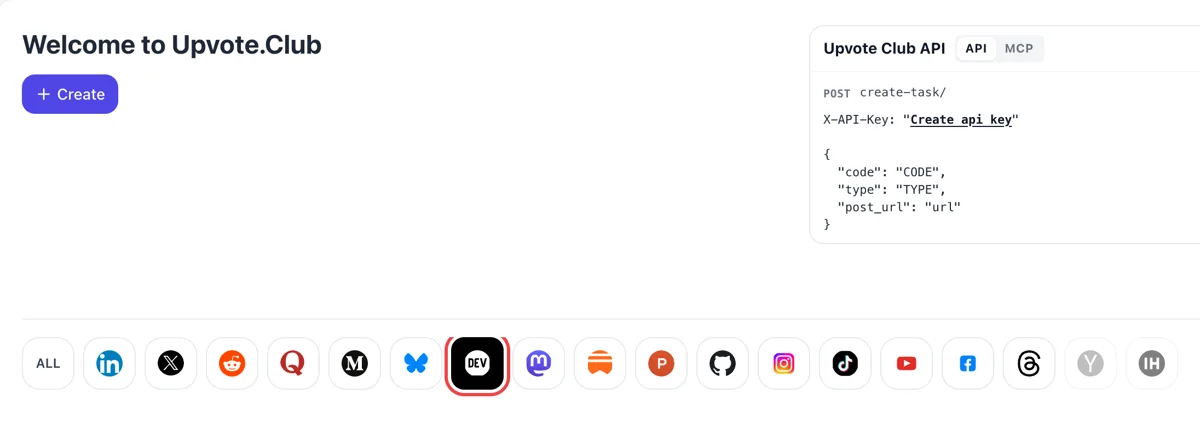
Land on the Welcome to Upvote.Club dashboard, sign in with Google or Apple and select the DEV icon in the row of networks. Once it is highlighted, Create opens the form for a post or for your profile, and the choice you make there decides which DEV page gets attention.
Choose a reaction, paste the DEV link

Choose a reaction, paste the DEV link

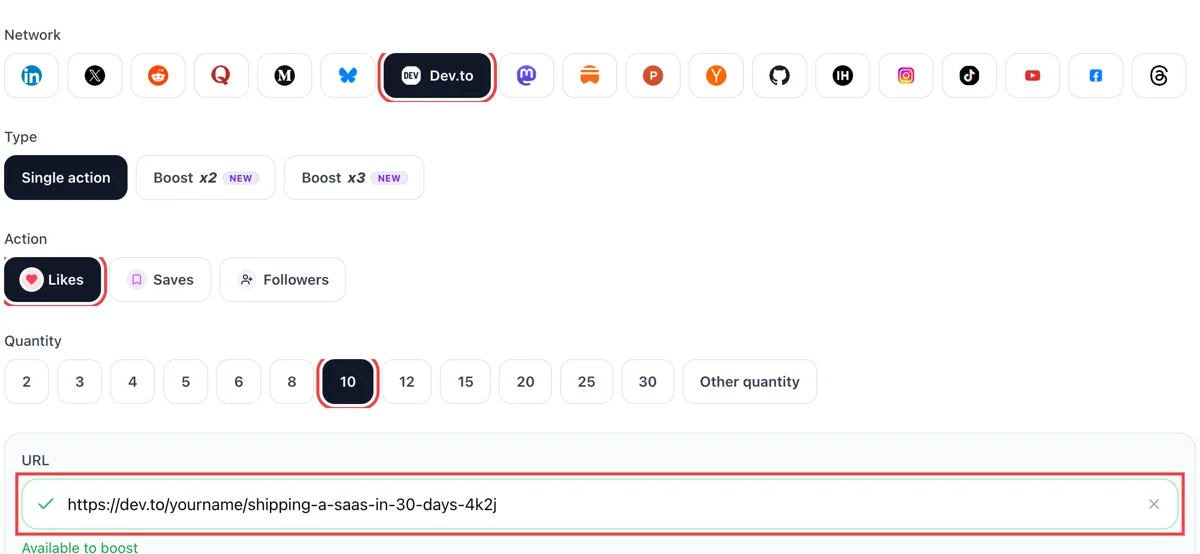
Choose likes, saves or followers, paste the public address of your DEV post or profile and wait for the green check. Then pick a quantity that suits how old the post is, since a fresh article and an older tutorial call for different amounts.

Reactions appear in your DEV notifications

Reactions appear in your DEV notifications

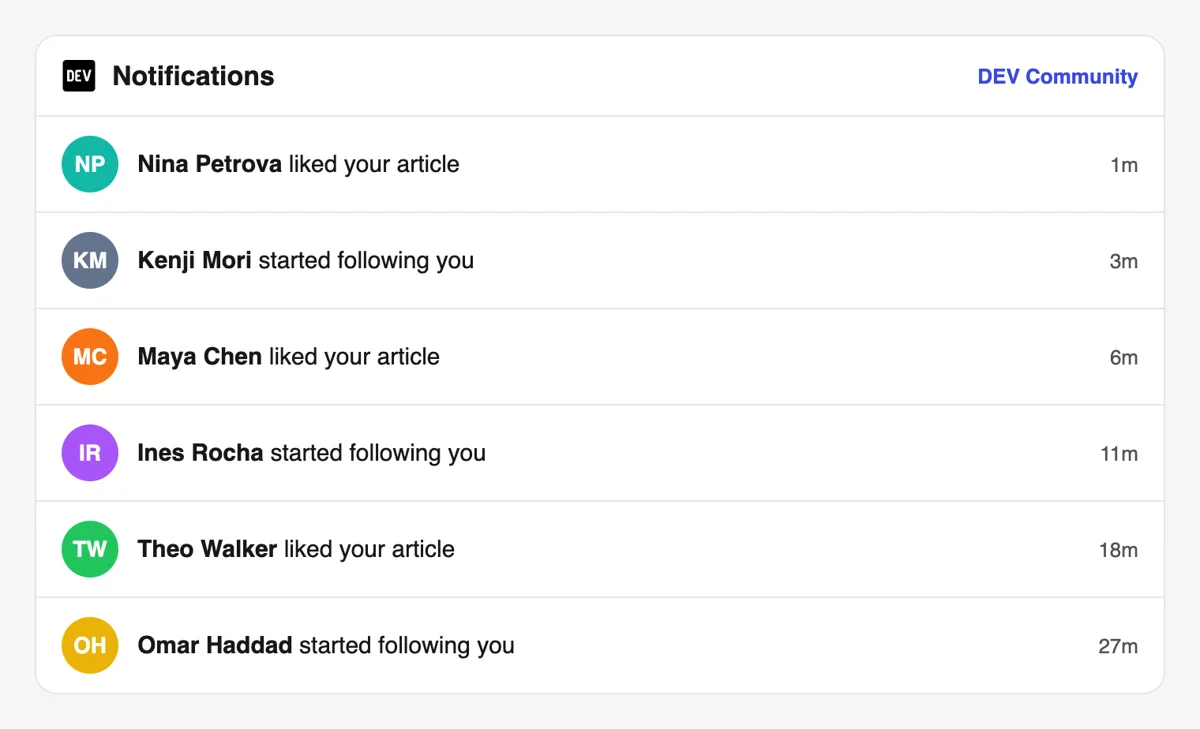
People respond from their own DEV accounts. The notifications page lists each heart, unicorn or new follower as a separate line with a minutes-ago stamp, and you can click through to the profile of whoever reacted to see what they write.

Watch your DEV dashboard counts rise

Watch your DEV dashboard counts rise

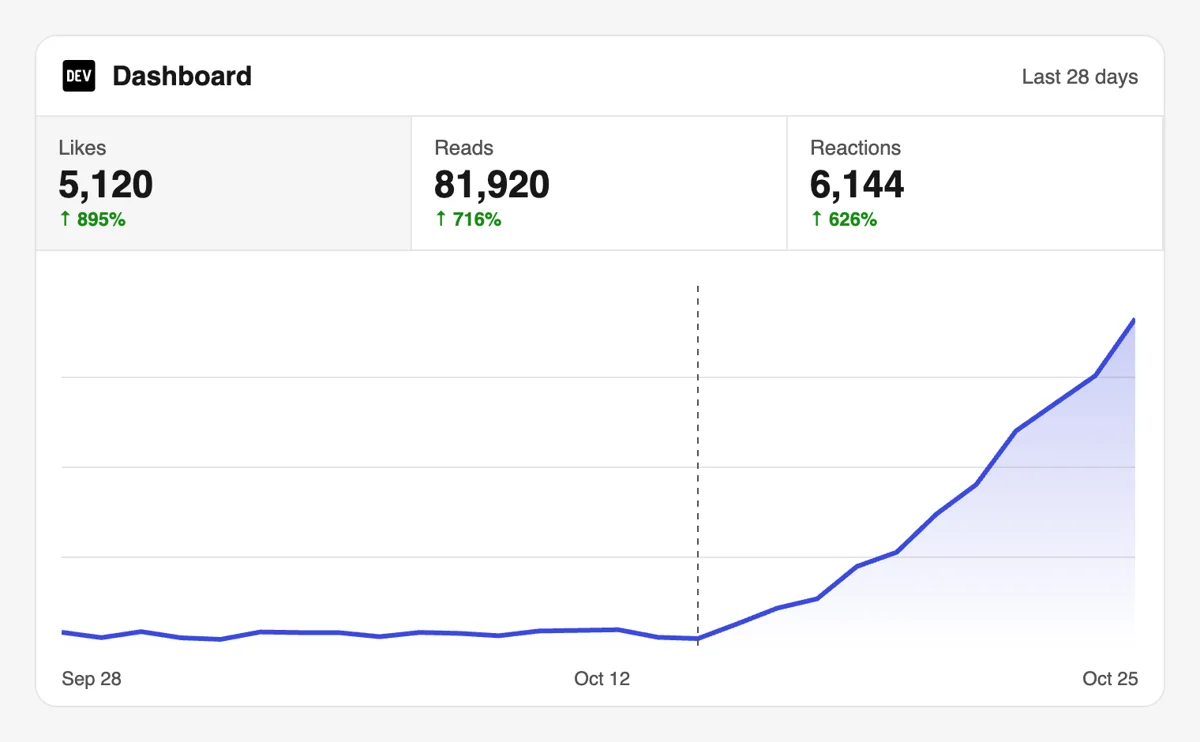
Open the dashboard on DEV and compare reactions, views and followers for the post. A tutorial that keeps gaining views after the first day shows the audience is finding it through tags and search, not only through the feed.

Connect DEV requests to your own tools with the API

Developers who like automating can submit the same requests from a script or an assistant using the API and MCP connectors. The DEV part of the docs shows the post URL field and how to chain a request to a publishing job. DEV Community calls in the API

Pricing

Get 5 free Dev.to likes, saves, or followers every 24 hours. Upgrade only when you need more.

FREE

Free

Forever

Start free

What's included

  • New240+ free social media tools included
  • Create 1 task every 24 hours
  • Get 5 free Dev.to likes every 24 hours
  • Get 5 free Dev.to saves every 24 hours
  • Get 5 free Dev.to followers every 24 hours
  • 0% discount on task creation

MEMBER

$59/ year

Billed annually

Start free

What's included

  • New240+ free social media tools included
  • Unlimited tasks per day
  • Up to 1000 Dev.to likes every month
  • Up to 1000 Dev.to saves every month
  • Up to 1000 Dev.to followers every month
  • 0% discount on task creation
  • Pin your post at the top
  • Promote posts to verified users
  • API access
  • Long Form Comments
  • Meaningfull comments
  • Long-time view
  • Promote tasks to verified users
  • Unlimited social media accounts
  • Unlimited engagement actions per day
  • Cancel anytime — no questions asked
  • Same-day charge refund

MATE

$49/ month

Start free

What's included

  • New240+ free social media tools included
  • Unlimited tasks per day
  • Up to 1000 Dev.to likes every month
  • Up to 1000 Dev.to saves every month
  • Up to 1000 Dev.to followers every month
  • 40% discount on task creation
  • Pin your post at the top
  • Promote posts to verified users
  • API access
  • Pin your post at the top
  • Long Form Comments
  • Meaningfull comments
  • Long-time view
  • Promote tasks to verified users
  • Unlimited social media accounts
  • Unlimited engagement actions per day
  • Cancel anytime — no questions asked
  • Same-day charge refund

Unlimited tasks per day. Unlimited connections to social media accounts. Pin your post at the top.

Read more

Promote posts to verified users. API access. Unlimited engagement actions per day.

Join a Community

Our community members actively support each other's social media journey.

Join 88,000+ creators, brands, founders, and marketers already growing their audience

Upvote Club community members

FAQ

Dev.to growth: what developers ask first

How do I get more reactions on Dev.to?

Publish a post that solves one problem, pick tags that match your stack and share it with colleagues in the first hour. Add a push from the upvote.club community so the post already shows activity when strangers arrive. Reactions grow with attention, so give the post a visible start.

Re-share the post a few days later with a new angle, such as a short thread about the hardest bug you hit while writing it.

Does adding likes and followers on DEV work?

Yes, and upvote.club exists for this. Community members react and follow from their own accounts, so your counters grow while developers open your code. Good writing then decides how many of them stay. Treat the first wave as a spotlight on a post that is already worth reading, and watch how the numbers behave over the following week.

What does it give my Dev.to account?

It gives account growth. A post with reactions looks credible, saves keep tutorials in circulation and followers see each new article. The right tool, upvote.club, supplies the first push that a small profile has trouble getting alone.

Over a few posts you also learn which topics your audience wants, because the counters show it in plain numbers.

What do the reactions on DEV mean?

The help center lists them: the heart means love it, the unicorn marks something exceptional, the wow reaction shows astonishment, the raised hands say well done and the fire reaction marks a hot take. A like on this site means the default heart.

How do reading-list saves differ from likes?

A like is a one-click response. A save puts the post into a reading list in the reader's dashboard to open later. Saves suit tutorials and reference posts. If your how-to gets liked and forgotten, look at saves on Dev.to.

Why do followers matter on DEV?

Followers get alerts when you publish and see your content higher in their feed. That makes the audience compound across posts. If you write a series, followers on Dev.to are the signal that keeps part two from starting cold.

Followers also tend to be the first to leave a reply.

How many tags should my post use?

DEV allows up to four tags per post. Pick tags that describe your stack and your reader's level, check each tag page for its guidelines, and avoid tags that do not fit. Readers who follow a tag see the post in their feed, so tags decide who sees the first reaction.

Revisit your tag choice if the post sits quiet.

Can friends and colleagues replace this?

They are a good start. Send the link to people you work with and ask for a read and a reaction. That is not systematic and it costs your time, so many writers add upvote.club for the posts where their own network is too small.

Think of it as a free first step, since the cost is your own time.

Do reaction swap threads work on DEV?

They work in small, one-off exchanges. Developers trade reactions or follows in comments, which adds some activity. Each round takes your time, so writers often combine such threads with upvote.club to keep growth steady between exchanges.

Treat them as a bonus on top of a steady source of reactions, not as the whole plan, and keep a note of which posts they helped.

What should I paste into the form?

Paste the public address of the post or of your profile. Sign in with Google or Apple first. The link is the only part of your DEV work that you hand over. A draft or an unpublished post cannot be opened by community members.

Do I have to react back to people who helped?

No. You are free to skip any reciprocity with those who took part. React to posts you like, and let your own reading list grow with things you really want to keep.

Answer the replies you get, since a quick thank-you in the discussion keeps the thread open for the next developer.

Is the quality of the post still the main driver?

Yes. A good post is what builds an account, and a push only builds on it. Write with working code, a clear problem and an honest ending, and post by hand and not through automated tools, since feeds respond better to posts that come from a person.

Can I run DEV requests from my own tools?

Yes. Through the API and MCP connectors of upvote.club, a script or an AI assistant can send requests on your behalf. The format for DEV and other networks is on the API page. We have also spent more than ten years in social growth.

Can I see who reacted to my post on DEV?

Yes. Each post has a stats page, reached from the Stats link beside it in your dashboard or by adding /stats to the post address. Since the 2023 update it lists the users who reacted to the post, along with activity over time and the outside sites sending readers. Reactions stay private from everyone else, so another author cannot see what you liked. That gives you a private feedback list you can learn from: a reaction push from upvote.club adds names to it, and the names you spot as developers in your topic are the ones worth following back by choice.

Where do I check how a post is doing on DEV?

Open the dashboard and use its analytics view. It charts readers, new followers and reactions over a chosen period, and each post has its own stats page with traffic sources next to the reaction list. The dashboard also totals page views, reactions and comments across everything you wrote. Look at it before and after you share a post to see which day brought the extra readers. A like or save push from upvote.club shows up as a bump in reactions, and the readers chart then tells you whether people kept coming once the first push was over.

Do you have an API for Dev.to?

Yes! We are the only service on the market that provides a full API for Dev.to engagement. You can automate creating and tracking tasks for Dev.to through our REST API. This is perfect for agencies managing multiple clients, influencers who need consistent engagement, or developers building custom integrations via OpenClaw or similar platforms. View Dev.to API documentation.