








Join through Apple and choose Facebook
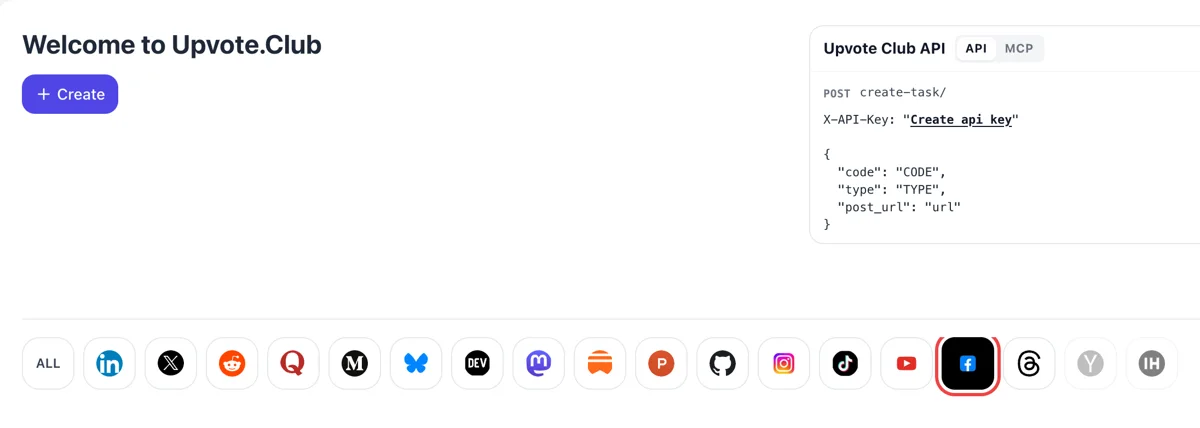
From the Welcome to Upvote.Club screen, sign in with an Apple ID, press Create and click the blue Facebook icon in the row of networks. Your profile, Page or group post will be the subject.
Give the public link of your Facebook post, Page or profile and choose the response you want.
Working with any agent




POSTcreate-task/
{
  "social_network_code": "FACEBOOK",
  "type": "LIKE",
  "post_url": "https://www.facebook.com/share/p/1ABCxyz",
  "actions_required": 10
}
Trusted by 88,000+ community members
We are a community of people who help each other grow their personal brand on social media. How It Works Our top priority is a zero-bot policy. We are maintaining a clean and safe community with real people. A variety of GEOs and interests are available inside our community.
A person with a Facebook profile of their own makes each reaction, comment, follow and save, which is what readers do under any post anyway.
The service asks for the address of a public post, Page or profile. Your Facebook account details stay with you, and the service login runs through Google or Apple.
The blog has practical writing about Page growth, post formats and posting routines on Facebook, written by people who run accounts there every week.
Facebook shows the reaction count right under the post. A post that already carries reactions looks like something other people stopped for, and the feed itself weighs how a post is interacted with when it decides who else sees it.
Meta describes its feed system as predicting how likely a post is to spark back and forth discussion. A post with comments under it gives that system and your readers something to react to, and it gives your own replies somewhere to begin.
On Facebook a follow means updates from you appear in the person's Feed. A Page or a public profile with a follower base reaches that audience with every new post, and a visitor reads the count as a sign that the account is active.
Facebook's Saved list is private, so a save is a quiet note that a reader wants to return to a post. It suits recipes, guides, event details and any post that holds information worth keeping. Facebook does not announce a save to the author, so readers can keep a post without any social pressure.
Small business Pages and new creator Pages often sit with a few reactions on each post. Building up a baseline lets a first-time visitor see a place where people respond, which makes the follow button easier to press. A local shop or a new coach with eight reactions on a post looks quiet, and a visitor who sees thirty feels invited to join.
The same account covers Facebook and every other supported network, so you manage Facebook next to X, Instagram or LinkedIn without creating new logins.
From the Welcome to Upvote.Club screen, sign in with an Apple ID, press Create and click the blue Facebook icon in the row of networks. Your profile, Page or group post will be the subject.
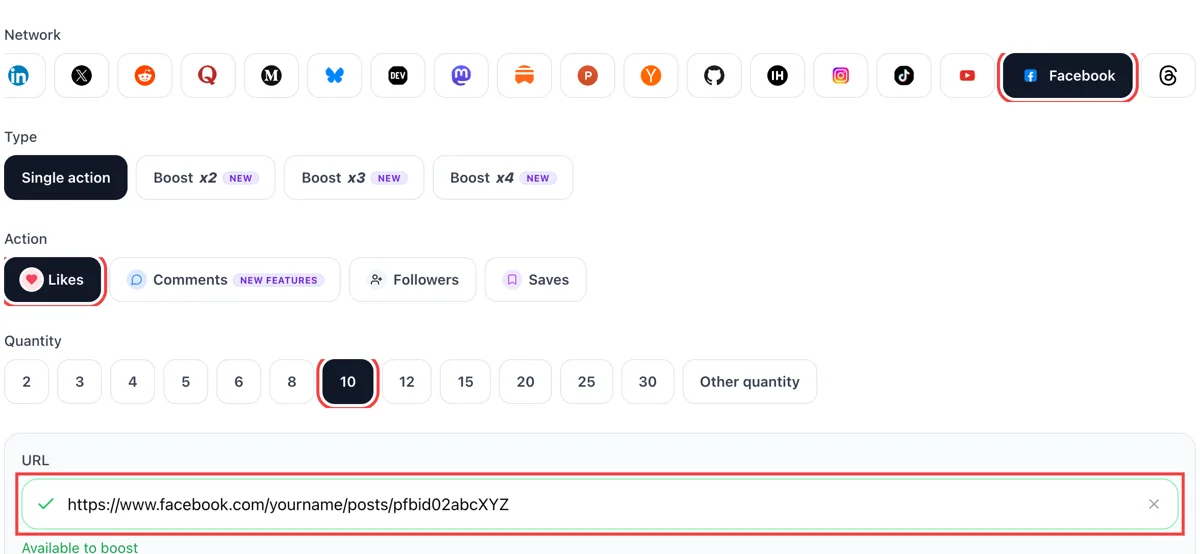
Choose reactions, comments, followers or saves, then paste a public post or Page address. A tick marks a working link. Set the quantity you want and send the form.
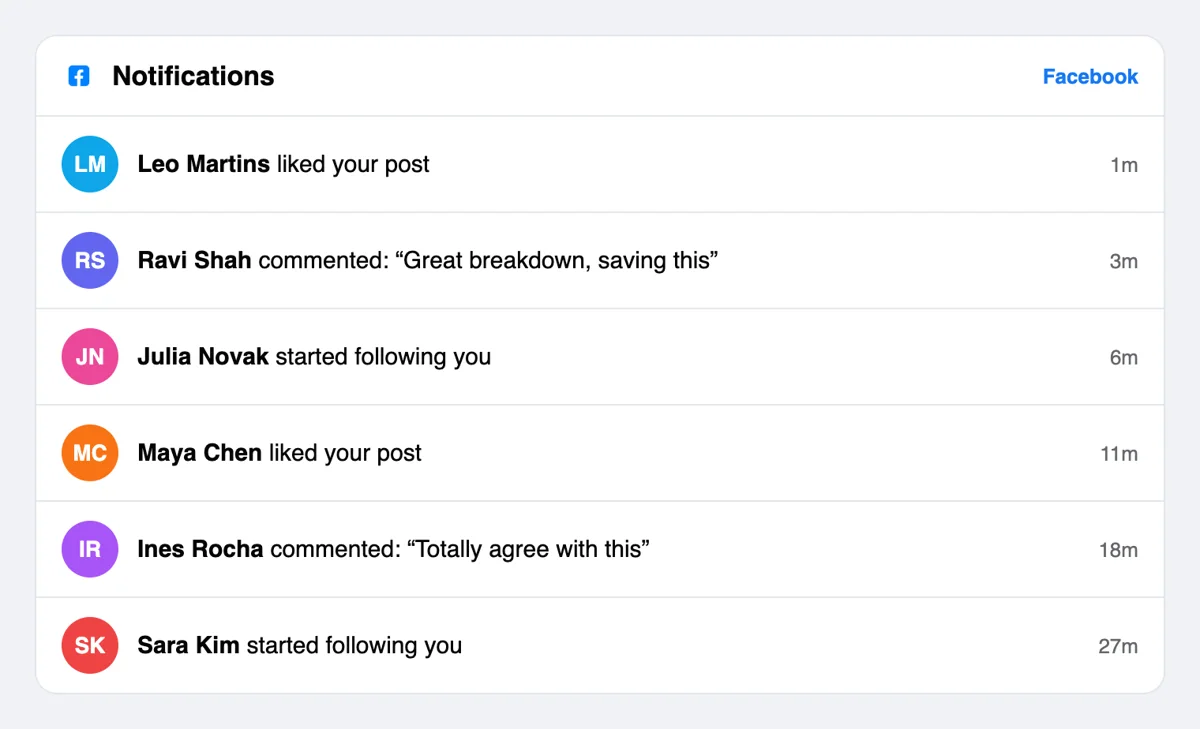
Open the notification bell on Facebook. Lines such as reacted to your post or commented on it appear with minutes-ago labels, each tied to an ordinary member profile. Hover over a name to preview it.
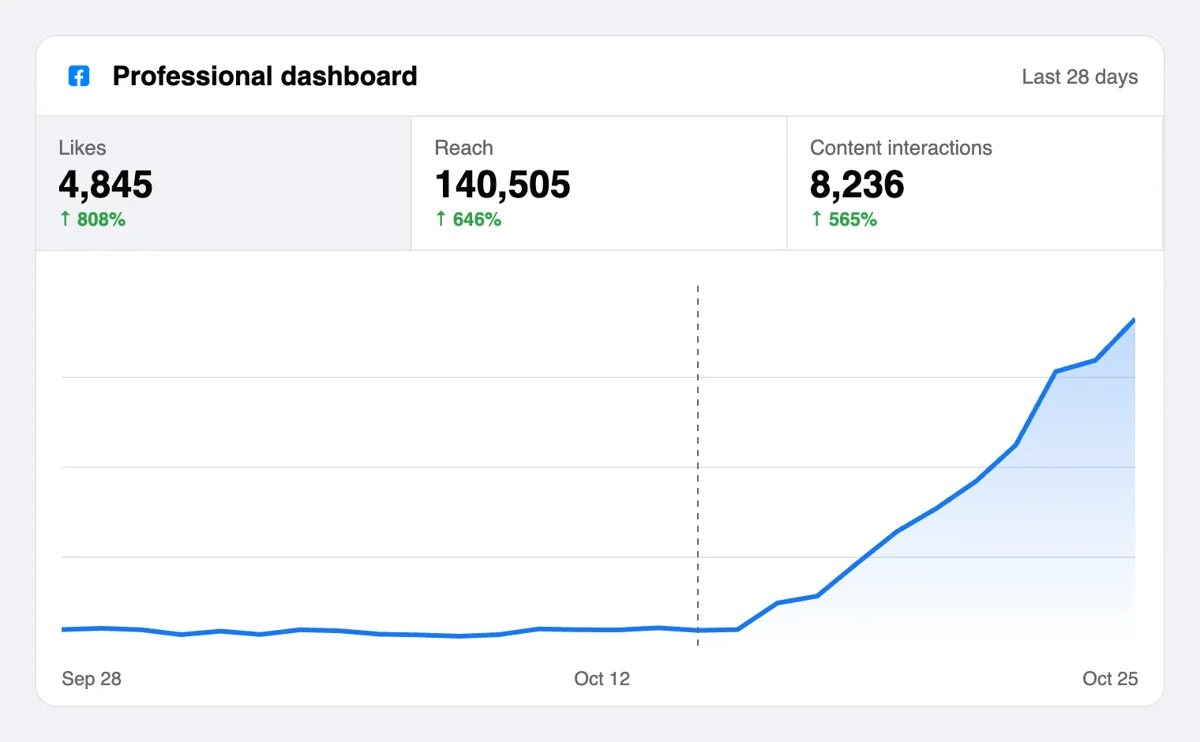
Read the counters under the post, then open Meta Business Suite for reach and Page followers. Set the numbers beside an earlier post to see what moved. Then decide which kind of post to publish next.
Teams looking after several Pages can send requests from a script or an AI assistant using the MCP connectors. Facebook fields live in the docs, together with notes on Page links. Connect Facebook requests to your own tools
Get 5 free Facebook likes, comments, followers, or saves every 24 hours. Upgrade only when you need more.
Free
Forever
What's included
$59/ year
Billed annually
What's included
$0/ first 3 days
After $49 / month
What's included
Unlimited tasks per day. Unlimited connections to social media accounts. Pin your post at the top.
Promote posts to verified users. API access. Unlimited engagement actions per day.
Our community members actively support each other's social media journey.
Join 88,000+ creators, brands, founders, and marketers already growing their audience
FAQ
They do when the setup is right, and Upvote.club is built to get that setup right. Reactions on a public post make it look noticed, and Facebook's feed looks at how people interact with a post when it chooses what to show. Pair it with a post that has a clear reason to exist: a photo from your neighborhood, a local update, a question or a short video. Reactions can support a good post, and they cannot rescue a post with nothing to say, so spend your effort on the first line and the picture.
Growth you can see. Posts look active, comments open conversation, a Page gains followers and useful posts collect saves. With Upvote.club, that activity comes from community members using their own profiles, so the numbers appear on the post or the Page and support every later post you publish.
For a new post, start with reactions, then add comments if you want a conversation. For a Page or public profile, choose follows. For a guide, a recipe or an event, pick saves. Each response has a different job, and they combine well. A new Page might start with follows and reactions on its first posts, a recipe might collect saves, and a question might gather comments.
A Page is a public home for a business, brand or creator, and people follow it. A profile belongs to a person, and strangers can follow it only when the owner allows public followers. Meta has been changing profile follower settings, so check yours before you ask for follows on a profile.
Meta says its Feed system gathers posts from friends, followed Pages and joined Groups, then predicts what each person will find worth their time. It looks at who posted, how someone interacted with that source before, the format and how others reacted. In short, posts people respond to are shown to more people.
Yes, for outsiders to find it. A post limited to friends cannot be opened by people outside your list. Set the audience to Public before you copy the link. Posts on a Page are public by default, which makes Pages the simplest place to start.
Posts with a clear subject do best: a photo with a one-line story, a short video, a question to your local audience, a how-to with steps. Facebook rewards content that people respond to, and the first line decides whether someone keeps reading. Strong content grows an account more than any other habit.
No. People who respond to your post expect nothing from you, and you owe no return favor to the specific members who helped. If you enjoy a post in the community, react to it, but nothing about your account depends on that.
Ask a question the reader can answer from experience, name a choice between two options, and reply to every early comment. Facebook ranks comments by relevance, so a thread with real discussion stays visible. Replies from the author also make the thread feel attended to, which invites more comments.
Yes. Developers and assistants are covered too: an API and MCP connectors let your own tools place Facebook requests. You can send Facebook requests from the same place where you schedule or draft posts. The API page has the details and examples.
Starting is free, with a Google or Apple login. Paste a public link, choose a response and see how the post reacts. Paid plans exist for people who want more, but the first step needs no payment. Many people begin with a single post to see how it behaves, then add a Page or a profile once they are comfortable with the process, and come back to the guides on the blog for ideas about what to publish next.
Yes. One account covers every supported network, so the same sign-in handles Facebook, X, LinkedIn, Instagram and more. Each network has its own pages, with advice that fits that network's posts and audience. The Facebook pages talk about reactions, Page follows and the Saved list, while the pages for other networks cover their own habits, so you can read only the part that matches where you are posting today.
Look at a post again after a couple of days. Facebook keeps showing posts to new people as they gain interaction, and comments or saves can keep arriving after the first burst. Compare the counts with your last several posts of the same type, and pay attention to which topics and formats keep drawing people in, because those are the ones worth repeating.
The analytics section of Meta Business Suite has an Overview tab with Views and Content interactions, and you can view them for all formats or for one format such as Posts. Breakdowns separate followers from non-followers, and organic from paid. Start with Views to see reach, then Content interactions to see whether people did something. After reactions or comments arrive through Upvote.club, check the same chart for the days that follow and compare with a week before. Pick a range of at least two weeks so a single quiet day does not mislead you.
Page admins and editors can pin a post. Open Options on the post and choose Pin post, or use Manage in the Featured section to place posts, videos or events. The pinned item stays where new visitors look first. Choose a post that explains what the Page is about, then use Upvote.club for reactions on it so the first thing a visitor meets already shows attention. Edit the pin whenever the Page changes direction, so the featured item stays current.