

















- Trusted by creators100K+
- Networks in one calendar17
- No trial, no card$0
Free social media scheduler
Plan every post in one calendar. We remind you by email or Telegram, you publish.
How it works
- 1
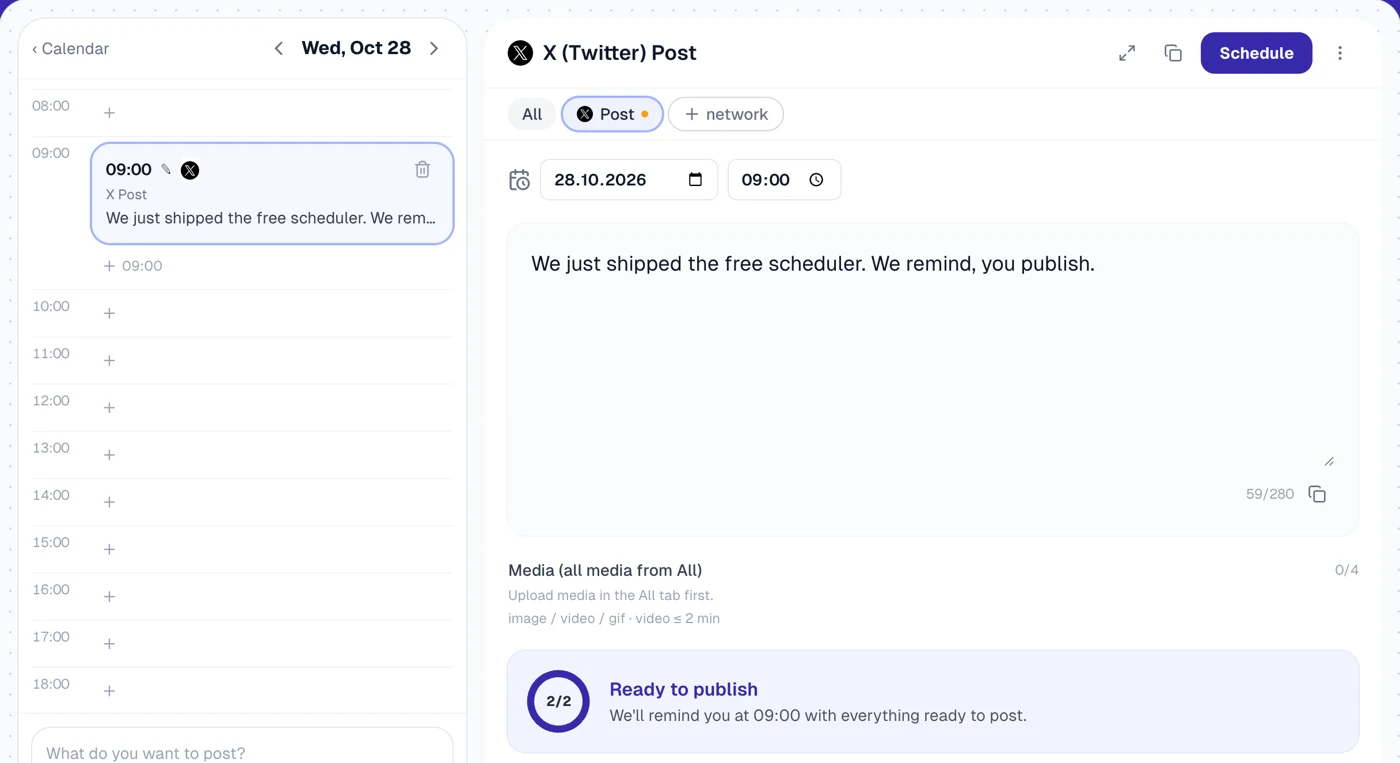
Plan the post
Pick the day and the hour, write the post once and tailor it for each network. Every format is checked against that network's limits.
- 2
Get a reminder
At post time we send you an email or a Telegram message with the text, the media and a publish page.
- 3
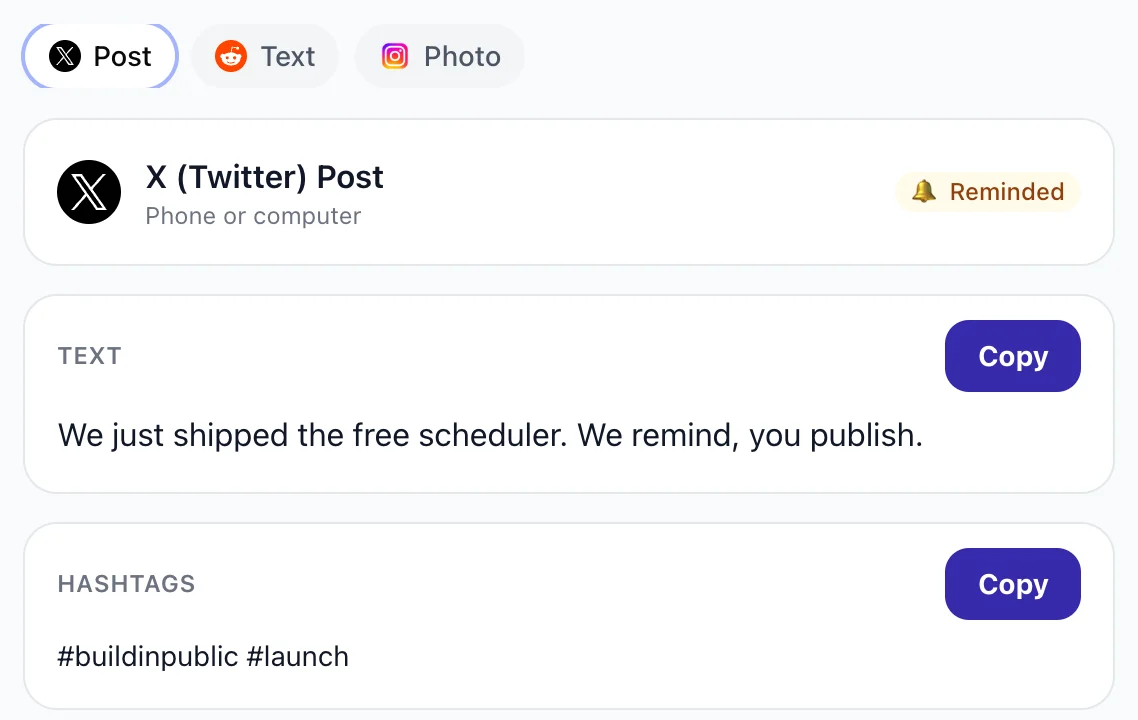
Publish in the app
Copy the text, save the media, open the app and post. Mark it as published and the calendar keeps track.
Start publishing
Pick where the reminder arrives at post time. It brings the text, the media and a publish page.
- Slack soon
Via Telegram or Slack
A message from our bot with the post ready to copy. Mark it published or snooze it right in the chat.
⏰ Time to post · X · 12:30
Text and media are ready to copy.
PublishedSnooze Via email
An email at post time with the text, the media and a link to the publish page.
From: Upvote.club scheduler
Time to post on LinkedIn · 09:00
Your text, media and a publish page are inside.
Open publish page- Coming soon
Via webhook
Send each post to your own endpoint at post time and publish it with your own tools.
POST https://your.app/hook
{ "network": "linkedin",
  "text": "…", "media": [ … ] }
Everything you need to post on time
One calendar, 17 networks
X, Bluesky, Threads, Mastodon, LinkedIn, Instagram, TikTok, YouTube, Facebook, Reddit, Quora, Medium, Substack, Dev.to, Hacker News, Product Hunt and Indie Hackers.
Every format checked
Posts, threads, carousels, reels, stories and articles, each with its own character, hashtag and media limits.
Write once, tailor per network
Shared text and media for all networks, with a separate version for any network that needs one.
AI writer in your browser
Describe the idea and a small AI model writes the draft on your device. Nothing you type is uploaded.
Reminders by email or Telegram
A reminder at post time with everything ready to copy, plus a follow-up if the post is still waiting.
Free forever
No trial, no card and no paid plans. Plan without an account and sign in only when you want reminders.
Free tools by network
See more
Best time to post
See more- LinkedIn Best Time to PostPost when your audience is awake and scrolling.
- Instagram Best Time to PostPost when your audience is awake and scrolling.
- TikTok Best Time to PostPost when your audience is awake and scrolling.
- X Best Time to PostPost when your audience is awake and scrolling.
- YouTube Best Time to PostPost when your audience is awake and scrolling.
Top picks
Hook generators
Engagement rate calculators
- 1LinkedIn Engagement Rate CalculatorEngagement rate calculators
- 2Instagram Engagement Rate CalculatorEngagement rate calculators
- 3TikTok Engagement Rate CalculatorEngagement rate calculators
- 4X Engagement Rate CalculatorEngagement rate calculators
- 5YouTube Engagement Rate CalculatorEngagement rate calculators
Image size checkers
See more- LinkedIn Image Size CheckerCheck that an image fits before you upload.
- Instagram Image Size CheckerCheck that an image fits before you upload.
- TikTok Image Size CheckerCheck that an image fits before you upload.
- X Image Size CheckerCheck that an image fits before you upload.
- Facebook Image Size CheckerCheck that an image fits before you upload.
FAQ
Frequently asked questions
Is this social media scheduler really free?
Yes. It is free forever: no trial, no card and no paid plans.
Do I need an account to plan posts?
No. You can build the whole calendar without signing up; your posts are kept in this browser. Sign in when you want reminders or media uploads, and your drafts move into your account.
How do the reminders work?
At the time you set, we send an email or a Telegram message with the post text, the media and a link to its publish page. You open the app, paste, publish and mark the post as published.
Which networks can I plan for?
17 networks: X, Bluesky, Threads, Mastodon, LinkedIn, Instagram, TikTok, YouTube, Facebook, Reddit, Quora, Medium, Substack, Dev.to, Hacker News, Product Hunt and Indie Hackers.
Can AI write the post for me?
Yes. Type the idea in the day column and a small open-source AI model writes a draft right in your browser. It downloads once and nothing you type is uploaded.
Does posting on schedule help a post get more reach?
Yes, when it is done right: post when your audience is online and get real engagement in the first hours. Plan the time here, then get real likes and comments on the post with Upvote.club.