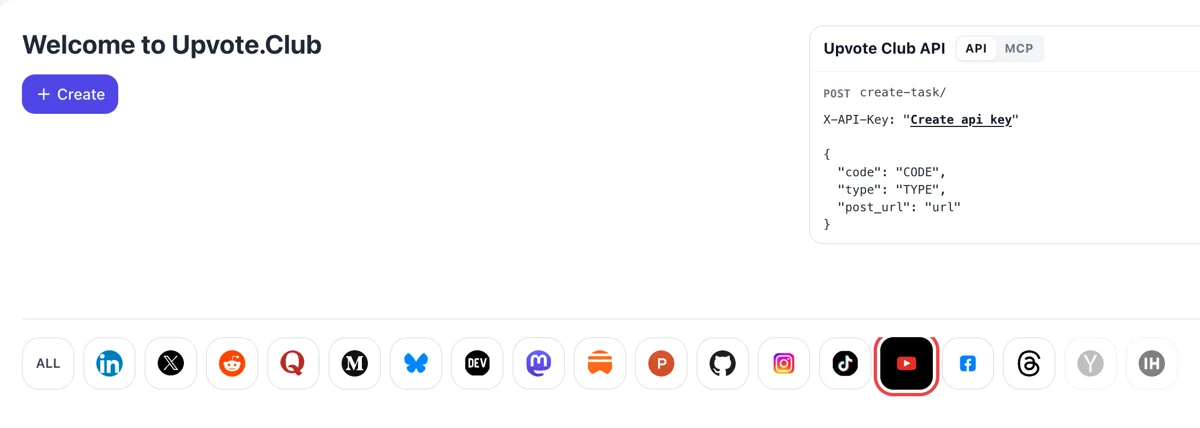
Log in and pick YouTube from the network row
Enter with Google or Apple, then find the network icons under the Create button. YouTube opens a form made for one video at a time, with comments listed among its actions.
Send us a public YouTube video and get written comments back from community members.
Working with any agent




POSTcreate-task/
{
  "social_network_code": "YOUTUBE",
  "type": "LIKE",
  "post_url": "https://www.youtube.com/watch?v=dQw4w9WgXcQ",
  "actions_required": 10
}
Trusted by 88,000+ community members
We are a community of people who help each other grow their personal brand on social media. How It Works Our top priority is a zero-bot policy. We are maintaining a clean and safe community with real people. A variety of GEOs and interests are available inside our community.
A person from the community types each comment while logged in to their own YouTube account. In the thread it looks like any viewer line, and you may answer, heart or pin it.
We pay attention to the profiles that write: filled-in channels with avatars make a thread look credible to a stranger who opens the section.
To begin, we need one video address that anyone can open, plus your Google or Apple sign-in on our site. Your YouTube login stays out of it.
Viewers who finish a video often scroll down to see what others thought. A section with readable comments gives them something to do next, which keeps them on your watch page and lets them move to another video from your channel.
Few viewers want to be the first to write. Once two or three comments sit under the video, the next person feels free to add an opinion or ask a question, and the thread can grow without any further push.
YouTube lets you pin a comment to the top of the thread, either your own or a fan's. A pinned line can carry a link to the next video, a correction or a question that sets the tone for the rest.
A channel owner can put a heart on a comment, and the commenter may get a notification that you loved it. People who receive that tend to come back and write again, which turns a single line into a regular viewer.
Comments show what viewers did not understand and what they want to see. Reading them is a cheap research round, and several channels build entire follow-up videos from the best question in a thread.
YouTube takes in many signals to decide which videos suit a viewer. A conversation under a video tells a new visitor that people cared enough to write, and a visitor's patience for your intro grows when others have clearly reacted.
Enter with Google or Apple, then find the network icons under the Create button. YouTube opens a form made for one video at a time, with comments listed among its actions.
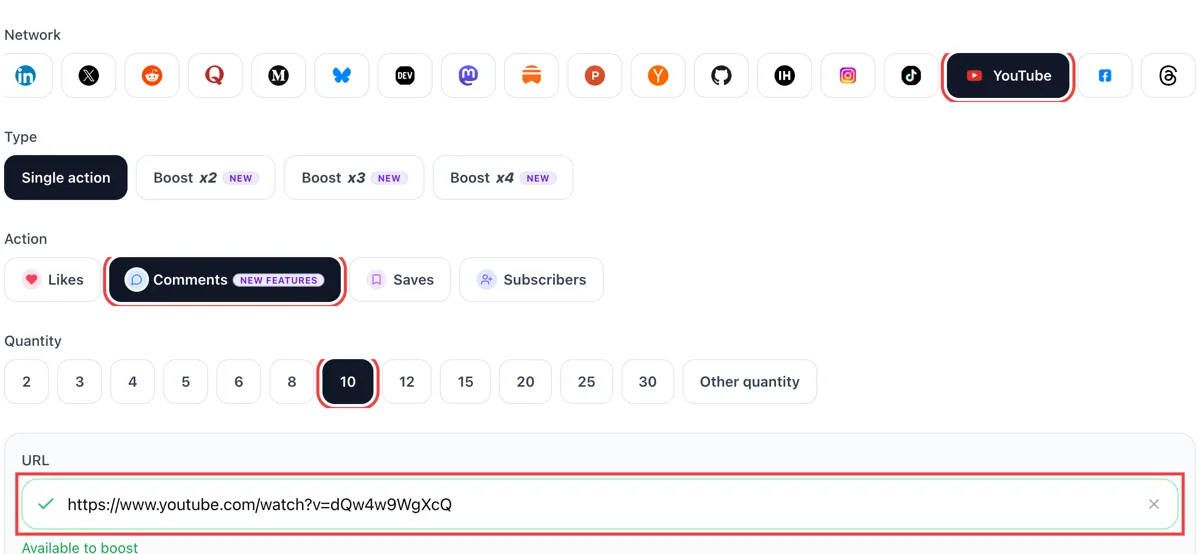
Copy the video address from the browser bar, set the action to comments, paste it and enter the amount. The link field shows a green tick when YouTube can open the video without anyone signing in.
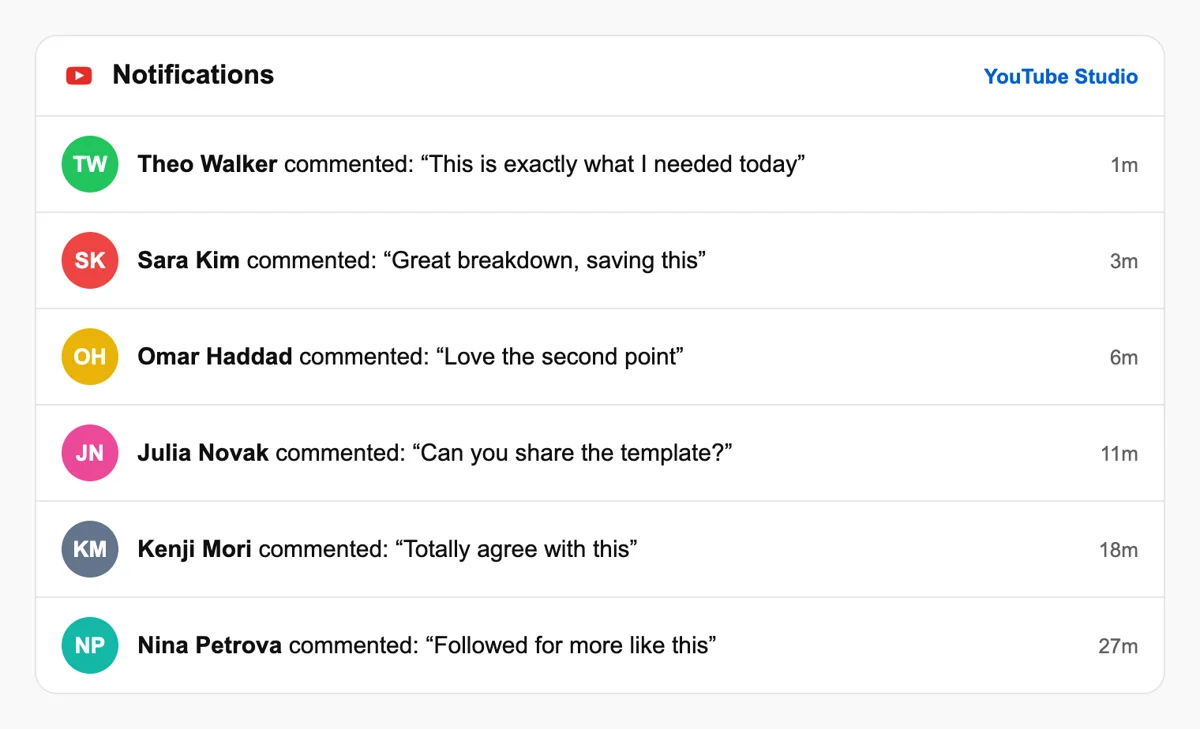
Open the bell menu or the Comments tab in Studio and the new messages sit there with the name of each viewer and a time stamp, ready to be replied to, hearted or pinned. Replies from you count as part of the thread.
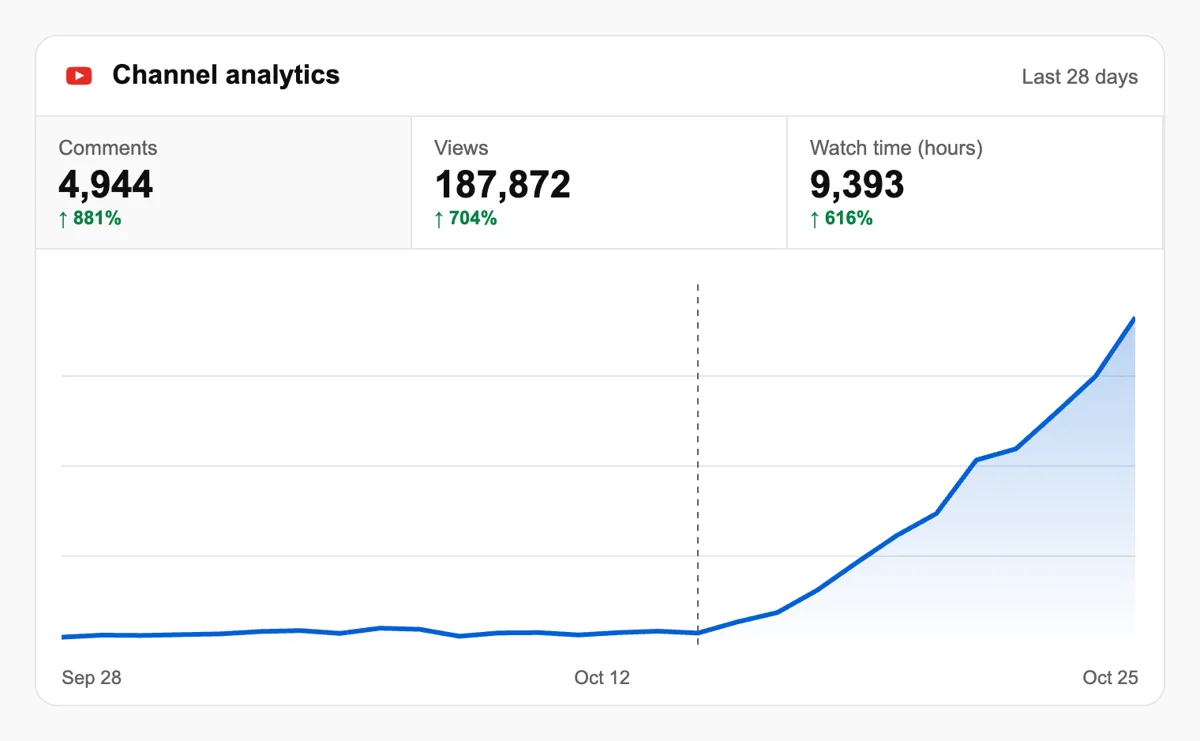
Reply to the first few and check Analytics, where returning viewers show up beside views. A video with a lively thread reads as a place worth staying in. Pinning the best one gives newcomers a place to start reading.
Channels that upload on a calendar can have each new video registered through the API or an MCP assistant, so the first comments appear while you work on the next edit. Queue comment requests through the API
Get 5 free YouTube comments every 24 hours. Upgrade only when you need more.
Free
Forever
What's included
$59/ year
Billed annually
What's included
$0/ first 3 days
After $49 / month
What's included
Unlimited tasks per day. Unlimited connections to social media accounts. Pin your post at the top.
Promote posts to verified users. API access. Unlimited engagement actions per day.
Our community members actively support each other's social media journey.
Join 88,000+ creators, brands, founders, and marketers already growing their audience
Great! 🎬
Jul 26, 2024
YouTube comments from real people actually move the algorithm, this works
Jul 21, 2024
got genuine comments on my product demo video, not spammy stuff 👌
May 29, 2025
fast delivery, real accounts, exactly what I needed ✅
Jul 2, 2024
been posting founder content on YouTube and comments make it feel like a real audience
Sep 2, 2024
used Upvote Club for YouTube comments, my video ranked way better after
Sep 6, 2024
YouTube comments are the hardest engagement to get organically, this is a legit shortcut 🔥
Apr 30, 2025
Blog
Guides and tips on growing social media with real community engagement.

Getting more views on YouTube in 2026 is achievable, even if you are just getting started.

The more you engage with your audience, the more they'll engage with you.
FAQ
The first request is free of charge. All it takes is a Google or Apple sign-in, an open video address and a click on comments. Paid plans exist for creators who later need more, and a single request is enough to see how a thread changes the feel of the page and the way viewers move through it.
It does. Upvote.club handles it the right way on YouTube. Members write under your public video from their own accounts, and the section fills. A video with a clear stance keeps that thread alive afterwards, because viewers add their own replies.
Growth, provided the right tool is behind them, and for YouTube that tool is Upvote.club. A visible discussion lengthens the visit, gives you questions for future videos and signals to newcomers that your channel is active. Together those effects make each upload easier to follow up.
End the video with one concrete question that has more than one reasonable answer, and repeat it in the description or a pinned comment. Vague invitations such as asking viewers to share thoughts produce little. A specific choice between two options gives people something easy to answer.
You can reply, give it a heart, like it or pin it to the top of the section. A pinned comment replaces the previous one, and you can unpin it whenever you want. YouTube may notify the commenter when you heart, pin or reply, which encourages them to come back.
While the video is new. Our experience is that early activity sets the pace, and viewers who arrive later read what is already there. Older videos with steady search traffic can also gain from a request, because new visitors see a quiet section and may hesitate to write first.
Answer the ones that ask something or add information, and heart the friendly ones. Your replies sit in the same thread, so they tell newcomers the owner is present. A short answer takes seconds in Studio and often earns a second comment from the same person.
They can, and it works well for a launch. It costs your time, and the group is small. Upvote.club helps once you publish often, since each video can receive its own thread without a round of messages to people you know.
They suit one-off exchanges where creators visit each other's videos. Results depend on who is online and the effort is manual. Many creators keep them going and add Upvote.club, which gives a steadier source whenever a new video is ready.
No tool produces comments without somebody paying for the work. Treat free promises with a question: who earns here, and what do they want from you. Our request needs only a public video address, and your content remains the thing that keeps viewers writing.
Members have to be able to open the video, so it must be public. You stay in charge of the section from Studio, where you can answer, heart or remove lines. Keep comments switched on for the video you share, otherwise nobody can write under it, and check the setting again if you change the video's audience options.
A creator can pin one comment to the top of the watch page, either their own or a viewer's, and viewers see a Pinned by label with the channel name. Pinning a new one replaces the old. A heart is a separate mark that shows your avatar with a small red heart on the comment. The commenter may get a notification when you heart, pin or reply, depending on their settings. Use the pin for the line you want everyone to read, and the heart for thanks. Both make a thread feel attended to, which invites the next person to write.
On public videos, every comment is public and anyone can reply to it, and a comment posted from a Google Account is visible to people outside its domain. Replies sit in a thread under the original comment, so a conversation reads as one block. On mobile the viewer expands the comment section to see a pinned line, while the preview under the video shows comments that are recent, pinned or hearted by the creator. That preview is the first place a visitor sees your discussion, so a thread with a pinned answer and a heart on the best reply gives it a strong first look.
The viewer may get a notification that you responded, depending on their notification settings, and the reply is threaded beneath their comment. This is the moment a one-time commenter can become a returning viewer. A short, specific answer works better than a general thanks: refer to what they wrote, add a detail, or ask a follow-up. Likes on comments are anonymous, so a reply is the only visible way to show attention. Make a habit of answering the first handful of comments after publishing, because those are the ones every new visitor reads before deciding whether to join in.