








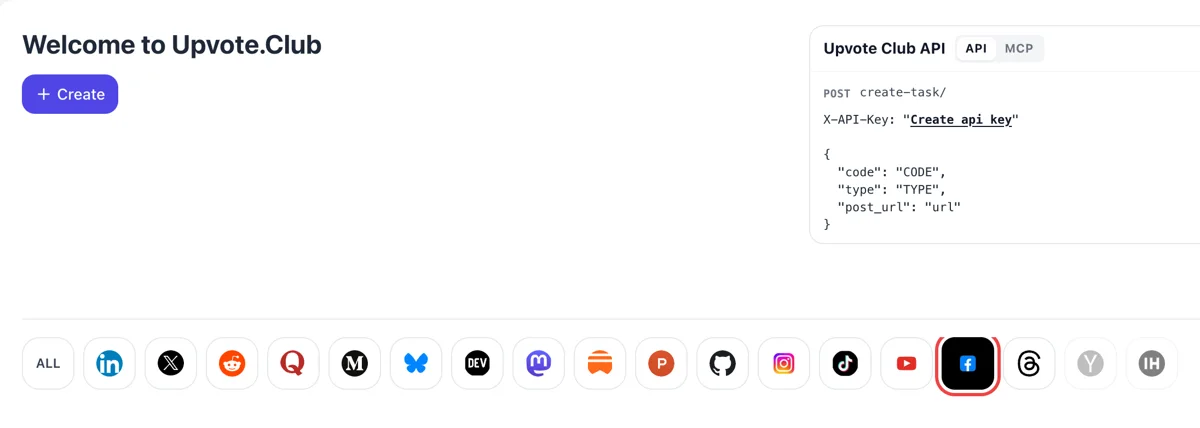
Come in with Apple and click Facebook
Apple ID works for login. Once inside, a Create button waits on the welcome page, and the Facebook mark in the network strip tells the form that a Page or public profile is the target.
Enter the address of your Facebook Page or public profile and community members follow it from their own accounts.
Working with any agent




POSTcreate-task/
{
  "social_network_code": "FACEBOOK",
  "type": "LIKE",
  "post_url": "https://www.facebook.com/share/p/1ABCxyz",
  "actions_required": 10
}
Trusted by 88,000+ community members
We are a community of people who help each other grow their personal brand on social media. How It Works Our top priority is a zero-bot policy. We are maintaining a clean and safe community with real people. A variety of GEOs and interests are available inside our community.
Each new follower is a member of the community with a personal profile, taking the same step any visitor takes when a Page catches their interest.
You supply the address of a Page or public profile. Facebook sign-in details stay with you, and the service itself uses Google or Apple for login.
The blog has step-by-step material on Page setup, posting routines and local audiences for Facebook, to help the followers you gain become regular readers.
Facebook says many Pages that once had a Like button now only have Follow. A follow is the connection a Page is judged by, and a visible count tells a new visitor that people chose to hear from you.
Meta says that when someone follows a profile or Page, updates from it may appear in their Feed. Each new follower adds one more person who can meet your next post without any extra step on your side.
Customers look up a shop, a coach or a studio before they call. A Page with some followers reads as an active business, and an empty one raises doubt even when the work itself is excellent.
Facebook says a story about a follow may appear in the follower's friends' Feed. That gives a local Page a chance to be noticed by neighbors and friends of the people who followed it.
Announcements for a launch, a sale or an event only reach people who connected with the Page. Followers collected before the announcement give it an audience from its first hour.
For personal creators, Meta now ties public followers to pro mode. A profile that has it turned on can keep letting anyone follow, which is the setup you need for an audience of strangers.
Apple ID works for login. Once inside, a Create button waits on the welcome page, and the Facebook mark in the network strip tells the form that a Page or public profile is the target.
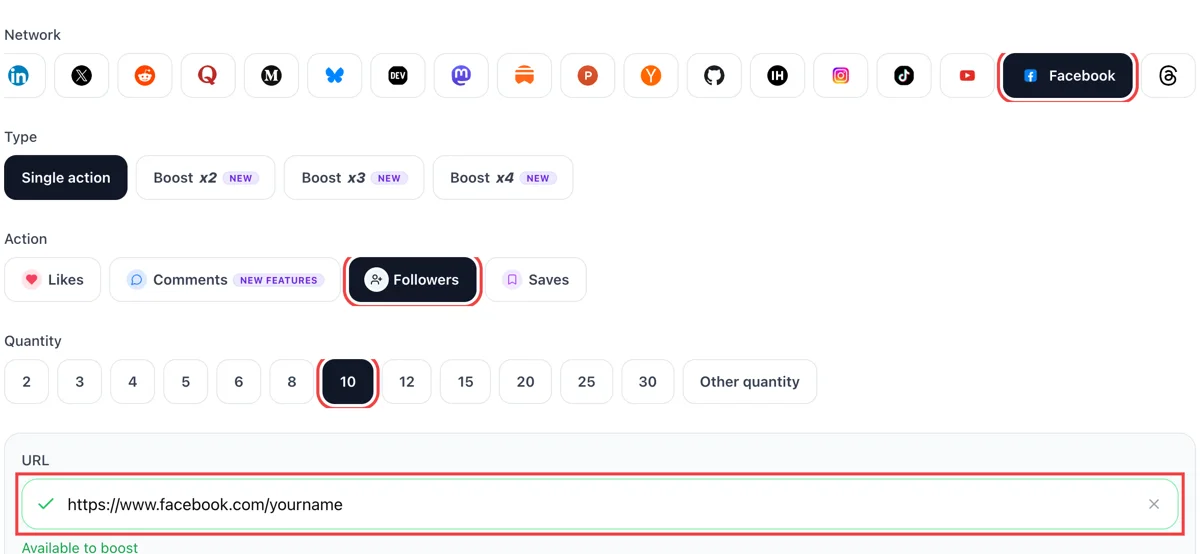
In the dropdown choose followers. The address field wants a public Page or profile link, and a tick tells you it resolved. After that, type the number of new followers you hope to see.
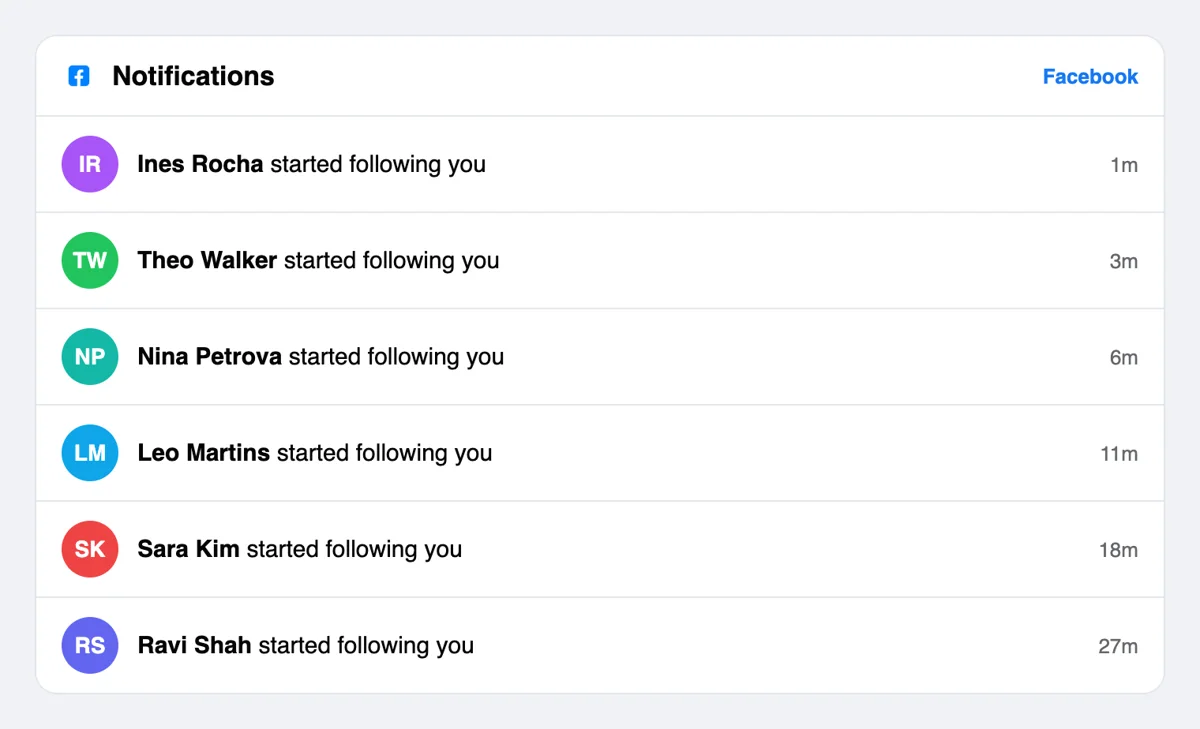
The Facebook bell lists entries like started following your Page, each with a minutes-ago label. Every name leads to an ordinary profile that you can open and read.
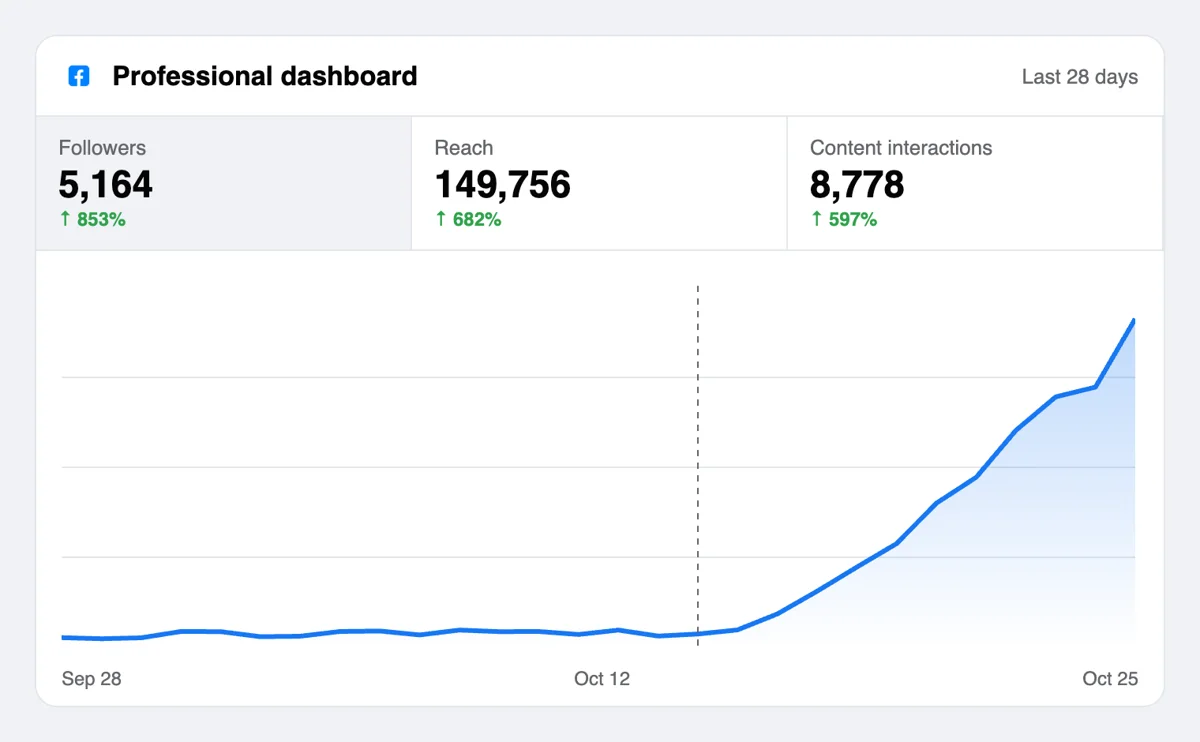
Read the follower count in the Page header and the audience tab in Meta Business Suite. A larger count helps a new Page look established when a visitor lands on it. Followers see your later posts in their News Feed, which is the real gain here.
Agencies that run many Pages can wire follows into their own workflow, since an AI agent on the MCP side or a plain script is able to place the order. Facebook details sit in the docs, including how to aim a request at a Page. Read the Facebook follow notes in the API docs
Get 5 free Facebook followers every 24 hours. Upgrade only when you need more.
Free
Forever
What's included
$59/ year
Billed annually
What's included
$0/ first 3 days
After $49 / month
What's included
Unlimited tasks per day. Unlimited connections to social media accounts. Pin your post at the top.
Promote posts to verified users. API access. Unlimited engagement actions per day.
Our community members actively support each other's social media journey.
Join 88,000+ creators, brands, founders, and marketers already growing their audience
after I got a few free followers on Facebook, I set a task to add 10 more. The task was completed fast
Jan 30, 2026
tnx upvote club
Jan 30, 2026
17 new followers on FB no bots
Jan 30, 2026
finally growing my Facebook page the right way
Sep 10, 2025
used this for my business page, followers came in fast and looked legit 👍
Feb 13, 2024
FAQ
Yes, provided the Page or profile gives visitors a reason to stay, and Upvote.club handles the follow side properly. Community members follow from their own accounts, which gives a young Page a visible base and a first audience for each post. Keep the posting routine going and the base becomes readers over time. Pages that publish at least a few times each week tend to hold on to the followers they gain, since the Feed keeps showing them.
An audience that sees your updates. A follower may get your posts in their Feed, and a Page with a healthy count convinces new visitors to follow too. With Upvote.club the first followers come from the community, so growth shows up in the number and in how many people meet each new post.
A Page is built for brands, shops and creators and is public by default. A personal profile suits an individual who wants a public following, and it needs the public follower setting or pro mode. If you plan to run ads or collect business inquiries, a Page is usually the cleaner home.
Facebook has moved many Pages to Follow only. If a Page previously had Likes and the person also followed it, they stay a follower. If they had only liked it and not followed, that connection was removed. For this reason the count that matters on a Page today is followers.
Updates from a followed profile or Page may appear in their Feed, and a person can place accounts they follow at the top using Favorites. Followers can also snooze or unfollow at any time. The way to keep a follower is to post material they would choose to read, so match each update to the promise on your Page's cover and description.
The people and Pages you follow can see that you follow them, and the people who follow you appear in your followers list. Account owners can choose who else sees these lists. Follows added here come from profiles that look like any other, with their own friends and activity.
Regular updates with a clear theme: behind-the-scenes photos, short videos, customer stories, local news or tips. Followers decide quickly whether a Page deserves space in their Feed, so keep a consistent tone and avoid long gaps. Good content keeps an audience more than any other single thing.
No. The members who followed your Page expect nothing in return. Following a profile makes you appear in their followers list, so follow accounts you actually want to read. Your own following list is for your Feed and nobody else's benefit.
For a personal profile, yes: the follower setting must be Public, or pro mode must be on, because Meta is removing the Public option from default profiles over time. A Page needs no change. If you are not sure, open Settings and search for Followers and public content.
There is. Agencies and founders with several Pages can queue follow requests through the API or through MCP connectors in an AI assistant, and keep a single routine for every client Page instead of repeating the form by hand. Keeping a short list of Page addresses for each client makes it easy to check follower growth Page by Page afterward.
It costs nothing to begin. Choose Google or Apple to log in, enter the address of your Page and select follows. Paid plans are optional. You can study how a first batch looks on your own Page, and how your analytics change, before you decide on anything further.
Net followers is the number of new followers minus the number of unfollows during the period you choose. It is a better gauge of growth than the raw total, because it shows whether people stayed. Follower analytics require at least 100 followers who are not also friends before they appear. Watch the line for the two weeks after your first batch from Upvote.club arrives, and you will see how many of them remain. The metric is shown with a chosen date range, so use the same range each time you compare.
A pinned post stays at the top of the Page where every visitor lands. Admins and editors pin it from Options on the post or from Manage in the Featured section. Use that slot for the post that explains what the Page publishes and why a stranger would want to see more. People arriving after a follow request through Upvote.club then meet a clear opening instead of whatever was posted last. Choose the post carefully and replace it when the Page changes direction, since a stale pin gives visitors the wrong impression.