Start with YouTube on the dashboard
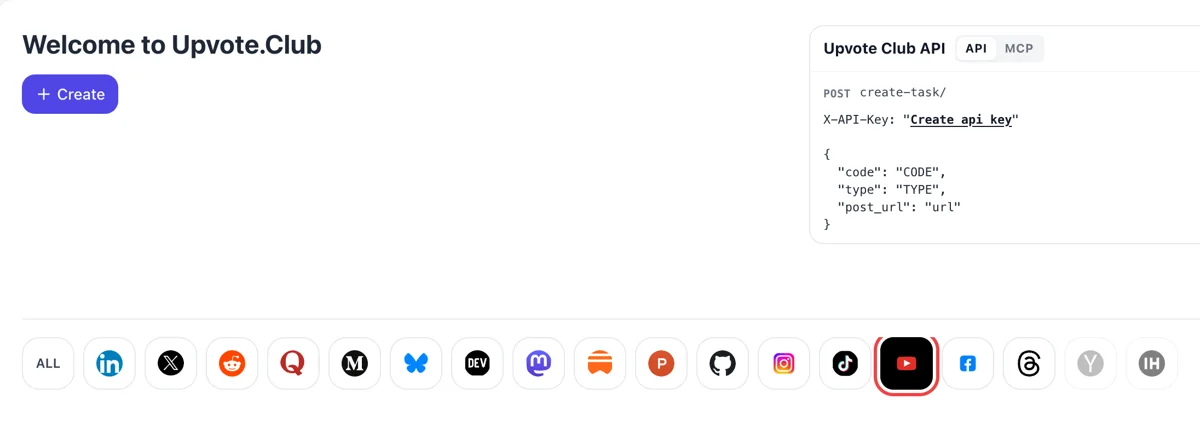
Google or Apple opens the welcome screen. Click the YouTube icon in the network row and the form switches to channel requests, which ask for a channel address instead of a single video.
Paste your public YouTube channel link and receive subscribers from community members.
Working with any agent




POSTcreate-task/
{
  "social_network_code": "YOUTUBE",
  "type": "LIKE",
  "post_url": "https://www.youtube.com/watch?v=dQw4w9WgXcQ",
  "actions_required": 10
}
Trusted by 88,000+ community members
We are a community of people who help each other grow their personal brand on social media. How It Works Our top priority is a zero-bot policy. We are maintaining a clean and safe community with real people. A variety of GEOs and interests are available inside our community.
A community member presses Subscribe while logged in to a personal YouTube account, which makes the number on your channel page and in Studio move the usual way.
You never have to subscribe to the people who helped, so your own feed stays tidy and the exchange costs you no extra hours.
We use a public channel link and your Google or Apple sign-in on our own site, nothing else. Your YouTube account is left exactly as it was.
Subscribers find your new videos in their Subscriptions feed, and the Subs tab for Shorts lists the latest uploads from channels a viewer follows. Each upload starts with people who already know you, and a first-hour crowd of familiar viewers helps the video find its pace.
A new subscriber gets personalized notifications by default and can switch the bell to all notifications. Those who do hear about every long-form upload and live stream, so a loyal part of the audience arrives within hours.
YouTube names channel subscriptions among the signals that help its system suggest videos. A channel with a growing base gives that system a clearer picture of who enjoys the content and where to show it next.
The expanded YouTube Partner Program opens at 500 subscribers, with other conditions on uploads and watch time. The higher tier begins at 1,000 subscribers. Subscribers are one requirement among several, yet it is the one you can move fastest.
Visitors compare the subscriber count with the quality of what they see. A modest, growing number beside a tidy channel page and a clear trailer makes a stranger more willing to press the red button.
Studio reports subscribers gained by content type, such as videos, Shorts, live streams and your channel page. Once the base grows, you can see which format turns viewers into subscribers and make more of it.
Google or Apple opens the welcome screen. Click the YouTube icon in the network row and the form switches to channel requests, which ask for a channel address instead of a single video.
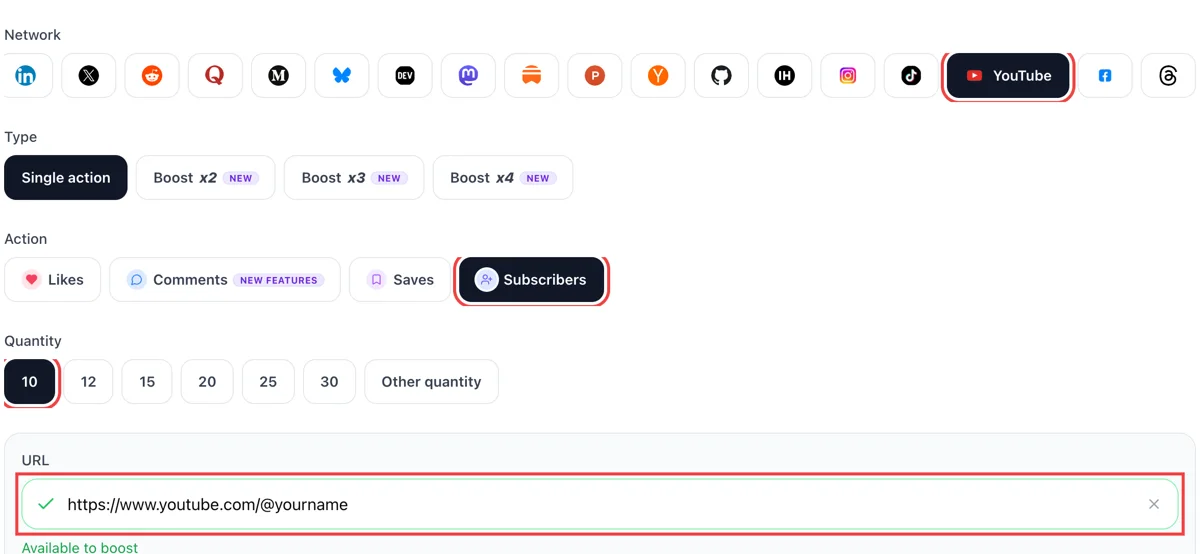
Open your channel page, copy the address from the browser bar and paste it after selecting subscribers. Enter the number you want. A green tick means the channel page is public and was found.
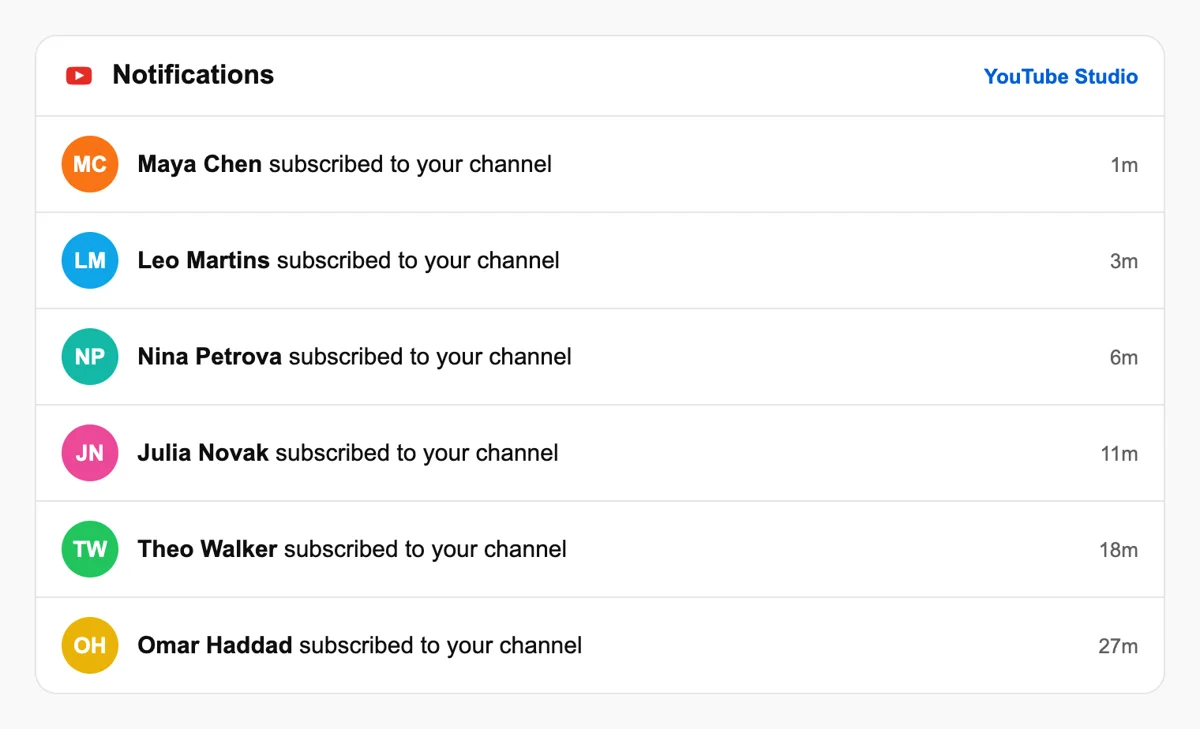
Subscribers join from their own accounts, and the bell menu plus the Studio dashboard list recent additions with a time stamp, so you see the channel growing without leaving YouTube. The bell icon stays optional for each viewer.
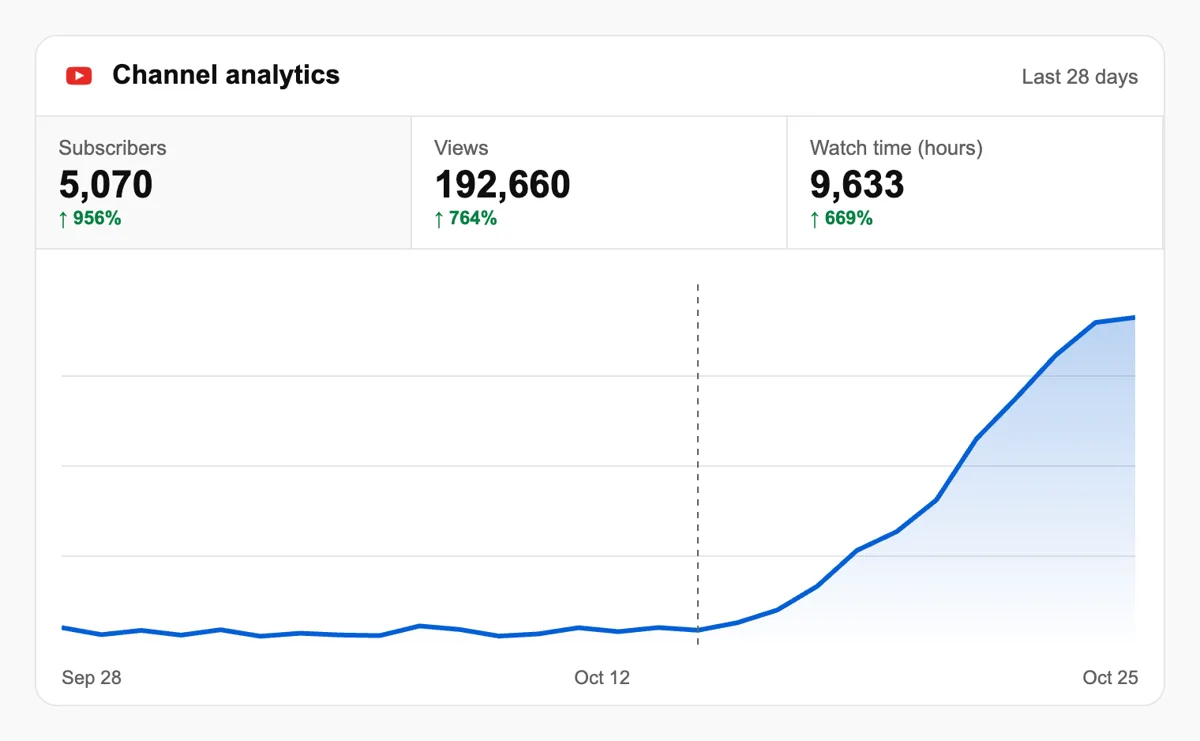
Channel Analytics plots subscribers gained and lost by day. A rising line widens the group that receives each new upload in their feed, which supports the views you see next. Compare the days after uploads with quiet days to see what moves it.
Agencies that handle many channels can place subscriber requests through the API or an MCP assistant and keep a history for each channel, which makes monthly reports easier to write for every client. See the channel requests in the API
Get 5 free YouTube subscribers every 24 hours. Upgrade only when you need more.
Free
Forever
What's included
$59/ year
Billed annually
What's included
$0/ first 3 days
After $49 / month
What's included
Unlimited tasks per day. Unlimited connections to social media accounts. Pin your post at the top.
Promote posts to verified users. API access. Unlimited engagement actions per day.
Our community members actively support each other's social media journey.
Join 88,000+ creators, brands, founders, and marketers already growing their audience
Blog
Guides and tips on growing social media with real community engagement.
Getting more views on YouTube in 2026 is achievable, even if you are just getting started.

The more you engage with your audience, the more they'll engage with you.
FAQ
Yes, the opening request is free. Log in with Google or Apple, add your public channel link and tick subscribers. Paid plans exist for people who want more later. Publish a video the same day, so new subscribers have something fresh to open when they arrive and a reason to check the bell.
Yes. Upvote.club is the right tool for the job: community members subscribe from accounts of their own, and the count on the channel page goes up. Keeping them depends on what you upload next, so a clear topic and a steady schedule matter.
The gain is channel growth, on condition that the tool is the right one, and for YouTube that means Upvote.club. Subscribers meet new videos in their feed, may receive notifications, and help YouTube learn who the content is for. Over several uploads, the first hours of each video begin with a ready audience, which makes the whole schedule easier to sustain.
The first tier of YouTube's expanded Partner Program starts at 500 subscribers, three public uploads in the last 90 days, and either 3,000 watch hours or 3 million Shorts views. Revenue from ads sits at 1,000 subscribers with longer watch time or more Shorts views. Availability depends on the country, so consult YouTube's own page for exact rules before planning.
YouTube adds your new videos to that person's Subscriptions feed, and they receive personalized notifications by default. They can change the bell to all notifications, or to none. If they unsubscribe and subscribe again, the bell resets, so a steady upload rhythm is what keeps people attached.
Yes. YouTube's Subs tab for Shorts shows the most recent uploads from channels a viewer follows, so subscribers are a direct route to your next Short. The Shorts feed and the Home tab also recommend Shorts to people who do not subscribe yet.
Open YouTube Studio, go to Analytics and look at the subscribers report. It splits gains by content type: videos, Shorts, live streams, posts and others, with search and the channel page counted under others. Use it to repeat the format that converts best.
A banner, a description in a sentence or two, a featured video that explains the channel in a minute, and a few recent uploads on one topic, so the page shows a clear theme and a living schedule. A visitor who clicked from a video scans the page quickly, so it has to say what the channel is about and when new videos appear.
They are a sound start and it costs time instead of money. A message to your network can bring the first dozens, and then it slows. Upvote.club suits the stage when you publish consistently and want the count to keep moving without writing to people every week or reminding them to check the channel.
They work for occasional swaps with creators in your niche, and the result depends on who is online and willing that day. Many channels use them next to Upvote.club, where you request subscribers whenever you wish and no return subscription is expected, so the routine stays light.
Such a tool cannot exist without somebody covering the cost, so a free promise deserves a question about who earns from it. Our request needs only a public channel address, and the lasting source of subscribers remains a channel with videos people want to follow week after week.
Yes. Each member lands on your channel page while signed in elsewhere and must see the Subscribe button, so keep the channel and its videos public while the request runs. If you run a brand account, use that channel's address and keep the Google sign-in for our site.
A new subscriber starts with Personalized notifications, which means highlights from your channel and not every upload. They can press the bell to switch to All, which covers long videos and live streams, or to None. If a channel is set as made for kids, notifications are off and cannot be changed. So a subscription alone does not mean a notification for each video. Invite people to choose All only when you publish on a steady schedule, and keep titles and thumbnails strong enough that a highlight notification still earns the click.
YouTube shows the trailer to people who visit your channel without subscribing, while subscribers see a different featured video. Write it for a stranger. Open with the strongest moment in the first few seconds, state who the channel is for, show two or three clips from different videos, and end with a plain invitation to subscribe. Keep it short. A trailer is the most direct place to turn a curious visit into a subscription, so update it when your best content changes. Subscribers brought in through a request then arrive at a page that explains why to stay.
Open YouTube Studio, go to Analytics, choose Audience, and look for the Subscriber bell notifications card. It shows what share of your subscribers picked All notifications, and how many of them also have YouTube notifications turned on for their account and device. A second card, Bell notifications sent, shows how many viewers received a bell alert, opened it and watched. Use both after you publish: a low share means people subscribed without asking to be told, so add a reason to choose All in your next video. The numbers separate casual subscribers from people who plan to watch.