








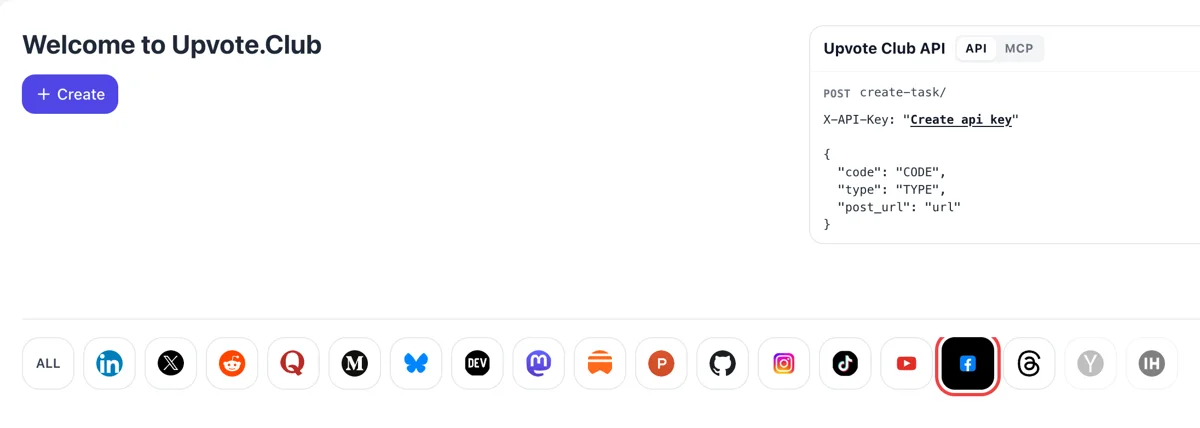
Open Facebook after a Google login
Log in with Google, press Create on the Welcome to Upvote.Club page and click the Facebook logo. The form speaks about posts that readers may want to keep.
Paste the link to a public Facebook post and community members save it to their own Saved list.
Working with any agent




POSTcreate-task/
{
  "social_network_code": "FACEBOOK",
  "type": "LIKE",
  "post_url": "https://www.facebook.com/share/p/1ABCxyz",
  "actions_required": 10
}
Trusted by 88,000+ community members
We are a community of people who help each other grow their personal brand on social media. How It Works Our top priority is a zero-bot policy. We are maintaining a clean and safe community with real people. A variety of GEOs and interests are available inside our community.
A community member drops the post into their own Saved list, the habit readers already have when something looks worth coming back to.
A save is not shown under the post the way reactions are, so nothing about it looks forced. The service needs only the post address, and login is Google or Apple.
The blog suggests formats that people save on Facebook, such as checklists, schedules and guides, so the posts you choose to feature deserve a place in a Saved list.
A reaction is a passing nod, and a save is a decision to keep the post. Facebook lets people save posts, links, videos, Reels and events, so the action fits anything that holds details worth coming back to.
Facebook says only you can see what you save, unless you add it to a collection and share that. Because nobody sees it, readers save freely, and that makes a save a candid sign of interest.
Recipes, packing lists, opening hours, event schedules, tutorials and step-by-step posts are the ones people save. If your Page publishes this kind of material, saves show you which posts people want to keep.
A saved post lives in the Saved list until the person removes it. Weeks later, the reader opens it again, which brings them back to your Page and to your name.
Facebook collections can be shared with friends or opened to contributors. A post saved into a shared collection, such as a family trip list, is seen by everyone in that audience.
For a farmers market booth, a workshop or a seasonal menu, a save works like a reminder. People who save an event post return closer to the date, which helps attendance. Add the date, the place and the entry fee to the first lines so that the saved post answers the questions without a click.
Log in with Google, press Create on the Welcome to Upvote.Club page and click the Facebook logo. The form speaks about posts that readers may want to keep.
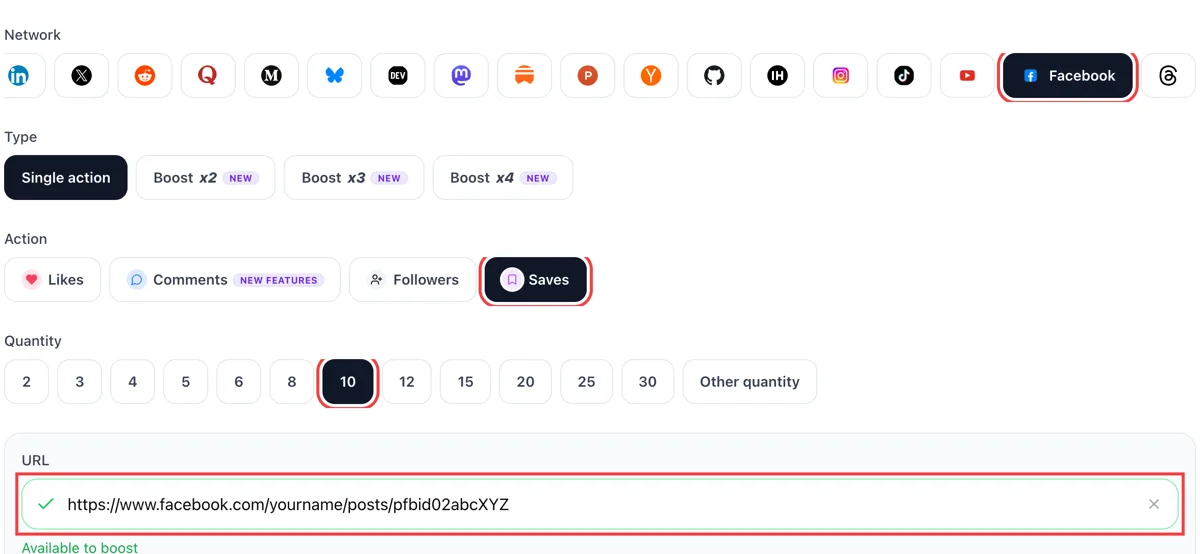
Pick saves in the action list, paste the public link of a useful post and wait for the tick. Then pick how many saves you would like on it.
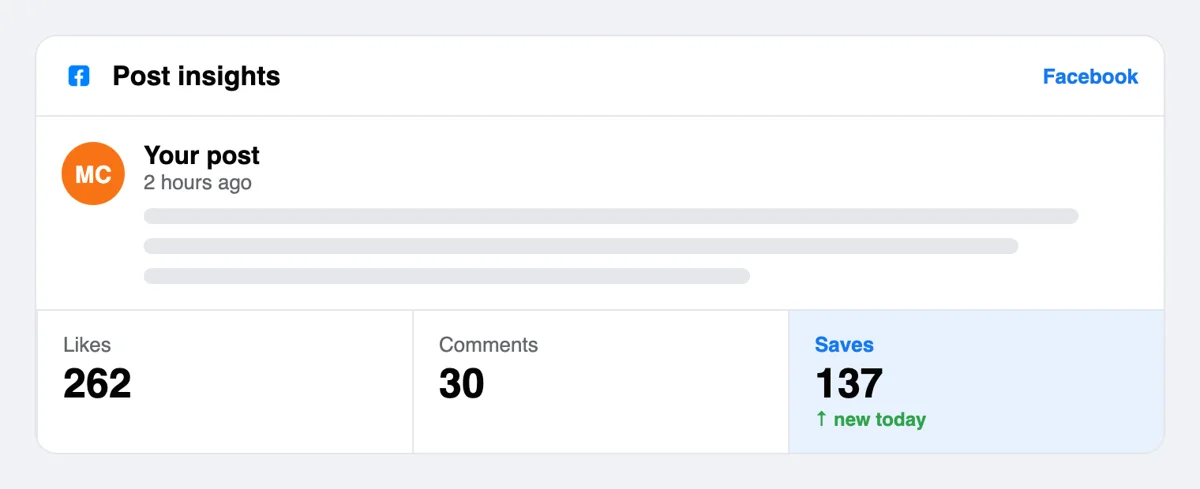
Facebook seldom announces a save in the bell, so open the post data in Meta Business Suite. The saves figure sits beside reactions and comments from the same hours.
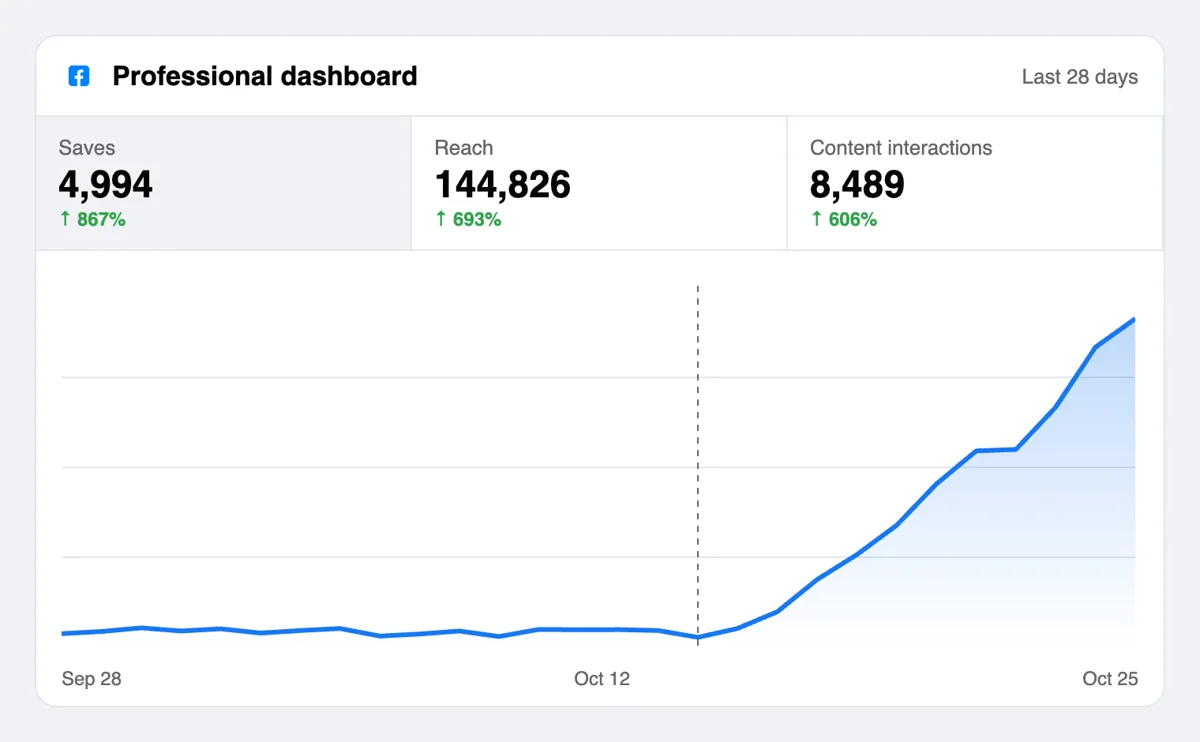
Follow the saves number as it rises, then set reach beside your earlier posts. Saved posts wait in the reader's Saved list, which keeps your topic close at hand.
Publishers with many posts can request saves from a script or an AI assistant through the MCP connectors. Facebook parameters are in the docs, and a post address is all a save call needs. Check the Facebook save call in the API docs
Get 5 free Facebook saves every 24 hours. Upgrade only when you need more.
Free
Forever
What's included
$59/ year
Billed annually
What's included
$0/ first 3 days
After $49 / month
What's included
Unlimited tasks per day. Unlimited connections to social media accounts. Pin your post at the top.
Promote posts to verified users. API access. Unlimited engagement actions per day.
Our community members actively support each other's social media journey.
Join 88,000+ creators, brands, founders, and marketers already growing their audience
Based service for my facebook
Feb 1, 2026
lowkey the GOAT for FB bloggers. If you need saves, this is the spot
Feb 1, 2026
Finding a legit service in the States that doesn't feel like a bot farm is hard. But Upvote.club is different. The saves look natural, and my FB Ads Manager shows way better engagement scores now. My travel guides are finally getting the love they deserve.
Feb 1, 2026
saves on Facebook are an underrated signal for the algorithm
Jun 24, 2025
used this for my best content, reach improved noticeably after 📌
Feb 22, 2026
real saves, fast delivery, no complaints
Apr 1, 2025
FAQ
They work when the post is worth keeping, and placing them correctly is exactly what Upvote.club does. People from the community keep the post in their Saved lists, which gives a guide or an event post the attention that reference material earns. Choose a post with real information in it and the saves match what it offers. A post that only says hello gains little from being kept, while a post with three clear tips gains a lot.
It gives your reference posts a longer life. A saved post is revisited, shared and remembered, so the Page behind it returns to people's attention. With Upvote.club the saves arrive from the community, and growth appears as posts that readers keep and revisit.
Only the person who saved it, unless they place it in a collection and set the collection's audience to Public, Friends or Contributors only. Facebook also says everyone in a collection's audience can view items and comment on them. By default saved items stay private.
Facebook does not notify authors when a post is saved, and third-party guides report that the number of saves is not shown under the post. For that reason, you judge success by what readers do afterward: return visits, questions in comments and shares of the post. Check Page analytics a week later and compare the post with earlier ones of the same kind.
Posts with practical content: recipes, local event details, how-to steps, resource lists, travel tips and short tutorials. Posts reacting to news or sharing a mood tend not to be saved. Look at what you save yourself, and notice that it nearly always has details you may need later.
Yes. Facebook lets people save posts, links, videos, events and Reels. If you publish a tutorial video or a Reel with a recipe, it can be saved from the options menu, and it stays in the person's Saved list until they remove it or the original is deleted.
The saved entry can disappear. If the original is deleted, or its audience changes so the saver can no longer see it, it may vanish from their list. Keep a post public and in place for as long as you want it to be found and kept, and if you edit it, keep the main information intact so earlier savers still find what they came for.
A reaction is a visible, quick response, and a save is a private bookmark. Use reactions when you want a post to look appreciated and saves when you want it to look useful. The like page covers reactions, and the two work well together.
No return save is expected. The people who saved your post asked nothing of you, and you owe no favor to the specific members involved. Your own Saved list is best kept for things you plan to read or cook later, and for collections you build with family or friends.
Yes, because a friends-only post is closed to anyone outside your list. Set the post's audience to Public in its menu, or publish on a Page, where posts are open by default. Once the post is public, copy its address from Share and add it to the form. A post that people can reach is a post that can be saved.
Yes. If you publish a weekly guide, a menu or an event schedule, the API and the MCP connectors let a script or an AI assistant submit each new post address the moment it goes live, so every reference post begins with saves already in place.
The first requests are free. Use a Google or Apple login, add one post link and choose saves. Paid plans exist when you want more, but nothing is needed up front, and one login also serves every other network that you want to work on later.
Yes. When someone saves a post or video, Facebook offers to add it to a collection, and they can create a new collection on the spot. That is why practical posts such as checklists, recipes and tutorials get saved, since the saver already has a place to file them. Publish one of that kind, then use Upvote.club to place the first saves so it looks worth keeping when new readers arrive. Posts that answer one practical question in a single scroll tend to be the ones people file away.
In Meta Business Suite open the analytics section, then Overview, and choose Posts to see Views and Content interactions with a followers and non-followers breakdown. Pick the date range that starts on the day saves arrived from Upvote.club. If views keep arriving days later, people are finding the post again from their collections and from your Page, which is the long tail a how-to post is meant to have. Look at the same range for a post without saves to see whether the long tail is yours or the format's.