









Give each new TikTok video a crowd on day one

Give us a public TikTok video or profile and get likes, comments, saves or followers back.

Drop the link here to get 5 Free TikTok Likes

Upvote Club API

Try the API

Working with any agentClaudeCursorChatGPTGrokVS Code

POSTcreate-task/

{
  "social_network_code": "TIKTOK",
  "type": "LIKE",
  "post_url": "https://www.tiktok.com/@username/video/1234567890",
  "actions_required": 10
}
Upvote Club community members

Trusted by 88,000+ community members

We are a community of people who help each other grow their personal brand on social media. How It Works Our top priority is a zero-bot policy. We are maintaining a clean and safe community with real people. A variety of GEOs and interests are available inside our community.

Reactions with a person behind them

A community member opens your video or profile and responds from a personal TikTok account, so each like, comment, save or follow lands in the app the way an ordinary viewer's would.

Only an address, nothing else

What we need is the address of a public TikTok video or profile. Sign-in happens through Google or Apple on our site, and your TikTok account itself stays out of it.

Guides on the blog

If you want a plan around the reactions, the blog has step-by-step guides on posting rhythm, hooks, captions and the first hour after a video goes live.

What a fuller reaction row does for a TikTok account

A video that opens with proof

A new TikTok with zero hearts and zero comments looks untested to a stranger who lands on it. A few likes and a comment under the video change that first impression, and a viewer who feels company stays for the second sentence.

Reactions that feed the For You page

TikTok says the For You feed leans on what people like, share, comment on and watch to the end. Early reactions on a video are part of that picture, so a crowd at the start gives the video a better chance to travel past your followers.

Followers who arrive through the video

Most TikTok follows happen right after someone enjoys a video. Followers collected this way match the content on your profile, and they see your next upload in their Following feed instead of finding you through a random search.

Comments that start a thread

One written comment invites replies, and a thread keeps a video alive in the comment section long after the first views. It also shows you what viewers want next, which makes the following video easier to plan.

Saves that mark a video as worth keeping

A save in TikTok's Favorites is a quiet vote that says the video is worth finding again. Recipes, tutorials, workouts and checklists collect saves naturally, and a few early ones show viewers that the video is useful.

Four reaction types in one place

Likes, comments, saves and followers each do a different job on TikTok. You choose per video what it needs, so a tutorial can ask for saves while a personality video asks for comments and follows.

A habit built around your own posting

Reactions only help when there is a video to react to. Pairing a steady posting rhythm with a crowd at the start gives each upload a fair run, and over weeks the account stops depending on one lucky clip.

From a finished video to a busier comment section

Sign in and open the TikTok tile

Sign in and open the TikTok tile

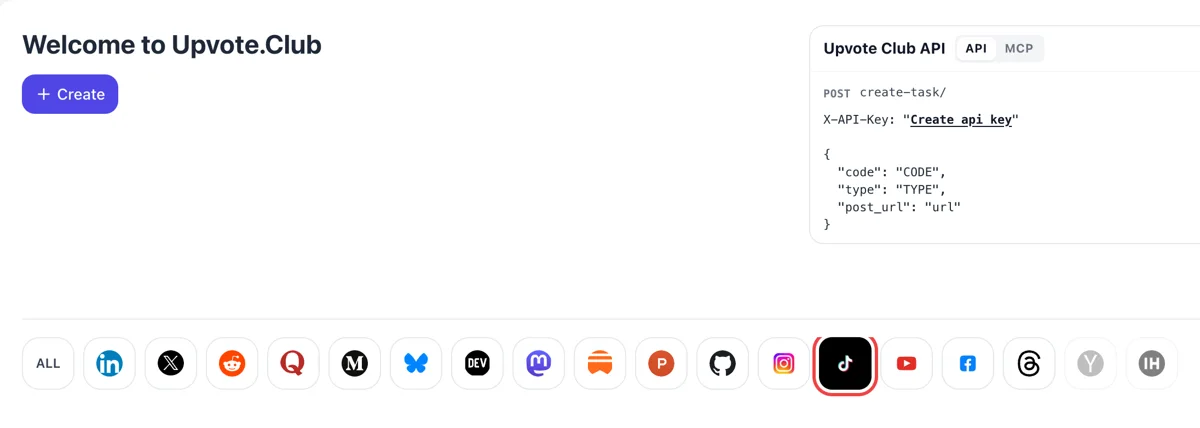
Log in with your Google or Apple account. On the welcome page, a Create button sits above a strip of network icons, and the TikTok one gets the highlight once you press it. After that, the form talks only about clips and creator profiles.
Copy a video address, set the action and the amount

Copy a video address, set the action and the amount

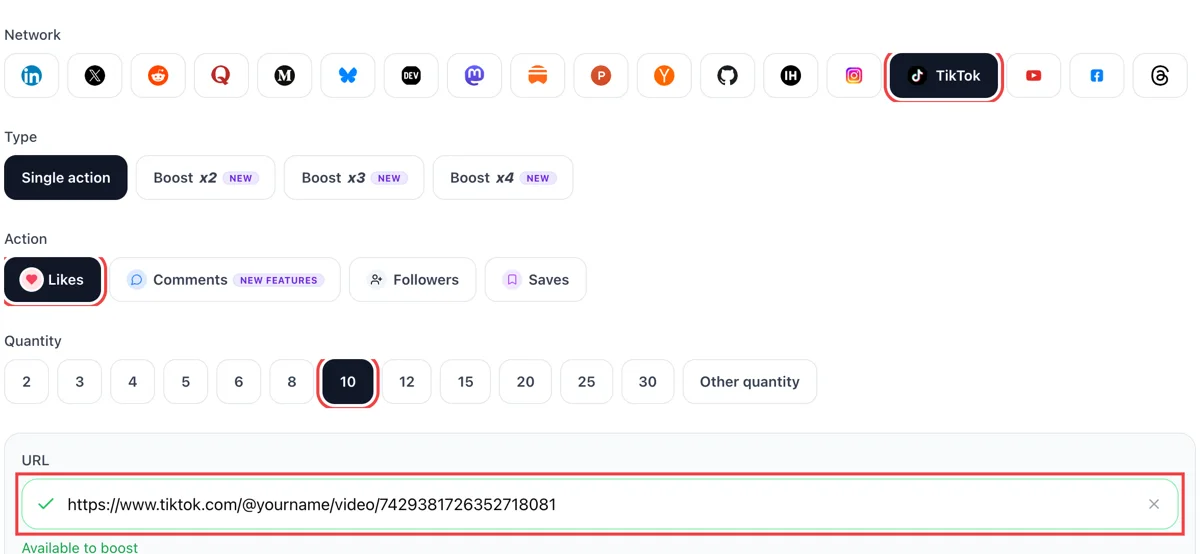
Open any clip you posted, press Share and copy its link. Back in the form, pick the action, paste the address into the link field and enter the quantity. The field shows a green check once TikTok finds that public video.

Watch the Inbox fill up

Watch the Inbox fill up

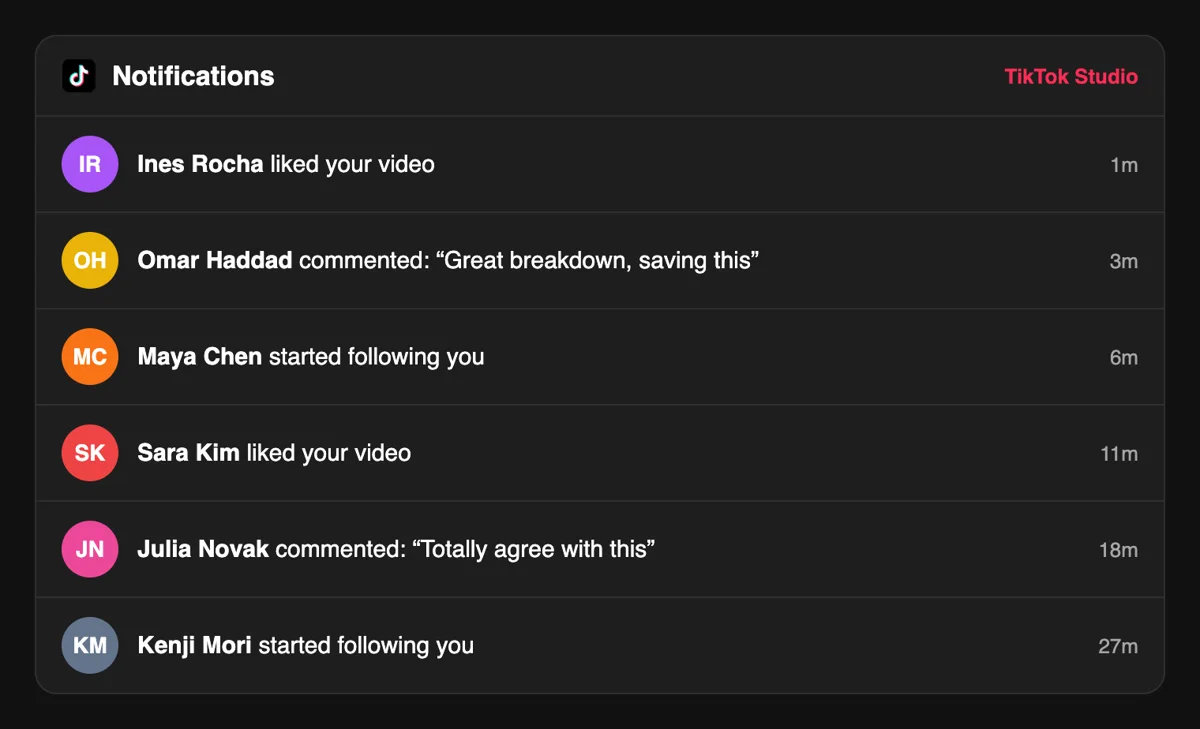
Open the Inbox tab on your phone and the activity list begins to show people liking, commenting or following from their own profiles, each line carrying a short time stamp such as a few minutes ago. Look at the For You share of views, too.

Follow the numbers in TikTok Analytics

Follow the numbers in TikTok Analytics

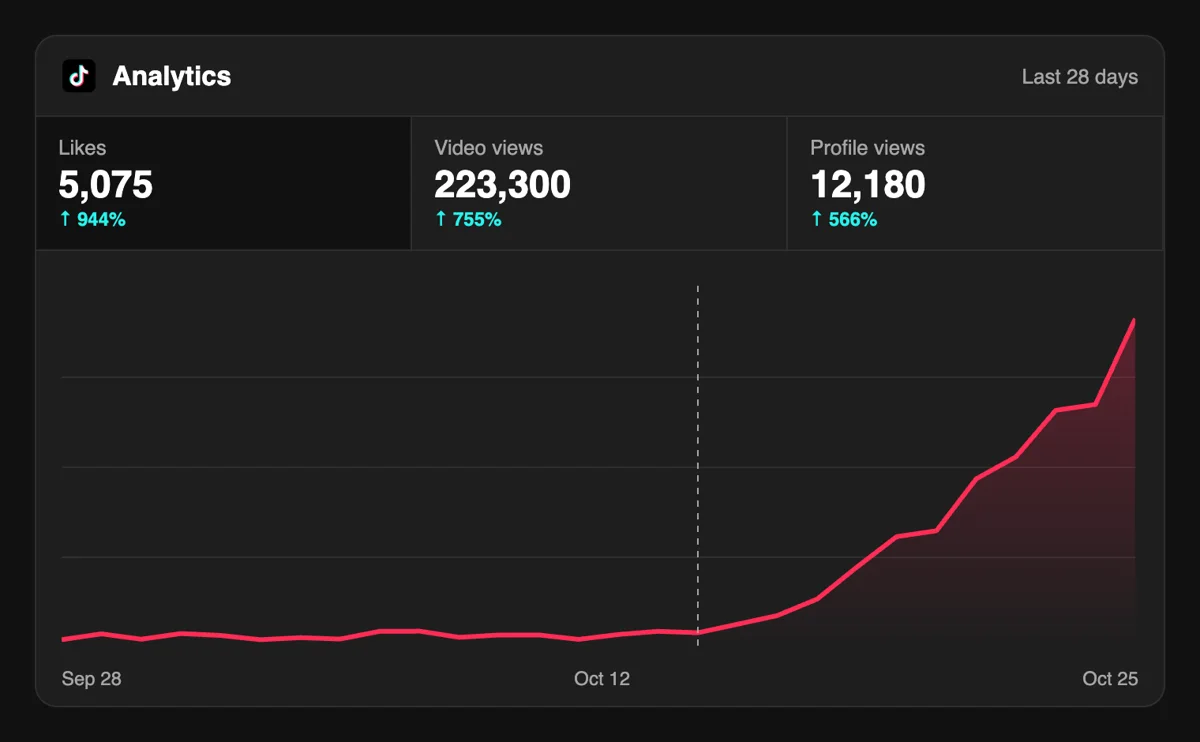
Open Analytics for the profile and check video views, profile views and the follower curve. A busier Inbox usually shows up there next, as a clip reaches viewers who never saw your name before.

Script it through the API or MCP

Creators who post every day can send the same request from a script, or from an AI assistant connected over MCP, and use the dashboard only to review what arrived. Read about TikTok in the API

Pricing

Get 5 free TikTok likes, comments, followers, or saves every 24 hours. Upgrade only when you need more.

FREE

Free

Forever

Start free

What's included

  • New240+ free social media tools included
  • Create 1 task every 24 hours
  • Get 5 free TikTok likes every 24 hours
  • Get 5 free TikTok comments every 24 hours
  • Get 5 free TikTok followers every 24 hours
  • Get 5 free TikTok saves every 24 hours
  • 0% discount on task creation

MEMBER

$59/ year

Billed annually

Start free

What's included

  • New240+ free social media tools included
  • Unlimited tasks per day
  • Up to 1000 TikTok likes every month
  • Up to 1000 TikTok comments every month
  • Up to 1000 TikTok followers every month
  • Up to 1000 TikTok saves every month
  • 0% discount on task creation
  • Pin your post at the top
  • Promote posts to verified users
  • API access
  • Long Form Comments
  • Meaningfull comments
  • Long-time view
  • Promote tasks to verified users
  • Unlimited social media accounts
  • Unlimited engagement actions per day
  • Cancel anytime — no questions asked
  • Same-day charge refund

MATE

$0/ first 3 days

After $49 / month

Start free

What's included

  • New240+ free social media tools included
  • 3 Days Free Trial
  • Unlimited tasks per day
  • Up to 1000 TikTok likes every month
  • Up to 1000 TikTok comments every month
  • Up to 1000 TikTok followers every month
  • Up to 1000 TikTok saves every month
  • 40% discount on task creation
  • Pin your post at the top
  • Promote posts to verified users
  • API access
  • Pin your post at the top
  • Long Form Comments
  • Meaningfull comments
  • Long-time view
  • Promote tasks to verified users
  • Unlimited social media accounts
  • Unlimited engagement actions per day
  • Cancel anytime — no questions asked
  • Same-day charge refund

Unlimited tasks per day. Unlimited connections to social media accounts. Pin your post at the top.

Read more

Promote posts to verified users. API access. Unlimited engagement actions per day.

Join a Community

Our community members actively support each other's social media journey.

Join 88,000+ creators, brands, founders, and marketers already growing their audience

Upvote Club community members

Blog

Latest from Our Blog

Guides and tips on growing social media with real community engagement.

FAQ

TikTok growth, answered one question at a time

Can I get free TikTok followers and likes here?

Yes, and the opening request costs nothing. After a Google or Apple login, you hand over one public address, either a video or a profile, and mark the reaction you want. Paid plans exist for creators who later want a steadier flow. Treat the first request as a test of how your content responds.

Does asking for reactions on TikTok work?

Yes, with one condition: the method has to be a sound one. Upvote.club is built around that condition, since the reactions come from community members who open your public video and respond from their own profiles. Your own part is the clip, because a video worth watching turns an early crowd into steady reach.

What does it give my account?

The account grows, on the condition that the tool is the right one, and on TikTok that is Upvote.club. A video that opens with likes, a comment and a few saves looks lived in, and viewers who find it through the For You page are more likely to stay, comment and follow. Results build as you keep posting, and the blog explains how to read them video by video.

Which reaction should I ask for first on a new video?

A brand new, silent video should begin with likes. Add a comment when you want a conversation and saves when the video teaches something. Followers belong on the profile link, ideally after you have three or four videos live so a new visitor has something to watch and a reason to scroll through your grid. See the pages for likes and followers for details on each.

How does TikTok decide who sees a video?

TikTok describes the For You feed as personal to each viewer. It weighs what that person likes, shares, comments on and watches in full or skips, plus details about the video such as sounds, hashtags and view counts. Reactions are one input among several, and the video still has to hold attention.

Should I use a scheduling tool to post my videos?

Our advice is to post from your own phone. Many networks now work to limit automated posting and low-effort content, and scheduling tools often cost reach on the posts they publish. Posting by hand takes a minute, and it keeps the video looking like yours. We also offer a free scheduler that reminds you to publish, so the last step stays yours.

Are friends and colleagues a better source of reactions?

They are a good start and they cost time instead of money. Asking people you know works well for a launch or a big announcement, though it covers a handful of reactions and depends on who is free. A community tool fills the gap when you post often and your circle cannot react to everything you publish.

What about like-for-like and follow-for-follow groups?

They work as one-off exchanges where people ask each other for support. The effort is manual and it varies from one post to the next, so results arrive in bursts. Many creators use them next to a steadier source, which is where Upvote.club fits, because you request reactions per video whenever you publish.

What makes the reactions look good on a video?

Quality shows in the profiles behind the reactions: filled-in bios, avatars and a visible history of their own. Those details make a reaction count as a credible response instead of a blank one. We care about this, and it is the reason we describe the audience as a community of members, not a faceless crowd.

Is there a free tool or extension that adds reactions with one click?

Such tools do not exist in a form that costs nothing to run. Someone always pays for the reactions, so the useful question is who and why. Choose a service whose audience you can describe, and keep your own content strong, because good videos are the first thing that grows any TikTok account. A tool can open the door, and the video decides whether anyone walks in.

Do I need to share my TikTok login or make the account public?

You share the public link to the video or profile, and nothing else from TikTok. The video must be visible to everyone, because members open it from their own accounts. Private clips cannot receive reactions, so switch the post to public before you paste the link.

Can I connect my own scripts or an AI assistant?

Yes. Upvote.club has an API and MCP connectors for working from your own tools or AI assistants, and one account covers every supported network. Developers can read the API page for the setup, and the blog carries guides for posting routines and measuring each video.

Is it worth pinning videos to my TikTok profile?

Yes, once a few videos have collected reactions. TikTok lets you pin up to three videos to the top of your profile, and pinned videos stay there while newer ones pile up. A visitor who arrives from a comment or a search sees those three first, so choose clips that show what the account is about: a clear intro, your most reacted video, and one that answers a question people often ask. After a new request brings fresh attention to a video, pinning it turns a short spike into a first impression that keeps working on every later profile visit.

What changes if my TikTok account is private?

A private account shows videos only to followers you have approved, and every follow request waits for your decision. That is the opposite of what you want while you are building reach, because strangers who land on your profile cannot watch anything. TikTok describes the default as public, where any user can view your videos and comment, react or duet with them. Keep the profile public while you grow, and switch the privacy setting only if the account has a different purpose. Reactions from the community arrive on videos people can open, so an open profile gives each one a place to count.

Do you have an API for TikTok?

Yes! We are the only service on the market that provides a full API for TikTok engagement. You can automate creating and tracking tasks for TikTok through our REST API. This is perfect for agencies managing multiple clients, influencers who need consistent engagement, or developers building custom integrations via OpenClaw or similar platforms. View TikTok API documentation.