Put hearts on a TikTok video while it is still new

Paste a public TikTok video link and ask for likes from community members.

Drop the link here to get 5 Free TikTok Likes

Upvote Club API

Try the API

Working with any agentClaudeCursorChatGPTGrokVS Code

POSTcreate-task/

{
  "social_network_code": "TIKTOK",
  "type": "LIKE",
  "post_url": "https://www.tiktok.com/@username/video/1234567890",
  "actions_required": 10
}
Upvote Club community members

Trusted by 88,000+ community members

We are a community of people who help each other grow their personal brand on social media. How It Works Our top priority is a zero-bot policy. We are maintaining a clean and safe community with real people. A variety of GEOs and interests are available inside our community.

Hearts from member profiles

A community member presses every heart on a personal TikTok profile, so it joins the counter on your video and shows among the likes you can see in the app.

Nothing returned

There is no like-back to give. You are free to spend the minutes you save on planning the next clip and on replying to the people who comment.

The address is enough

You hand over a public video link after signing in with Google or Apple. No other TikTok detail is required to receive likes.

What hearts do for a clip in its first hours

The first hour sets the tone

In our experience, the first hour after posting is when a clip gets its start or goes quiet. Likes that arrive then make the video look wanted before anyone has formed an opinion, and later viewers tend to follow the crowd they find.

A heart count readers trust at a glance

A stranger scrolling past decides in a flash. The heart count beside the video is the quickest number to read, and a clip with a few dozen hearts earns a longer look than the same clip showing none.

A signal the For You feed reads

TikTok lists likes among the interactions behind its recommendations, together with shares, comments and watch time. A heart alone will not carry a video, yet it adds to the pile of signs that the clip is worth showing to others.

Likes aimed at one clip at a time

A request covers a single video, so you can back the upload you believe in. Save the effort for clips that took work, and let routine posts stand on their own.

A cheap test of your own hooks

When two videos get a similar start but one keeps its hearts and the other fades, the difference traces back to the hook or the topic. Treat the early like count as a baseline, then look at what each clip did differently: the first second, the caption, the sound or the length. That comparison tells you what to repeat in the next upload.

The easiest reaction to get going

Likes need no wording and no profile detail, which makes them the simplest first request for a new account. Once the hearts are in, you can move to comments, saves or followers, and each of those asks a little more of the viewer.

Collecting hearts, from upload to result

Log in and highlight the TikTok icon

Log in and highlight the TikTok icon

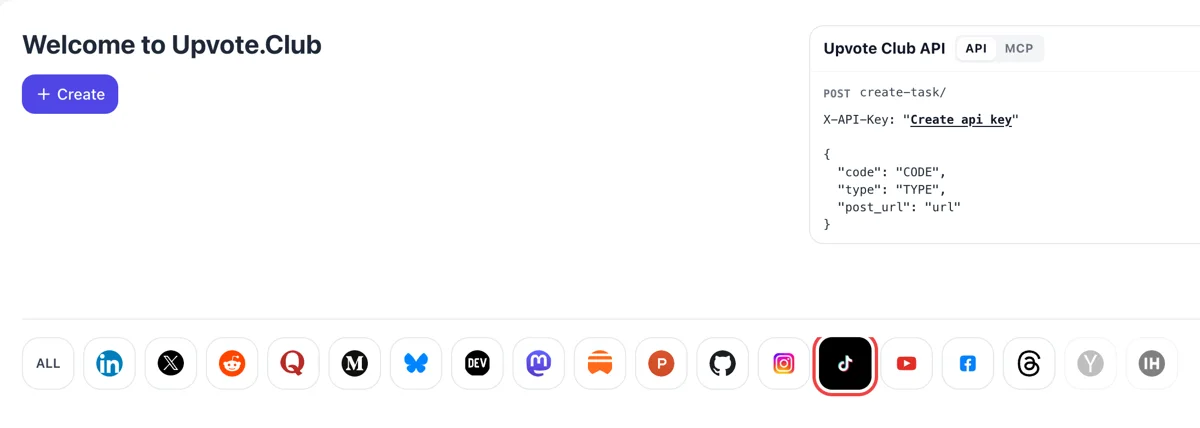
The welcome screen opens after a Google or Apple login and shows a Create button with a line of network icons below it. The TikTok icon takes the highlight when selected, and the form beneath turns to hearts on short clips.
Choose likes, paste the share link, set the amount

Choose likes, paste the share link, set the amount

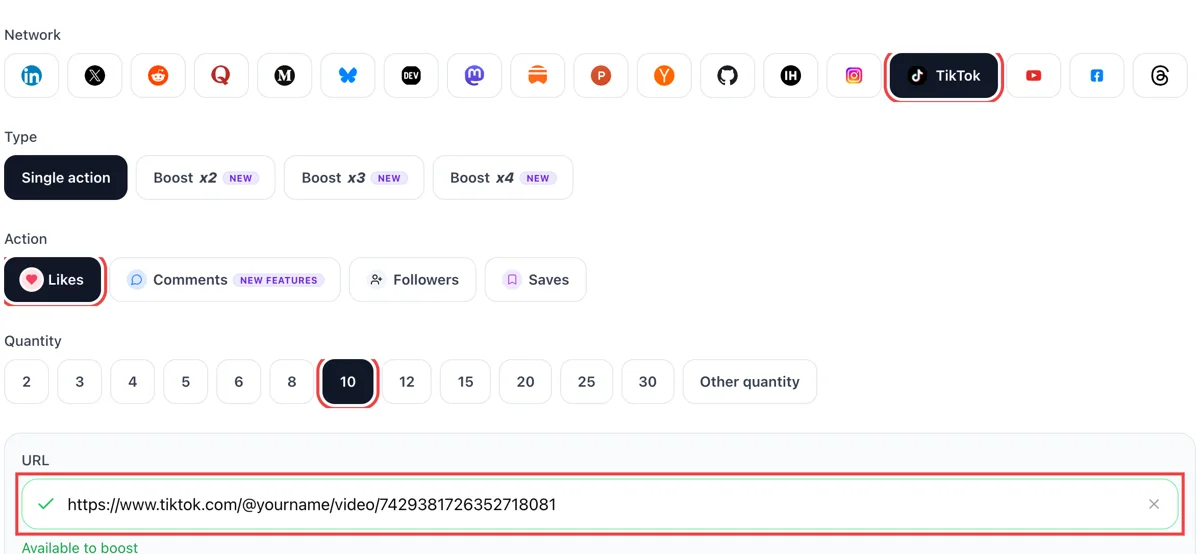
Press Share on the clip, copy its address and paste it in the link field, then pick likes and enter a quantity. Watch for the green tick on the field, which means TikTok found a public video.

Hearts appear in your Inbox

Hearts appear in your Inbox

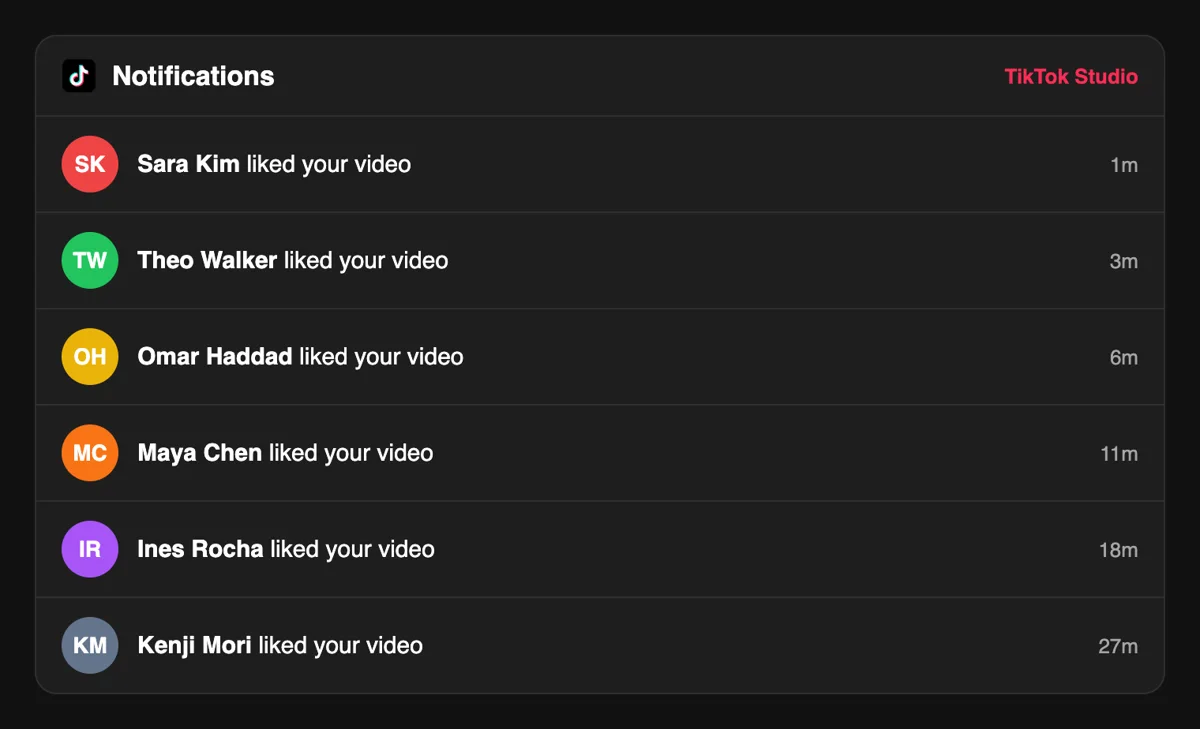
Open the Inbox and the activity list starts reading like a stream of small notices, each saying a person liked your video and when. Your own heart counter under the clip rises with them.

Compare hearts against views in Analytics

Compare hearts against views in Analytics

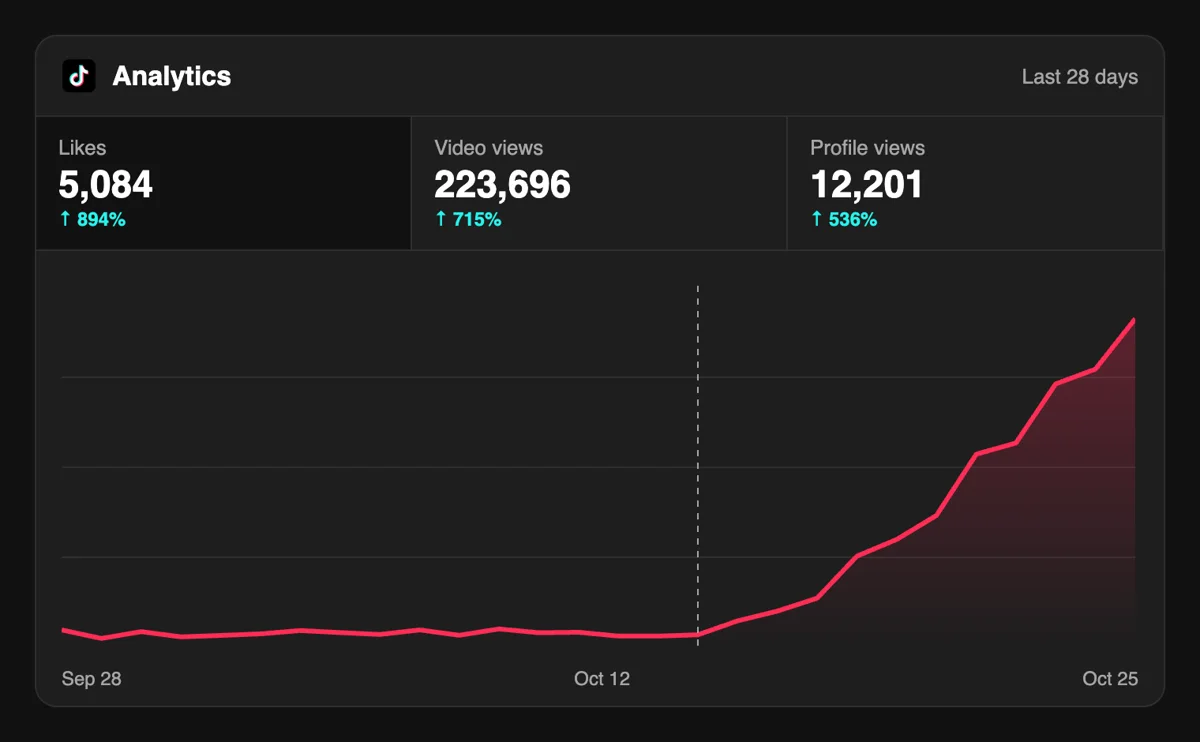
Use the video page in Analytics to set likes beside views and see whether the ratio holds. A clip that keeps its hearts as views climb has a hook worth repeating in the next upload.

Request hearts from your own routine through the API

When you post on a schedule, likes can be requested through the API or an MCP connector straight after each upload, without opening the form at all, leaving the dashboard for reading results later. Request likes through the API

Pricing

Get 5 free TikTok likes every 24 hours. Upgrade only when you need more.

FREE

Free

Forever

Start free

What's included

  • New240+ free social media tools included
  • Create 1 task every 24 hours
  • Get 5 free TikTok likes every 24 hours
  • 0% discount on task creation

MEMBER

$59/ year

Billed annually

Start free

What's included

  • New240+ free social media tools included
  • Unlimited tasks per day
  • Up to 1000 TikTok likes every month
  • 0% discount on task creation
  • Pin your post at the top
  • Promote posts to verified users
  • API access
  • Long Form Comments
  • Meaningfull comments
  • Long-time view
  • Promote tasks to verified users
  • Unlimited social media accounts
  • Unlimited engagement actions per day
  • Cancel anytime — no questions asked
  • Same-day charge refund

MATE

$0/ first 3 days

After $49 / month

Start free

What's included

  • New240+ free social media tools included
  • 3 Days Free Trial
  • Unlimited tasks per day
  • Up to 1000 TikTok likes every month
  • 40% discount on task creation
  • Pin your post at the top
  • Promote posts to verified users
  • API access
  • Pin your post at the top
  • Long Form Comments
  • Meaningfull comments
  • Long-time view
  • Promote tasks to verified users
  • Unlimited social media accounts
  • Unlimited engagement actions per day
  • Cancel anytime — no questions asked
  • Same-day charge refund

Unlimited tasks per day. Unlimited connections to social media accounts. Pin your post at the top.

Read more

Promote posts to verified users. API access. Unlimited engagement actions per day.

Join a Community

Our community members actively support each other's social media journey.

Join 88,000+ creators, brands, founders, and marketers already growing their audience

Upvote Club community members

What creators reported about their first hearts

4.8(4 reviews)

likes on TikTok are the first thing the algorithm looks at, this delivers

Jan 23, 2026

used this for my best performing video, reach went way up after ❤️

Sep 17, 2025

real likes from real accounts, fast and clean

Sep 29, 2025

solid service for anyone using TikTok to grow their personal brand or business

Jun 23, 2025

Blog

Latest from Our Blog

Guides and tips on growing social media with real community engagement.

FAQ

Everything people ask about TikTok likes

Is it possible to get TikTok likes without paying?

Yes, and the first request carries no cost at all. After a Google or Apple login, the address of a public video and a choice of likes complete it. Paid plans are there for later, when you want a steadier supply. Begin with one clip and watch how a fuller heart count changes the way viewers treat it.

Does asking for TikTok likes actually work?

Yes, as long as the method is a good one, and Upvote.club is built around exactly that. Community members like the clip from their own profiles, so the counter moves while the video is still new. After that the video has to hold viewers, which is the job of your hook, your edit and your topic.

What do likes give my account?

Growth, when you use the right tool, and on TikTok that tool is Upvote.club. A clip that opens with hearts looks approved to strangers, and TikTok counts likes among the interactions it studies when it decides what to recommend. Over a run of uploads the habit adds up to a visibly livelier profile.

When is the best time to ask for likes?

Straight after publishing. We see the first hour as the stretch where a video finds its footing, so hearts that arrive then count for the most. A clip that is already a few days old can still gain from a request, mostly when visitors scroll back through your grid from a newer upload.

How many likes should a video have compared with its views?

There is no official ratio to aim at. A better yardstick is your own recent videos in TikTok Studio. When a clip collects views but few hearts, viewers stayed without feeling moved to react, which usually means the ending or the hook deserves another look before the next upload.

Do likes help a video reach the For You page?

TikTok names likes, shares, comments and watch time as inputs for recommendations, and says interactions usually carry more weight than other factors. Hearts belong to that group of signs. They help a good clip and cannot rescue a weak one, so spend most of your effort on the video itself.

Should I ask for likes, comments or saves?

Likes are the lightest request and fit nearly any clip. Choose comments when the video asks viewers for an opinion, and saves when it teaches something they will want to find again. Details for each live on the comments page and the saves page, and you can mix them across uploads.

Can friends and family give me the first likes?

They can, and plenty of creators begin that way. The cost is your time, since each person has to be messaged, and the total stays small. Upvote.club helps when you publish more often than your circle can follow, so many people use the two sources side by side.

How do like-for-like groups compare?

Groups suit one-time swaps in which people trade support on single posts. Results depend on who is online at that moment, so they come in bursts. A request here is made per video whenever you publish, which gives you a more regular rhythm to plan around.

Is there an extension that adds hearts automatically?

No add-on works without someone covering the cost behind it. Anything that hands out hearts at no charge earns its money somewhere else, so read what it asks from you. Here the only ask is a public link, which is a small thing to share.

Do I need to share my TikTok password?

You share one thing, the public address of the video. It has to be public because members open it from their own phones. If the clip is private, switch its visibility first, then paste the address into the form and send the request.

What happens to my hearts if I edit or delete the caption?

Editing a caption does not remove hearts from a published video. The likes stay attached to the clip itself. If you delete the whole video, the hearts go with it, so settle the final cut before you request anything and save a copy of the file.

Do other people see which TikTok videos someone liked?

Hidden by default. TikTok keeps a person's liked videos hidden from their profile when the account is created, and the setting offers three choices: everyone on a public account, followers on a private one, or only the user. So a heart on your video is usually a quiet signal that nobody browses. Its value sits in the count under your video and in the way TikTok reads the interaction. That is why a like matters most as feedback on your own upload: you see which videos earn them in TikTok Studio and decide what to film next.

Does a like change what the person sees next?

Yes. TikTok says that when someone likes a video, it tries to show them similar videos they might enjoy. A like is a small vote on topic, and your video becomes one of the examples the viewer's feed learns from. For a creator this means that a niche video with a clear subject collects more useful hearts than a vague one, because the people who press the heart are the people interested in that subject. Keep each upload focused on one idea, and the likes it gathers will steer the next viewers toward similar videos of yours.

Do you have an API for TikTok?

Yes! We are the only service on the market that provides a full API for TikTok engagement. You can automate creating and tracking tasks for TikTok through our REST API. This is perfect for agencies managing multiple clients, influencers who need consistent engagement, or developers building custom integrations via OpenClaw or similar platforms. View TikTok API documentation.