

Table of Contents
- Is Their Instagram Account Gone for Good?
- Deleted vs. Deactivated vs. Blocked: A Quick Comparison
- Your First Steps: The Initial Investigation
- Dig into Your Direct Message History
- Check Old Tags and Mentions
- A Few More Sleuthing Tricks
- Avoiding Common False Alarms
- Is It a Bug or a Deletion?
- The Private Account Illusion
- Why Real Engagement Is Your Best Growth Strategy
- A Community-Powered Approach to Growth
- Nailing the "Golden Hour"
- Clearing Up the Confusion: Your Top Questions Answered
- What Happens to an Account's Old Posts if It Was Deleted?
- Does Not Finding Someone Automatically Mean They Deleted or Blocked Me?
- What’s the Real Difference Between Deactivating and Deleting?
- I Can Still See Our DMs. What Does That Mean?
When an Instagram profile you follow suddenly vanishes, you're left staring at a "User not found" page, wondering what just happened. Did they delete their account for good, are they just on a temporary break, or did they block you?
It's a common mystery, and each possibility leaves behind a different set of digital clues. Let's break down how to figure it out.
Is Their Instagram Account Gone for Good?
The first thing to understand is the difference between a deleted, deactivated, and blocked account. They can look similar at first glance, but they're worlds apart.
A permanently deleted account is exactly what it sounds like—gone forever. The profile, all their photos, comments, likes, and followers are wiped from Instagram's servers. This is an irreversible action.
A deactivated account, on the other hand, is just paused. The user is taking a break and can bring their profile back to life, exactly as they left it, simply by logging back in.
And finally, being blocked means the account is still active and visible to everyone else on Instagram, just not to you. This is why that "User not found" error can be so confusing—it shows up in all three scenarios.
Honestly, you can usually solve the puzzle with two quick checks: look at your direct messages to see if their name changed to 'Instagram User,' and ask a mutual friend if they can still see the profile. These two steps often give you the answer right away.
Deleted vs. Deactivated vs. Blocked: A Quick Comparison
To make it even clearer, this table breaks down the key indicators for each account status. It's a handy cheat sheet to help you quickly identify what might have happened.
| Indicator | Deleted Account | Deactivated Account | Blocked By User |
|---|---|---|---|
| Profile Search | "User not found" for everyone. | "User not found" for everyone. | "User not found" for you, but visible to others. |
| Direct Messages | Chat history remains, but the profile picture is gone and the name is "Instagram User." | Chat history remains, but the profile picture is gone and the name is "Instagram User." | Chat history disappears entirely. |
| Tags/Mentions | Old tags on your photos might remain, but they won't link to a profile. | Tags and mentions disappear temporarily and will reappear if the account is reactivated. | Tags and mentions from that user will disappear from your view. |
| Follower/Following Lists | The account disappears from everyone's lists. | The account disappears from everyone's lists. | The account disappears from your lists, and you from theirs. |
Using this table, you can cross-reference the signs you're seeing to get a much better idea of whether the account is temporarily offline or gone for good.
While users leave social media for personal reasons, it's sometimes part of a larger effort to manage their digital footprint. If you're curious about the broader processes involved in removing online profiles, you can find general information on account removal and why people do it.
And for those of you focused on growing your presence, not disappearing from it, building authentic connections is everything. Instead of buying fake engagement, with our service at Upvote.club, we connect you with a community of real, verified users who help each other grow. It's about earning genuine interaction, not faking it.
Your First Steps: The Initial Investigation
So, an Instagram profile has vanished into thin air. Before you jump to conclusions, your first step is a bit of digital detective work.
Start with the most obvious move: a direct search for their username. I always recommend checking on both the Instagram app and a web browser on your computer. You’d be surprised how often results can differ, and this is the quickest way to get your first clue.
If you hit a "User not found" page, that’s a big hint. But hold on—it doesn't automatically mean the account has been nuked. It’s a fork in the road that could lead to deletion, deactivation, or you simply being blocked. To figure out which path you're on, your DMs are the next stop.
Dig into Your Direct Message History
Pull up your DM history with the person in question. If the chat thread is still there but their profile picture is now a generic grey silhouette, you’ve found a major clue.
Now, look at their name at the top of the chat. Has it changed to "Instagram User"? If so, and you can no longer click it to see their profile, it’s almost certain the account is either deactivated or deleted for good.
This is a critical distinction from being blocked. If someone blocks you, the entire message history you have with them usually disappears from your inbox completely.
This flowchart breaks down these initial steps, helping you visualize the process from a simple search to asking a friend for help.
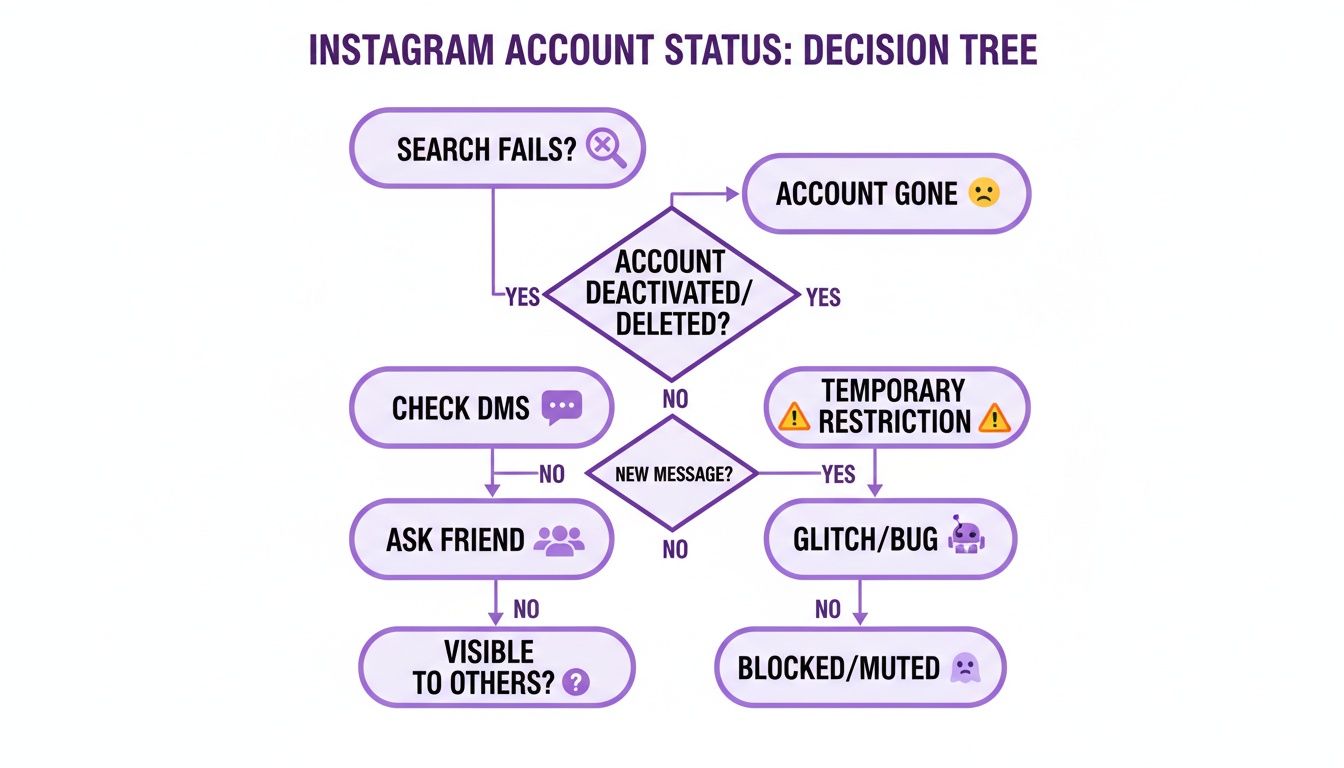
As you can see, if your search comes up empty and the DMs look off, the next logical move is to get a second opinion to see if the profile is visible to anyone else.
Check Old Tags and Mentions
Another smart tactic I’ve used is to hunt down old photos or posts where you tagged the person or they were mentioned. Find one and tap on the tag.
What happens next tells a story:
- The tag has vanished: The user probably just deactivated their account. This temporarily hides their profile and removes all tags.
- The tag is there but you can't click it: This is a strong indicator the account has been permanently deleted.
- The tag leads to a "Content Not Available" page: This almost always means you’ve been blocked.
Seeing users disappear like this often points to a desire for a digital detox. The pressure to stay constantly active is immense—so much so that by early 2026, over 2,407 lawsuits had been filed against platforms like Instagram for their addictive qualities. With global daily usage hitting 33.1 minutes, it’s no wonder people sometimes need to step away.
Key Takeaway: If a username becomes "Instagram User" in your DMs and their profile is unsearchable, you can be pretty confident they’ve either deactivated or deleted their account—it’s not a block.
Growing your own account in this climate can be draining, which is why authentic, mutual engagement is more important than ever. With our Upvote.club service, we’ve built a community around this very idea. With our service, you can get real followers for Instagram by joining a system where genuine users help each other out, ensuring the connections you make are with active, engaged people.
So, the basic checks haven't given you a straight answer. It’s time to dig a little deeper. When an Instagram profile vanishes, it's easy to jump to conclusions, but a few more targeted checks can help you figure out if the account is truly gone or if something else is going on, like being blocked.
The quickest way to get clarity is to bring in a second pair of eyes.
Just ask a friend—ideally one who also followed the account—to search for the user's exact username. This is the fastest way to solve the "deleted vs. blocked" mystery. If your friend pulls up the profile with no problem, complete with profile picture and posts, then the account is still active. I hate to be the one to tell you, but you've likely been blocked.
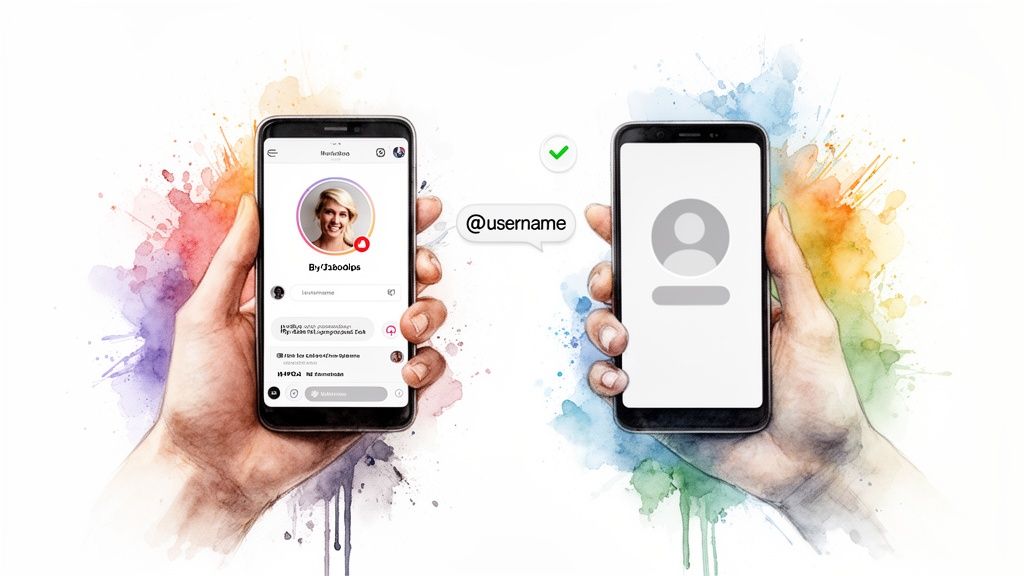
On the other hand, if your friend also gets the "User not found" error, you know it’s not just you. This really narrows it down to two possibilities: the account has been deactivated or it’s been permanently deleted.
A Few More Sleuthing Tricks
Got a group chat you share with the person? This is another great place to investigate. Open the group and try to mention them by typing the @ symbol and their username.
- If their name and profile picture pop up as a taggable option, their profile is still out there, just not visible in search.
- But if nothing comes up when you try to tag them, it's another strong sign the account has been taken offline.
You can also do a quick anonymous check using any web browser. Open an incognito or private window and type instagram.com/[username] directly into the address bar. Since you aren't logged into your account, this search completely bypasses any blocks. If you can see their page this way, you're definitely blocked. If you still see the "Sorry, this page isn't available" message, the account is well and truly offline.
I always recommend using these methods together. If a friend can't find them and an incognito search comes up empty, you can be pretty confident the account has been either deactivated or deleted for good.
It's also worth remembering that sometimes an account vanishes for reasons that have nothing to do with the user. Instagram occasionally purges accounts it suspects are bots. While less common, it's a possibility. If you're curious, you could even use an Instagram bot checker to explore that angle.
Disappearing accounts are a part of social media, but for those of us trying to grow, consistency is everything. In our Upvote.club service, we’ve built our entire system around stable, real engagement from verified humans. Our community members earn points for genuine interactions, which they can then use to boost their own content. It’s a reliable way to improve your performance in the algorithm without ever worrying that your engagement will come from fake accounts that might be gone tomorrow.
Avoiding Common False Alarms
It’s happened to all of us. You go to look up a friend or an old colleague, and poof—their Instagram profile is gone. It's easy to jump to the conclusion that they've deleted their account, but I've found that's often not the whole story. There are a few common mix-ups that can make an account look deleted when it really isn't.
One of the biggest culprits is a simple username change. Someone updates their handle, and suddenly searching for their old username gives you that dreaded “User not found” error. It looks exactly like a deletion.
Before you write them off, try searching for their real name or peeking through the follower lists of mutual friends. More often than not, a quick scan will turn up their new, rebranded profile.
Is It a Bug or a Deletion?
Sometimes, the issue isn't on their end at all—it's Instagram itself. We’ve all seen the app act strangely. Temporary glitches, server maintenance, or a random bug can make profiles disappear for a little while.
If you suspect a platform issue, here's what I do first:
- Force-close and restart the app. The classic "turn it off and on again" works wonders.
- Check from a web browser. This helps determine if the problem is with the mobile app or the platform as a whole.
- Look at a site like Downdetector. If tons of other people are reporting issues, you can bet it's a platform-wide problem.
These glitches are usually fixed pretty fast. A bit of patience can save you from assuming an account is gone for good when it's just a temporary hiccup.
The Private Account Illusion
Here's another one I see trip people up all the time: private accounts. If a user you don't follow switches their public account to private, their profile will vanish from search results. Searching their name will turn up nothing, making it seem like they’ve deleted it.
The key here is that if you were already following them, you'd still be able to see their profile just fine. This is exactly why checking with a mutual friend is one of the most reliable ways to get a straight answer.
The trend of users deleting accounts for mental health is very real. One creator with 140,000 followers famously announced she was deleting her profile entirely, citing the relentless pressure to stay engaged. When a once-prolific account goes dark, it's often an intentional choice. You can read more about how people are rethinking their relationship with social media on san.com.
While some people are stepping away, many creators are doubling down on building a genuine presence. For them, getting that initial burst of engagement is important for growth. With our Upvote.club service, we've built a community of real users to help give your posts that important first push. Check out our guide on how to get more Instagram likes from real people to see how our community-first system can help.
Why Real Engagement Is Your Best Growth Strategy
The fact that you're even looking up how to tell if an Instagram account is gone for good points to a bigger truth about social media: people leave. They get tired of the noise or feel like they aren't making real connections. This is exactly why chasing empty metrics is a losing game. Building a real, engaged community is the only growth strategy that actually lasts.
That’s where we saw a huge gap. We built Upvote.club not as a way to just inflate your numbers, but as a community where real people on Instagram, TikTok, and Twitter help each other grow. The focus is on real interaction, not just fleeting vanity metrics.
A Community-Powered Approach to Growth
We designed Upvote.club to work differently from other services. While other platforms let you buy likes, our service is not about buying engagement—it's about participating in a community.
Our service operates on a community-based model where users help each other grow. We maintain strict moderation, and bot accounts are not allowed. If a user joins and completes tasks using a real account, they become a part of the community. Users earn points for completing tasks—an internal currency that can be used to create their own tasks. In other words, by helping others, you earn the ability to promote your own content.
When you register with us, you receive 13 free points and 2 task slots. These can be used to create your first task. For example, getting 2 likes on Twitter might cost 4 points. If you need more points, you must complete tasks for others. The first time you complete a task, our system will ask you to verify your social media accounts. Each social network only needs to be verified once. No passwords are required—instead, we use a unique emoji-based verification system. Every 24 hours, you receive 1 free task slot. If you need more tasks, you can purchase a subscription. While the subscription isn't cheap, it provides a large number of points and free task slots right away.
Nailing the "Golden Hour"
Look, there are really only two ways to grow on social media: consistently post high-quality content and get engagement. Getting that engagement within the first hour of posting—what everyone calls the "Golden Hour"—is the secret sauce. This is when your content has the best chance to reach a wider audience, and getting likes, comments, and reposts quickly is key. Influencer agencies use this exact strategy to boost their clients’ content. That’s why it works. With our Upvote.club service, we make this powerful method accessible to everyday users who want more reach on social media.
The sheer amount of time people spend scrolling is staggering. By 2026, Instagram's average daily usage is projected to hit 46 minutes per user. Think about that. With so much activity, when a user who normally spends that much time online suddenly goes dark, it's a huge clue they've likely deleted their account for good. You can read more about these platform trends and what they mean over on Storyboard18's analysis of internal data.
With our Upvote.club service, we have basically taken the "Golden Hour" strategy and made it accessible for everyone. Our community helps you get that first wave of likes, comments, and saves right when it counts, giving your content the push it needs to reach a much wider audience.
This is the exact playbook the big marketing agencies use, but we've opened it up to everyday creators. By participating, you're not just getting numbers; you're driving the real interactions that algorithms love, helping you build reach and credibility the right way.
If you’re ready to move beyond guesswork and build a profile that lasts, check out our guide on how to buy Instagram followers from real, active users using our community system.
Clearing Up the Confusion: Your Top Questions Answered
When an account vanishes, it's easy to jump to conclusions. I get these questions all the time, so let's walk through some of the most common ones to clear things up.
What Happens to an Account's Old Posts if It Was Deleted?
No, you can't. Once an account is permanently deleted, every single piece of its content is wiped from Instagram's servers for good. I'm talking all posts, stories, Reels—the whole history.
Think of deactivation as putting your account into temporary storage. Deletion, on the other hand, is the shredder. It’s an irreversible step, and you won’t find their old photos or videos anywhere on Instagram after the account is gone.
Does Not Finding Someone Automatically Mean They Deleted or Blocked Me?
Not always. While it’s a very strong clue, there are a few other things that could be going on. Before you assume the worst, run through these possibilities:
- A Simple Username Change: The user might have just rebranded their Instagram handle. A quick search for their real name or a peek through the follower lists of mutual friends can often solve this mystery.
- A Technical Glitch: Let's be real—Instagram isn't perfect. It can have temporary bugs or server hiccups that make profiles disappear for a little while. I've found it's always a good idea to wait a bit and check again later.
- They Went Private: The user could have just switched their account to private. If you weren't following them before they flipped the switch, their profile will no longer show up in public searches.
A reliable trick I use is to try searching from a friend's account or an incognito browser window. This is a solid way to rule out being blocked before you conclude the account is gone for good.
What’s the Real Difference Between Deactivating and Deleting?
The key difference here is permanence. One is a temporary break, and the other is a final goodbye.
Deactivating is like putting your account in a closet. Your profile, photos, comments, and likes are all hidden from view, but they aren't erased. You can bring it all back just by logging in again.
Deleting is the nuclear option. When an account gets deleted, all of that data is permanently scrubbed from Instagram’s servers. There's no coming back. Both actions will make an account show up as "User not found," but only deactivation leaves the door open for a return.
I Can Still See Our DMs. What Does That Mean?
This is one of the most reliable clues you can find. Your direct message history with a person who has deleted their account will almost always stay in your inbox.
The chat will look different, though. Their profile picture will be gone, replaced with a generic default icon. Their username will now read "Instagram User." Most importantly, that name won't be clickable—you can't tap it to see a profile because one no longer exists. You also won't be able to send any new messages. This is the exact same thing you'll see when an account is just deactivated, too.
While figuring out if someone deleted their Instagram is helpful, your own growth comes from building connections that stick around. With our Upvote.club service, we’ve built a community where real, active users help each other succeed. It’s not about buying fake engagement—it’s about earning it through genuine interaction. This helps you gain real traction without bots or empty numbers. To see how our community-driven system works, check out our tools for Twitter and other social networks.
