Table of Contents
- Table of Contents
- The Simple Answer to a Complicated Question
- What changed for normal users
- Why the question still confuses people
- The Big Change Explained How X Hides Likes Now
- Before and after the rule change
- Can You Make Your X Likes Public Again?
- Does X Premium Make Likes Public?
- What users can still see
- What this means in plain English
- Do You Need to Hide Your Likes on X?
- Where Your Likes Still Appear and Where They Dont
- Who still sees your likes
- Who does not see your likes
- Can Followers or Employers See Your Likes?
- Where likes still have effects
- A simple visibility map
- X Like Visibility FAQ
- Proactive Steps for Managing Your Engagement
- Stop managing the past and fix the present
- Focus on the first wave of engagement
- A practical operating routine
- Why This Privacy Shift Changes Everything
- Privacy got stronger, transparency got weaker
- The social math of X changed
- What smart users should do now
- A New Era for Engagement on X
No — Twitter/X likes are not public for other users as of 2026. X made likes private for everyone on June 12, 2024, and that rule has not been reversed. Other people can still see a post's total like count, but only the original poster can see which specific accounts liked it.
That flips a rule many people treated as permanent. For years, likes worked like a public receipt of your attention. Now they don't. If you're still thinking in terms of “Can people check my Likes tab?” you're asking the old question. The better question is this: what still shows, what still matters, and how should you use X now that likes are semi-private instead of fully public?
A lot of outdated advice still says people can browse your liked posts. They can't. That old playbook is dead. The practical move now is to stop obsessing over whether random users can audit your likes and start focusing on the signals that still shape reach, trust, and momentum on X.
Table of Contents
- The Simple Answer to a Complicated Question
- The Big Change Explained How X Hides Likes Now
- Where Your Likes Still Appear and Where They Dont
- Proactive Steps for Managing Your Engagement
- Why This Privacy Shift Changes Everything
- A New Era for Engagement on X
The Simple Answer to a Complicated Question
Stop treating likes like a public record. On X, they are no longer publicly visible in the old way.
If you want the direct answer to are Twitter likes public, the answer is no for other users. People can still see that a post has likes. They cannot see the full list of who liked it unless they wrote the post themselves.
That change closes off one of the oldest forms of casual profile research on the platform. A like used to function as a visible signal of taste, support, interest, or affiliation. Now the signal is narrower. The count still shapes perception. The identity behind many of those likes does not.
What changed for normal users
The distinction is important. Hidden likes are not neutral likes.
A like is still visible to the person who published the post, and it still feeds X's recommendation systems and your own experience on the app. What disappeared is the easy public audit trail that let anyone browse a profile and inspect likes as if they were permanent public bookmarks.
Keep these rules in mind:
- The post author can still see your like. Your interaction is hidden from random profile browsers, not from the account that posted it.
- X still uses your actions. Likes continue to influence what you see and what the platform learns about your interests.
- Like counts are still public. People can still judge whether a post is getting traction, even if they cannot inspect the user list behind that count.
Practical rule: Stop stressing about old Likes-tab snooping. Start building visible engagement signals that still affect reach, trust, and momentum.
That shift should change your behavior. Passive monitoring matters less now. Active engagement strategy matters more. If you're trying to grow, you need replies, reposts, quote posts, and deliberate participation patterns that create public proof. Tools such as Upvote Club's X engagement tools fit that reality because the goal is not hiding signals. It is creating the right ones.
Why the question still confuses people
The confusion comes from the interface. The heart icon is still there. The count is still there. So people assume the old visibility rules still apply.
They do not.
X kept the public engagement number and removed most of the public identity layer behind it. That is why this question keeps coming up, and it is also why the better question is no longer "can people see my likes?" The better question is "which engagement signals on X still shape reputation in public, and how am I creating more of them?"
The Big Change Explained How X Hides Likes Now
X made the change official on June 12, 2024. Likes became private by default for all users, and that hasn't been reversed as of 2026, according to this 2026 update on X like visibility.
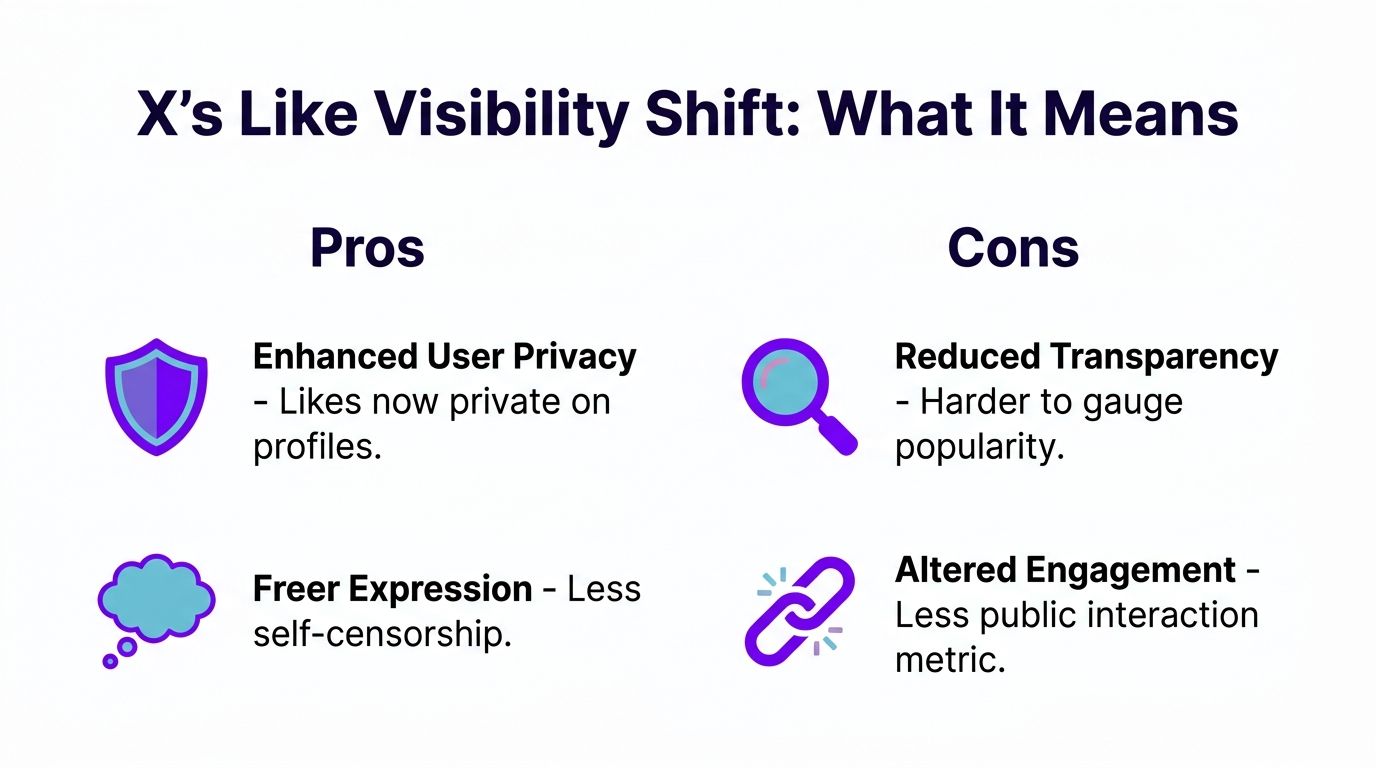
Before and after the rule change
The easiest way to understand it is to compare the old system with the current one.
| Situation | Before mid-2024 | Now |
|---|---|---|
| Public like count on posts | Visible | Visible |
| List of people who liked a post | Publicly viewable | Hidden from other users |
| Post author seeing who liked | Yes | Yes |
| Public Likes tab as a profile audit tool | Yes | No |
That's the whole shift. X did not remove likes. X removed the public identity layer attached to likes.
Can You Make Your X Likes Public Again?
No. X has not added a setting to make your likes public again. There is no toggle in privacy settings, account preferences, or X Premium that restores the old public Likes tab or lets other users browse your liked posts. The June 2024 change applies to every account equally, and it remains in effect as of 2026.
Some users reply to posts to show public support, but that is a different signal than a like. For most accounts, likes stay private from other users, and that rule has not been reversed.
Does X Premium Make Likes Public?
No. Before June 2024, X Premium subscribers could choose to hide their likes tab. After the platform-wide change, likes are private for everyone — free and Premium accounts follow the same visibility rules. Paying for X Premium does not restore a public Likes tab or expose your liked posts to followers or profile visitors.
What users can still see
When you scroll X today, you can still see that a post has likes. You can still use the count as a rough signal of traction. What you can't do is click around and inspect the exact set of users behind that count unless you're the author of that post.
That difference is bigger than it sounds.
Public counts tell you that attention happened. Hidden liker identities block you from knowing who supplied that attention. For creators, reporters, researchers, and growth teams, that removes a layer of context that used to be easy to inspect.
- You can see popularity signals. The number is still there.
- You can't see the crowd behind the number. The user list is no longer exposed to everyone.
- The author keeps access. If it's your post, you can still see who liked it.
Public engagement on X is now partly visible and partly sealed. That's why old advice fails. It treats likes as either fully public or fully private, when they're neither.
If you manage growth across multiple platforms, this is also a reminder that each network now handles lightweight engagement differently. For a useful comparison point, how likes work on Bluesky creates a different visibility and discovery dynamic.
What this means in plain English
You can't publicly audit another account's likes anymore. That's the practical takeaway.
If your old workflow depended on checking who liked a competitor's post, who kept liking a niche creator, or what a prospect publicly liked, that workflow is gone. You need to shift to other visible actions and your own direct engagement strategy.
Do You Need to Hide Your Likes on X?
No. You do not need to change any setting to hide your likes on X. Since June 12, 2024, likes have been private by default for every user. There is no separate privacy toggle to enable — the platform already hides your liked posts from other users' view.
If you want to remove old likes from your own history, you can unlike posts one by one from your personal Likes tab. That is optional cleanup, not a privacy requirement. Most users only need to understand the default rule: other people cannot browse what you liked.
Where Your Likes Still Appear and Where They Dont
Your likes remain visible to you and to the authors of the posts you liked, but not to followers, profile visitors, or other members of the public. Like counts still appear publicly on posts, while the identities behind those likes are restricted.
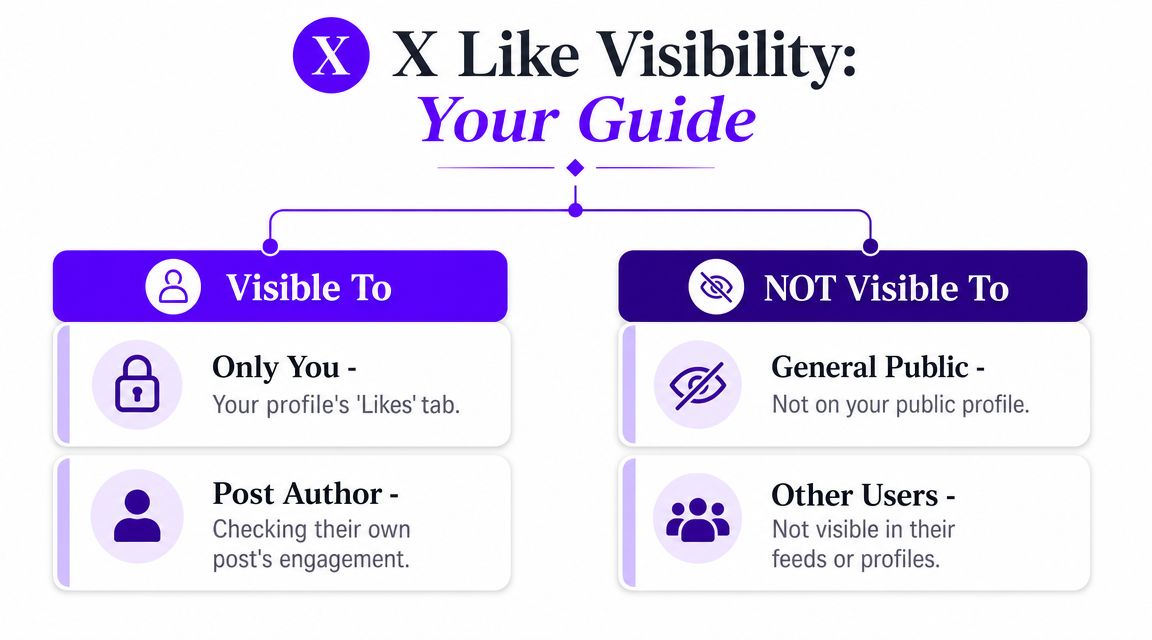
Who still sees your likes
You and the author of the post can still see your like. You can access your liked posts from your own account, while each post author can identify the accounts that liked their post.
Followers, profile visitors, and unrelated users cannot browse your Likes tab or see a public history of what you liked.
Who does not see your likes
Random profile visitors don't get a public audit trail anymore. Your followers can't open your profile and casually browse what you liked. Other users also can't use your like history as a quick shortcut for reading your tastes or alliances.
Here's the clean split:
- Visible to you: Your own liked content remains accessible on your account.
- Visible to the author: The creator of the specific post can identify accounts that liked it.
- Not visible to the public: Other users can't browse your likes as a public profile feature.
- Not visible to followers by default: Following you doesn't restore access.
Can Followers or Employers See Your Likes?
Followers cannot browse your liked posts. Following your account does not restore access to your Likes tab or your like history. The same rule applies to coworkers, employers, clients, and casual profile visitors — none of them can open a public audit trail of what you liked on X.
The main exception is still the post author. If you like someone's post, that person can usually see your account in their engagement notifications. For everyone else, your likes stay off the public record even though the like count on each post remains visible.
Where likes still have effects
This is the part that matters more than public visibility. Your likes still affect what X shows you.
Liking content trains your feed. It tells the platform what topics, tones, and accounts you engage with. So even if the public can't inspect your likes, the platform still uses them as behavior data inside your experience.
A private like can still create a public consequence if it changes what you see, who you interact with next, and how your account behaves over time.
That matters for marketers because hidden likes don't mean neutral likes. If you keep engaging with low-quality content, outrage bait, or off-brand topics, you're still shaping your own environment. That can pull your posting, replies, and network in the wrong direction.
A simple visibility map
Your likes are visible to you and to each post's author, but not on your public profile or to other users browsing X. The table below summarizes that visibility split.
| Place | Are your likes visible there? |
|---|---|
| Your own account view | Yes |
| The post author's engagement view | Yes |
| Your public profile for other users | No |
| Other users browsing X | No |
Protected accounts still add another layer of restriction around audience access, but the main rule for likes is already strict enough for most users: identity-level like visibility is no longer public.
As for third-party access, the practical reality is the same for normal users and tool builders. The open window that once made public-like browsing easy is shut. If you're thinking in old-school monitoring terms, move that energy into visible signals and direct actions instead.
X Like Visibility FAQ
Are Twitter likes public in 2026?
No. Other users cannot see which posts you liked or browse your Likes tab. The like count on individual posts is still public.
Can you make likes public again on X?
No. There is no setting to reverse the June 2024 change for any account type.
Does X Premium show your likes to others?
No. Premium does not restore public like visibility.
Who can see my likes on X?
You, the author of each post you liked, and X's recommendation systems. Followers and strangers cannot browse your liked posts.
Do like counts still show on posts?
Yes. The number under the heart icon on each post remains visible to everyone.
Proactive Steps for Managing Your Engagement
If your first instinct is to clean up old likes, you can. It's just slow.
You'll need to go through your own liked posts and remove them one by one. There's no magic setting that wipes the history clean for public image reasons, and there's no reason to obsess over it unless you personally need the cleanup. It is often more productive to spend that time building stronger current engagement.
Stop managing the past and fix the present
This is the mindset shift I recommend. Don't treat X like a cleanup project. Treat it like a publishing system.
The people who grow on X now usually do a few things well:
- They post with intent. Not random thoughts, not filler, not vague “just checking in” posts.
- They create early interaction. Replies, likes, reposts, and comments close to publish time matter more than delayed attention.
- They repeat what gets traction. Not by copying themselves badly, but by spotting patterns.
- They remove friction. That means scheduling, batching, and having a process before posting.
A useful workflow resource here is this 2026 guide on scheduling social media, which breaks down how to plan publishing instead of relying on memory and luck.
Focus on the first wave of engagement
The first hour after posting gets a lot of attention from experienced creators for a reason. If a post gets quick interaction, it has a better shot at spreading beyond your immediate audience. That's why waiting around and hoping people show up is a weak strategy.
You need a repeatable system that helps you create real activity early.
Some creators do that with tight-knit peer groups. Some use internal team coordination. Some use reminders and calendars. If you need early interaction on your own posts, free X (Twitter) likes and other engagement tasks through Upvote Club can help you test a participation-based workflow. Users create tasks for likes, comments, saves, and followers from real community members, earn points by completing tasks for others, and start with 13 free points and 2 starter task slots. Profile verification uses an emoji-based check and never asks for your social passwords.
My recommendation: if you care about growth, spend less time asking who can see your likes and more time making sure your own posts get immediate human interaction.
A practical operating routine
Use a simple cadence:
- Before posting: Draft the post, tighten the hook, and decide what action you want.
- Right after posting: Be available to reply. Dead silence kills momentum.
- During the next stretch: Push the post into circles that can interact naturally.
- Later that day: Review which part worked. The opening line, the angle, the topic, or the timing.
That approach beats passive posting every time. Hidden likes changed privacy. They did not remove the need for active distribution.
Why This Privacy Shift Changes Everything
X's privacy shift changed how users evaluate attention, reputation, and relationships on the platform. Like counts remain public, but the identities behind most likes are hidden, giving individuals more privacy while removing information previously used by creators, brands, and researchers.
As a result, visible actions such as replies, reposts, and quote posts now carry more weight as public signals of support and affiliation.
Independent 2024 estimates put X/Twitter at about 396 million users worldwide, while Statista estimated roughly 429 million X users worldwide in early 2024, including more than 106 million in the United States, according to Cross River's roundup of Twitter statistics.
Privacy got stronger, transparency got weaker
For ordinary users, there's an obvious upside. People can like content with less fear that strangers, coworkers, or casual followers will browse that behavior later. That makes liking feel safer.
For researchers, brands, and operators, there's an obvious downside. A public metric stayed visible, but the identity layer disappeared. That makes it harder to judge whether attention came from a relevant community, a tightly connected niche, or a questionable cluster you'd rather not rely on.
The social math of X changed
The old model let users read lightweight endorsements in public. The new model hides that endorsement trail from everyone except the author.
That pushes more weight onto actions that remain visible:
- Replies show direct participation.
- Reposts and quote posts show public endorsement or disagreement.
- Profile positioning matters more because people can't infer as much from likes.
- Direct relationship-building becomes more important than passive observation.
If you want another platform-level comparison, how favorites work on Mastodon helps show how engagement norms can differ when visibility rules shift.
Here's a short explainer worth watching if you want another take on how X visibility changes affect user behavior:
The biggest mistake is treating hidden likes as the end of public signaling on X. Public signaling didn't disappear. It moved.
What smart users should do now
If you're a creator, build around visible actions.
If you're a brand, stop relying on public likes as a research shortcut.
If you're a professional protecting your image, worry less about your old likes and more about the conversations, reposts, and posting habits that still sit in plain view.
A New Era for Engagement on X
The answer to are Twitter likes public is now straightforward. Other users can't publicly inspect who liked what the way they used to. But that doesn't mean likes stopped mattering.
They still matter to authors. They still matter to your own feed. They still matter as part of a post's visible engagement total. What changed is the social visibility layer around them. That's why the old habits of monitoring likes, judging likes, or worrying about public like audits no longer fit the platform.
The better approach is simple. Use likes as one small signal, not the whole game. Put more effort into replies, reposts, quote posts, profile clarity, and fast post-launch interaction. That's where public momentum lives now.
X didn't make engagement invisible. It made engagement more selective in how it appears. Users who accept that shift and build around it will do better than users still stuck on the old public Likes tab mindset.
If you want a practical way to build real engagement on X without bots, Upvote Club offers a community-based system where users complete tasks for each other to earn points and drive likes, comments, saves, and followers from real community members.