

Table of Contents
- Quick Ways to Find Your Past Tweets
- Using Profile Search
- Comparing Quick Search Methods for Tweet History
- Using Advanced Search to Pinpoint Any Tweet
- Mastering the Filters
- Unlocking Deeper Engagement Metrics
- How to Download Your Entire X Archive
- Navigating Your Downloaded Archive
- Give Your Best Content the Boost It Deserves
- A Secure, Community-Powered Approach
- Third-Party Tools for Advanced History Analysis
- Moving Beyond Simple Searches
- How These Tools Work
- Getting a Head Start on Engagement
- Common Questions About Viewing Tweet History
- Is My Tweet History Truly Private?
- Can I View Someone Else’s Full Tweet History?
- Why Are My Old Tweets Not Showing Up in Search?
- Frequently Asked Questions About Your X History
- How Can I Get My History to Grow My Account?
Trying to find one of your old tweets can feel like digging for a needle in a digital haystack. Thankfully, you don't always have to download your entire archive just to find a single post.
There are a couple of quick, built-in methods that work great when you just need to find something from the last few weeks or if you remember a specific keyword.
Quick Ways to Find Your Past Tweets
The most obvious approach is just to head to your own profile and start scrolling. X loads your tweets in reverse chronological order, so your most recent posts are right at the top.
This is perfect for finding something you tweeted yesterday or last week. But if the post you're looking for is months or even years old, scrolling becomes a serious time sink. You'll be there forever.
Using Profile Search
A much faster method that a lot of people don't even know exists is the search bar on your own profile page. I'm not talking about the main X search bar at the top of the site; this is a separate search field that appears only when you're viewing your own profile.
When you type a word or phrase into this box, it filters only your own tweets. It's incredibly efficient. For instance, if you remember tweeting about a marketing campaign, just search for the campaign's name, and every tweet you've ever posted about it will pop right up.
Reviewing your past high-performers this way is a solid first step for anyone trying to grow their audience. For more tips on boosting your posts, check out our guide on how to make your tweets go viral.
Pro Tip: These simple, on-platform methods are your best bet for quick, casual searches. They give you instant access to your post history without having to navigate complicated menus or wait for a data download.
Comparing Quick Search Methods for Tweet History
So, when should you scroll versus when should you use the profile search? It really comes down to what you're trying to find.
This table breaks down the two simplest techniques for looking through your tweet history. It highlights what each method is best for, how fast it is, and where its limits are.
| Method | Best For | Speed | Limitations |
|---|---|---|---|
| Profile Scrolling | Finding very recent tweets from the last few days or weeks. | Instant | Inefficient for finding posts older than a few months. |
| Profile Search Bar | Locating specific tweets using keywords or phrases you remember. | Very Fast | Relies on you remembering specific terms used in the tweet. |
Ultimately, for any casual search, one of these two methods will get the job done quickly. For anything more complex, you'll need to turn to some more powerful tools, which we'll cover next.
Using Advanced Search to Pinpoint Any Tweet
Scrolling endlessly for a specific tweet you know you saw is frustrating. When the basic search bar on a profile isn't cutting it, it’s time to pull out the big guns: X's Advanced Search. This is where you go from casting a wide, hopeful net to spearfishing with pinpoint accuracy.
I use it all the time. Whether I'm trying to find a brand's most popular posts from a campaign last year or track down a public figure's exact words on a topic from a few months back, Advanced Search is the tool for the job. It lets you slice and dice the platform's massive database with some seriously powerful rules.
Mastering the Filters
Advanced Search can look a little intimidating at first, but it’s broken down into logical sections that let you attack your search from different angles.
- Words: This goes way beyond simple keywords. You can hunt for an "exact phrase," look for any combination of words, or even exclude terms to filter out the noise. This is your first and best tool for getting specific.
- Accounts: You can zero in on tweets from a specific account (
from:username), find replies sent to a specific account (to:username), or pull up any post that mentions an account (@username). - Dates: Honestly, this is one of the most useful filters. You can set a start and end date to see every tweet posted within that specific window. No more scrolling back to last summer.
This flowchart shows the basic thought process for finding tweets, starting simple and getting more specific as needed.
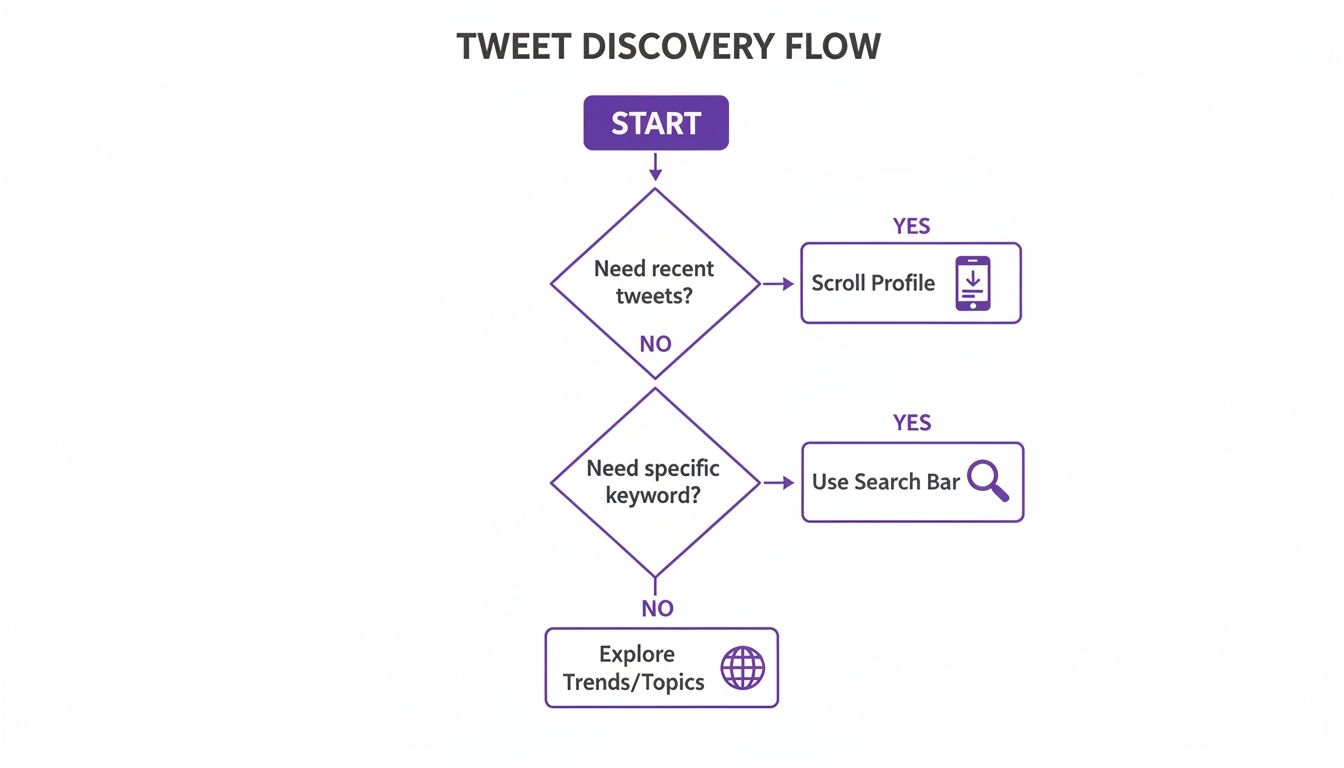
As you can see, a quick scroll might work for recent stuff, but for anything else, a targeted search is just way more efficient.
The real magic happens when you start layering these filters. For instance, you could search for tweets
from:@YourBrandthatmention:@Competitorand include the phrase"customer service"but specifically exclude"job opening", all within the last six months. That kind of surgical precision is something a basic search just can't deliver.
Unlocking Deeper Engagement Metrics
But it’s not just about words and dates. Advanced Search also lets you filter by what people did with the tweet.
You can set a minimum number of replies, likes, or reposts. This is my secret weapon for automatically identifying top-performing content without having to sift through analytics.
By setting a high minimum for likes, you can instantly generate a list of your most-loved posts. It’s a fantastic way to find content that’s worth repurposing or putting some ad spend behind. It also helps you spot posts you might want to keep forever; check out our guide on how to save your favorite tweets for your personal archive.
Finding these high-engagement tweets is the key to understanding what truly connects with your audience. Once you know what works, you can do more of it. That’s where our Upvote.club service comes in. We have designed our service to help give your best new tweets an immediate boost with a community of real, verified people who provide likes and comments in that critical first hour, helping you gain traction with the algorithm and build credible social proof right from the start.
How to Download Your Entire X Archive
If you’re serious about having a complete, offline record of your entire life on X, nothing beats downloading your archive. Think of it as your personal time capsule—a definitive backup of every tweet, DM, and like, completely under your control. It's your data, independent of whatever changes the platform decides to make next.
Requesting your archive is surprisingly simple and all happens right within your account settings.

Just head over to your "Settings and privacy" menu, click into "Your account," and then find the option to "Download an archive of your data." X will ask you to re-enter your password to make sure it's really you.
Once you hit that request button, the platform starts bundling up all your data. Depending on how long you've been on X and how active you are, this can take a few hours or even more than 24 hours. You'll get a push notification and an email as soon as it's ready.
And this isn't just your tweets. The archive is very complete, containing your DMs, liked posts, media you've uploaded, and even your block list. It’s everything.
Navigating Your Downloaded Archive
After you download the .zip file and unzip it, you’ll see a folder full of data files. The golden ticket here is a file called "Your archive.html".
Just double-click that file. It will open a self-contained, offline webpage in your browser that looks and feels a lot like the X interface. This makes it incredibly easy to search, filter, and browse your entire history, right back to your very first tweet.
Having a personal archive is more than just a trip down memory lane. It’s a vital practice for account security and personal data management, giving you a complete backup that you control.
Digging into this data can also show some fascinating shifts in user behavior on the platform. For example, looking at data between 2024 and 2025 shows weekly posts per user climbing by 8%. But the real story is in retweets, which shot up by a massive 35%, proving that sharing is what really drives visibility these days. While likes are still high, their growth was a much quieter 8%, which tells us the algorithm is probably weighing active shares and replies more heavily now.
For us at Upvote.club, this data just confirms what we already know: sparking that initial wave of interaction is the secret sauce. It's a strategy we help our community members master every single day. If you want to dive deeper into these kinds of trends, you can explore more X platform statistics.
By analyzing your own archive, you can spot the posts that truly performed well with your audience in the past. Once you find those winning patterns, you can start replicating that success. And with our Upvote.club service, you can give your new, high-potential tweets that "Golden Hour" boost from a community of real users, helping them break through the noise and get seen.
Looking through your old tweets is one thing. But turning that history into a game plan for your future content? That's where the real growth is. After you've spent time figuring out what worked, the next move is to channel those lessons into your new posts and give them the strongest possible start.
This is very important during the "Golden Hour"—that first 60 minutes after a tweet goes live. Nailing early engagement in this window tells the X algorithm that your content is worth showing to more people, which can explode your reach.
Give Your Best Content the Boost It Deserves
We built our Upvote.club service specifically to help you get that initial traction. This isn't about buying a bunch of fake likes. Our platform is a community of real, verified users helping each other out. It's a genuine give-and-take system where everyone wins.
With our Upvote.club service, you can earn points by doing simple tasks like liking or reposting content from other members. Then, you spend those points to create your own tasks for your fresh tweets, driving that all-important early engagement from real accounts.
We’ve seen firsthand how a small, authentic push can completely change a tweet’s trajectory. When real people interact with your content quickly, you have a much better shot at getting prioritized by the algorithm and earning more organic visibility.
Think about it. Since Jack Dorsey sent the first tweet back in 2006, the platform has blown up to over 500 million tweets per day. With that insane volume, it's no surprise that learning how to view tweet history effectively has become a secret weapon for creators. If you're curious, you can dig into more of the platform's wild growth with these Twitter user insights.
A Secure, Community-Powered Approach
We've made the whole process safe and simple. With our Upvote.club service, you'll never be asked for your password. We use a unique, emoji-based verification to make sure every single account in our community is a real person, keeping bots out of the picture.
It creates a simple but powerful loop for growth:
- You dig into your tweet history to spot your winning formulas.
- You craft new, high-quality content based on those findings.
- You use our community to give that content an initial push from real people.
Once you have your tweet history in hand, the next step is solid data analysis and report writing to pull out actionable findings. When you combine that historical analysis with a community-driven promotion, you're set up to consistently improve your reach and credibility. It's also a great way to grow your Twitter following over the long haul.
Third-Party Tools for Advanced History Analysis
Okay, so X's built-in search is great for quick lookups. But what if you need to go deeper? To really understand what’s working, you need more firepower. That’s where third-party tools come into play. These platforms are built for serious analysis, letting you see trends, track keyword performance, and even measure the emotional vibe of conversations around your account.

Think of it this way: these tools are what social media pros and data analysts use to turn a pile of old tweets into a solid gold plan for what to post next.
Moving Beyond Simple Searches
A lot of these tools offer features you just can't get from X’s native interface. For example, you can run sentiment analysis to see if people are talking about your brand in a positive or negative light. Others let you export tweet data straight into a spreadsheet, giving you the freedom to slice and dice the numbers however you want.
This is where the magic happens. You’re not just finding what you tweeted; you’re understanding how people actually reacted to it on a large scale. It's perfect for tracking how a campaign performed or pinpointing your most influential followers.
And if your research needs to go beyond a single platform, a powerful social media finder can help you uncover profiles across the web, including X. This gives you a much wider lens when analyzing a brand’s or person’s complete digital footprint.
By using these specialized tools, you stop just finding old posts and start strategically analyzing your entire content history. It's all about finding the patterns you can repeat for future wins.
How These Tools Work
Most of these analytics platforms plug into your X account using the API (Application Programming Interface). This just means you give them permission to access and organize your public tweet data into much more visual and user-friendly dashboards.
Here are a few of the common features you’ll run into:
- Tweet Exporting: The power to download tweets from any public account—not just your own—into a CSV or Excel file for custom analysis.
- Engagement Tracking: Visual charts showing which tweets got the most likes, replies, and reposts over certain timeframes.
- Follower Analysis: Reports that break down your audience demographics, spot your most active followers, and track your growth over time.
- Mention Monitoring: Real-time alerts and historical data for any time your username, brand, or a specific keyword gets mentioned.
Getting a Head Start on Engagement
Once you’ve used these tools to figure out what worked in the past, the next logical step is to apply those findings to your new content. Knowing what resonates gives you a huge advantage, but you still need to get eyeballs on your tweets fast. That’s where we come in.
With our Upvote.club service, you can give your best new content an instant push. Our platform is a community of real, verified people helping each other grow. You earn points by liking or commenting on other members' content, then spend those points to get genuine engagement on your own tweets right after you post. It's a killer way to build on what your historical analysis taught you and make sure your new stuff takes off.
To make it even easier, you can learn more about our Chrome extension for social media tasks, which integrates this whole process right into your workflow.
Common Questions About Viewing Tweet History
Even after you've mastered the tools, a few common questions always seem to surface about digging into your tweet history. Let's clear up some of the most frequent points of confusion I see when people are trying to find, manage, and understand their old posts on X.
Is My Tweet History Truly Private?
This is a big one. Your public tweets are, by design, visible to absolutely everyone. Anyone can find them.
Your downloaded archive, however, is a different story. Think of it as your personal X diary—it's a private file saved directly on your own computer. It's got everything, including your protected tweets and even Direct Messages. Only you have access unless you decide to share it.
If your account is set to protected (what most people call a "private account"), then only the followers you've approved can see your tweets on the platform. But remember, a determined person can always take a screenshot. "Private" on social media is never 100% absolute.
Can I View Someone Else’s Full Tweet History?
Yes, for public accounts. You can head over to any public user's profile and scroll through their timeline or use the on-page search bar with the from:username operator to find what you're looking for. For more targeted digging, X's Advanced Search is your best friend for filtering by dates or keywords.
But here's the important part: you cannot download another user's archive. That feature is exclusively for the account owner themselves. And if an account is protected, you'll only see their tweets if they’ve personally approved you as a follower.
Why Are My Old Tweets Not Showing Up in Search?
This happens all the time and it can be frustrating. Sometimes, X’s main search just doesn't index every single tweet ever posted, especially the really old ones from years ago. If you’re searching for a post and it’s not popping up, it almost certainly doesn’t mean the tweet is gone for good.
This is the perfect scenario to download your archive. Your archive is a complete, unfiltered record of your activity. It will contain every tweet you've ever posted, regardless of whether it's findable through the platform's public search.
The most reliable way to find a specific old tweet that standard search misses is to request and search within your own data archive. It’s your complete, personal database.
To help you get quick answers, I've put together some of the most common questions in a simple table.
Frequently Asked Questions About Your X History
Here are some quick answers to common queries regarding accessing, managing, and interpreting your X/Twitter data.
| Question | Answer |
|---|---|
| How far back does my X history go? | Your history goes back to your very first tweet. The most complete record is always found within your downloadable X Archive file. |
| Can I see my deleted tweets? | No. Once a tweet is deleted, it's removed from X's servers and will not appear in a future archive download. Your archive only contains data up to the point you request it. |
| Why can't I find tweets from a suspended account? | When an account is suspended, its tweets are no longer visible on the platform. You cannot search for or view them until the suspension is lifted. |
| Does my archive include my likes? | Yes, your X Archive contains a file listing all the tweets you have liked. This can be very useful for analysis. |
| Is there a limit to how many tweets I can see? | On the platform timeline, you're limited by how far you can scroll back (typically around 3,200 tweets). For full access, your archive is the only way to go. |
Hopefully, this table clears up any lingering questions and helps you navigate your X history with more confidence.
How Can I Get My History to Grow My Account?
Viewing your tweet history is step one; the real magic is turning those findings into actual growth. Once you've identified your most successful past content—the posts that got all the engagement—you need to give your new, improved posts a strong start. The first hour is very important.
This is where a little help can go a long way.
With our Upvote.club service, you can get your new tweets in front of a community of real, verified people. Our system is simple: you earn points by completing simple tasks for others in the community. You then spend those points to create tasks for your own content, getting early likes and comments that signal to the algorithm that your post is worth showing to a wider audience. We use a strict moderation process and an emoji-based verification system to ensure all engagement comes from genuine accounts, and you never have to share your password.
By combining smart historical analysis with a strategic promotional push, you can turn your past performance into future growth. Get started with Upvote Club and see for yourself how community-driven engagement can give your content the boost it deserves. Find out more at https://upvote.club/twitter.
