

Table of Contents
- Why You Need a Good Twitter Picture Downloader
- What usually goes wrong
- When basic saving isn't enough
- Simple Methods for Single Image Downloads
- Desktop browser save
- Mobile save on iPhone and Android
- When to use these methods
- Using Web Services and Extensions for Bulk Downloads
- Web services
- Browser extensions
- Comparison of Twitter Image Download Methods
- How to choose without wasting time
- Advanced Techniques for Maximum Quality and Control
- Finding the direct image URL
- Why this method works better
- For bulk and repeat work
- From Curation to Growth How We Amplify Our Content
- Good references help. Distribution decides reach.
- Why early engagement changes the outcome
- Why that model fits creators better
- Ethical Guidelines for Using Downloaded Images
- The working rules I use
- Attribution isn't a substitute for permission
- Build an audit trail

You open a tweet, tap the image, save it, and later realize the file looks soft, compressed, or stripped of the context that made it useful in the first place. That's the main problem with a basic twitter picture downloader workflow. It gets you a file, but not always the right file.
For casual use, that's fine. For journalism, social media work, research, OSINT, brand tracking, or building a reference library, it isn't. You often need the best available version, the source post, the timestamp, and a clean record of where the image came from.
Most guides stop at “paste the link and click download.” That's only half the job. The better workflow is to think in layers. Quick save for speed. URL-based tools for convenience. Local methods for quality and control. Then a final check for rights, attribution, and provenance.
Why You Need a Good Twitter Picture Downloader
You grab an image from a tweet for a pitch deck, a news brief, or a research folder. An hour later, you realize the file is softer than it looked on screen, the filename is useless, and you did not save the post URL. That is the point where a basic save option stops being good enough.
A good twitter picture downloader helps with more than speed. It helps you preserve image quality, keep the source attached, and build a workflow you can defend later if a client, editor, or colleague asks where the asset came from.

X is still a high-volume image source. Business of Apps reports that Twitter had an estimated 388 million monthly active users in 2024 (Twitter statistics from Business of Apps). For anyone tracking trends, documenting public posts, or collecting creative references, that means a constant flow of visuals worth saving properly.
The practical need changes by job. A social strategist building a competitor swipe file needs clean screenshots and image assets that still hold up on a large monitor. A reporter covering a breaking story needs the image, the original tweet, the account name, and the posting time saved together before the post is edited or removed. A researcher tracking a narrative over time needs files that can be traced back to a source account and date. A creator assembling references for design or editing needs the best available version, not a compressed copy that falls apart in crop and zoom.
What usually goes wrong
The problem is rarely the user. The problem is the default workflow.
Images shown in the feed are often optimized for fast delivery, not for editing, verification, or long-term storage. If you save them casually, you usually lose one of the things that professionals care about:
- Usable quality for slides, reports, mockups, or editorial review
- Source context such as the tweet URL, username, timestamp, and surrounding conversation
- Order and naming when you pull several images from one thread, event, or account
- Metadata and provenance needed for research notes, newsroom standards, or internal documentation
That last point gets ignored in simple guides. It should not.
If you download images for journalism, marketing, OSINT, brand monitoring, or academic work, the file itself is only part of the record. You also need enough context to verify where it came from, whether it was posted publicly, and whether you have the right to reuse it beyond reference or reporting.
I use a simple rule. If the image could end up in a client deck, a published article, a case study, or a research archive, save the image and the source together.
For teams that turn saved references into published posts later, distribution matters too. After the asset collection stage, some creators use communities such as Twitter growth support for early engagement to help new posts get seen by real users. That is a separate step from downloading, but it is part of the wider workflow from research to publishing.
When basic saving isn't enough
Built-in saving works for occasional personal use. It starts to fail when the work needs to be repeatable.
The tipping point is usually one of four things. You need higher quality. You need bulk downloads. You need cleaner records. Or you need a method you can trust six months later when someone asks where a file came from and whether it can be used.
Simple Methods for Single Image Downloads
The built-in options are still useful. They're fast, they don't require extra tools, and they work on almost any device.
They're just not the method I'd trust for image quality or professional archiving.
Desktop browser save
On desktop, the fastest route is still the old one:
- Open the tweet.
- Click the image so it opens larger.
- Right-click the image.
- Choose Save image as.
- Save it to a folder you'll easily find later.
That's the emergency option. It's good for mood boards, rough references, and one-off grabs when quality isn't the priority.
The downside is obvious once you zoom in. Sometimes the file is web-optimized, renamed awkwardly, or delivered in a format that isn't ideal for editing and reuse.
Mobile save on iPhone and Android
Mobile is even easier:
- Open the post and tap the image.
- Press and hold the image, or use the menu if the app shows one.
- Save to Photos or your device gallery.
This is the fastest method when you're collecting examples while scrolling. It's also the easiest way to lose the source context because the image goes straight into your camera roll and gets mixed with everything else.
Save the tweet link in your notes app at the same time if you think you'll need to prove where the image came from later.
When to use these methods
These native save options are fine when the job is simple.
| Use case | Built-in save works well | Built-in save falls short |
|---|---|---|
| Quick inspiration grab | Yes | |
| Sending a reference to a teammate | Yes | |
| Reusing in design work | Quality may disappoint | |
| Newsroom archive | Missing source context | |
| Research collection | Hard to keep organized |
If you're only saving a single image and time matters more than precision, use the built-in route. If you need cleaner files, bulk collection, or metadata, move to a dedicated tool.
Using Web Services and Extensions for Bulk Downloads
When saving images individually becomes tiresome, web services and browser extensions offer a convenient alternative. They represent the practical middle ground, being faster than manual saving and simpler than power-user methods.
The market moved in this direction a while ago. Some tools are built to “bulk download images posted/retweeted from a Twitter user's timeline,” which shows that timeline-scale downloading is a real use case, not a niche edge case (Twitter Timeline Image Downloader on GitHub).
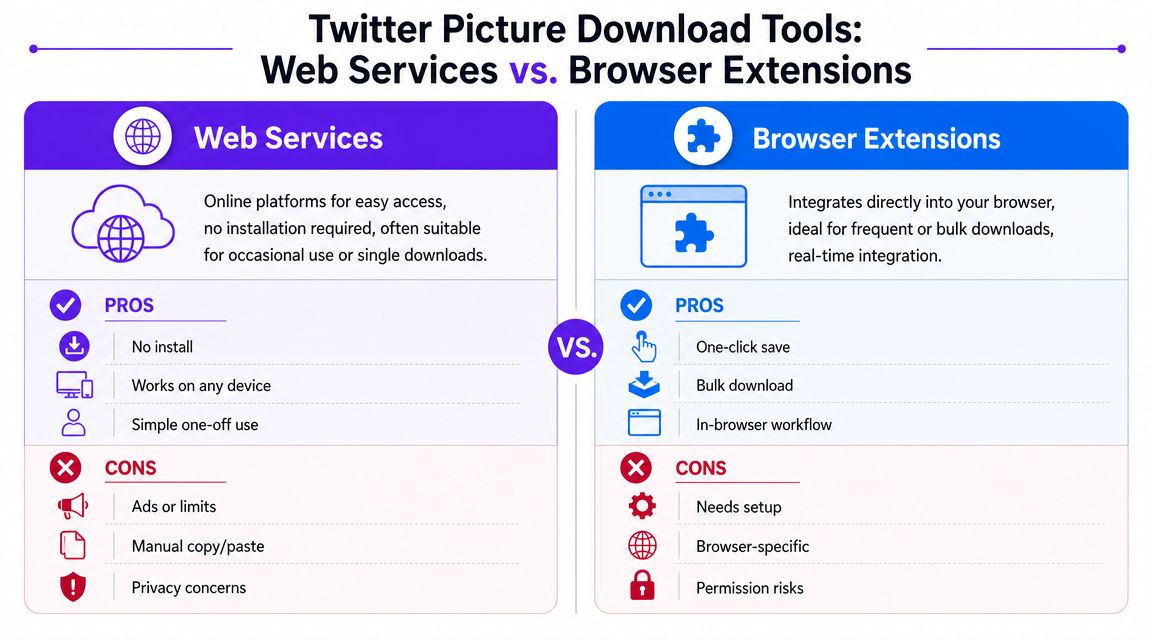
Web services
The usual workflow is simple. Copy the tweet URL, paste it into a downloader site, and grab the image.
That works well when you want speed and don't want to install anything. Publer is one example of the common model. It lets users paste a Twitter/X photo URL and download the image in HD through a browser-based flow.
Web services are good for occasional use, but they come with trade-offs:
- Convenience first because there's no setup
- Easy for one-off downloads from a single post
- Mixed privacy comfort because you're submitting URLs through a third-party site
- Reliability can vary if the service is ad-heavy or not maintained
Browser extensions
Extensions are better when downloading images becomes routine.
A good extension can add buttons directly on the page, support repeated downloads, and reduce the copy-paste loop. Some also organize files more cleanly or let you save from media grids and profile pages.
That said, extensions deserve more scrutiny than web tools. Check what permissions they ask for. If an extension wants broad access to browsing data for a basic media-save job, that's a warning sign.
I trust extensions more when they do one job clearly and don't ask for invasive permissions they don't need.
Comparison of Twitter Image Download Methods
| Method | Ease of Use | Best For | Potential Downsides |
|---|---|---|---|
| Browser save | Very easy | One image in a hurry | Lower quality, weak context |
| Mobile long-press save | Very easy | Quick personal saving | Hard to track source |
| Web service | Easy | Occasional URL-based downloads | Privacy concerns, ads, inconsistent uptime |
| Browser extension | Easy to moderate | Frequent saving, repeated workflow | Permission risk, browser dependence |
| Bulk utility | Moderate | Profile-level archiving, research | More setup, may need maintenance |
A decent twitter picture downloader should make repeated work easier, not just promise HD in a big button.
If you spend a lot of time in Chrome and want more direct social workflow tools, the Upvote Club Chrome social install page is worth a look for the broader posting and engagement side of the workflow.
How to choose without wasting time
Pick based on the job, not the marketing copy.
- For occasional saves, use a web service.
- For daily use, a browser extension usually feels smoother.
- For profile-wide media collection, use a utility built for batch jobs.
- For sensitive work, avoid anything that obscures how it fetches or stores media.
The mistake is treating all downloaders as interchangeable. They aren't. Some are convenience tools. Some are archive tools. Some are little more than ad pages wrapped around a button.
Advanced Techniques for Maximum Quality and Control
When quality matters, I stop relying on generic one-click tools and go local. That usually means using the browser itself to inspect what's being loaded, then saving the actual image URL rather than the first version the interface offers.
For practical work, that's where the strongest results come from. Tools built for serious downloading often focus on original quality, metadata, and bulk operations, while consumer-grade tools can fail on rate limits or dynamic page rendering. Local processing is often more reliable when the work needs to hold up under repeat use (Apify X image downloader overview).

Finding the direct image URL
The cleanest manual method is to locate the image request inside your browser.
- Open the tweet and click the image.
- Right-click and open the browser inspector, or use Developer Tools.
- Look for the image element or the network request that serves the media.
- Open that image in a new tab.
- Save from there instead of saving from the tweet page.
If you don't do this often, a short guide on how to locate hidden image web addresses can help you spot the actual media URL faster.
This method is slower than a downloader site, but it gives you more control. You can inspect the file name, the image path, and whether you're looking at a display version or a more complete asset.
Why this method works better
The feed interface is built for viewing, not for careful extraction. Developer Tools let you bypass a lot of that surface layer.
That matters when:
- You need the cleanest available file
- You want to verify the actual served asset
- A web downloader fails to load the media
- You don't want to send the task through another service
The best download method is often the one that leaves the smallest trail of guesses. Direct URL, local save, source link logged.
For bulk and repeat work
If you're handling large collections, manual inspection won't scale. At that point, command-line and scripted tools make more sense. Developers and archivists often use local utilities that can fetch media, preserve filenames more predictably, and keep logs of what was downloaded.
The rule here is simple. If you're saving a handful of images, stay manual. If you're collecting from threads, profiles, or recurring topics, automation starts paying off fast.
One more thing matters at this level. A solid bulk workflow should be resumable. If a transfer fails halfway through, you don't want to restart the entire queue. Segmented and checkpoint-based media handling is the safer pattern for unstable connections and large archives, because partial failure is much easier to recover from than a full restart.
For builders and technical teams working across social and code communities, Upvote Club's GitHub page also shows how the broader ecosystem around creator tooling can connect across platforms.
From Curation to Growth How We Amplify Our Content
Saving strong images is usually the start of a content workflow, not the finish.
Teams commonly use downloaded X images in one of three ways. They collect references for future posts, archive examples of what's getting attention in their niche, or build internal libraries for design and copy direction. The file itself is useful, but the bigger point is what happens next. You turn raw inputs into your own posts.
Good references help. Distribution decides reach.
A lot of creators get stuck on the production side. They build better visuals, write better copy, and post more consistently. Then they wonder why some posts still die early.
That's because quality and distribution are separate jobs. One gets the post ready. The other gets people to react before the algorithm moves on.
Here's the plain version:
- Curate well so your own content doesn't look generic
- Publish consistently so your audience sees a pattern
- Get early interaction so the post has a chance to travel further
A saved image can improve your next post. It can't create momentum on its own.
Why early engagement changes the outcome
When a post gets ignored right after publishing, it often stays ignored. That's why teams care so much about the first wave of likes, reposts, comments, and saves.
With our Upvote.club service, we built that first-wave support around a community model instead of bots. Users help each other grow by completing tasks with verified human accounts, then earn points they can use to promote their own posts. It's not a buy-likes setup. It works more like an exchange where participation earns distribution.
The mechanics are straightforward. When someone joins, they receive 13 free points and 2 task slots. They can use those to launch a first task. If they want more points, they complete tasks for other members. Social accounts are verified once through an emoji-based system, and no passwords are required.
Why that model fits creators better
What I like about a community model is that it matches how social platforms work. Content gets seen when real people interact with it.
With our Upvote.club service, members can create unlimited tasks for likes, comments, reposts, saves, and followers across X and other networks. There's strict anti-bot moderation, visibility into who completed each task, daily streak rewards, and referral-based point gains. That keeps the loop active without turning growth into fake traffic.
For creators who already know how to research winning visuals, this is the missing piece. Curation sharpens content. Real early engagement helps that content move.
Ethical Guidelines for Using Downloaded Images
Most twitter picture downloader guides stop at the click path. That's where the main risk starts.
Professionals ask better questions. Is the image still available if the post gets deleted? Can it be reused legally? How do you verify where it came from? Those are the practical issues that simple downloader pages usually skip, even though many professionals need ethical, traceable capture and audit trails, not just convenience (discussion of ethical and traceable media capture).
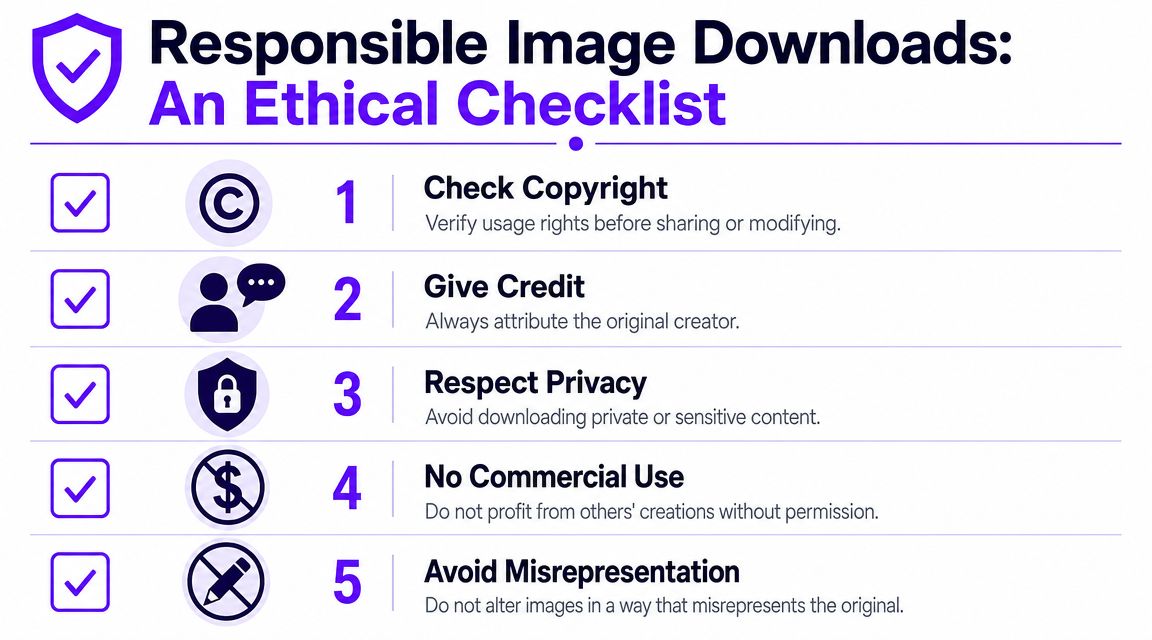
The working rules I use
Downloading an image and having the right to reuse it are not the same thing.
Use this checklist before you publish, repost, or archive anything for professional work:
- Check authorship first. Identify the original poster and, if possible, the original creator of the image itself.
- Keep the source record. Save the tweet URL, username, posting date, and a screenshot of the post in context.
- Separate archive from reuse. Internal research or documentation is different from publishing the image in marketing material.
- Ask for permission when money is involved. If the image supports a commercial post, ad, or branded asset, get clear permission.
- Treat private or sensitive material carefully. Publicly visible doesn't always mean ethically safe to download and circulate.
Attribution isn't a substitute for permission
A lot of people assume credit solves everything. It doesn't.
Attribution is good practice. It may also be expected in editorial or research workflows. But credit alone does not create a license to use someone else's image in a campaign, sales page, product graphic, or monetized post.
Field note: If you'd hesitate to show the creator your use case directly, stop and get permission first.
Build an audit trail
If you work in journalism, brand monitoring, or OSINT, a file without context is weak evidence. Preserve the chain around the image.
A simple audit trail includes:
| Item | Why it matters |
|---|---|
| Original post URL | Shows where the image appeared |
| Screenshot of the post | Captures surrounding context |
| Save date | Helps document timing |
| Username or account name | Ties media to an account |
| Notes on edits or crops | Prevents later confusion |
If your problem is the opposite and someone has copied your work without permission, a practical guide on protecting content from online infringement can help you think through the response side of image misuse.
For social proof workflows tied to your own original posts, Twitter saves through Upvote Club fit better when the goal is boosting visibility for content you own, not reusing content from someone else.
A professional workflow is simple to state and harder to fake. Save the best file you can. Preserve the context. Credit correctly. Ask when reuse crosses into promotion or profit.
If you want help after the content is ready, Upvote Club gives you a community-driven way to get real engagement on X without bots. With our Upvote.club service, you can create tasks for likes, comments, reposts, saves, and followers, earn points by helping other members, and use verified human activity to give your posts traction during the window when engagement matters most.
