

Table of Contents
- Why Managing Your Twitter Archive Is a Good Idea
- Building a Stronger Presence Proactively
- How We Help You Grow Authentically
- How To Request And Navigate Your Twitter Data Archive
- Requesting Your Data From X
- What’s Inside The Archive ZIP File
- Common Filtering Strategies
- The Problem with Just Deleting and a Better Way Forward
- Picking The Right Deletion Tool
- Tweet Deletion Method Comparison
- A Different Approach: Building Instead of Erasing
- Rebuilding Your Presence After Deleting Tweets
- Kickstarting Your Account Activity
- A Community-Based Approach to Regaining Reach
- Building a Sustainable and Real Presence
- Frequently Asked Questions
- How Long Does It Take to Receive My Twitter Archive?
- Are Third-Party Tweet Deletion Apps Safe to Use?
- Will Deleting My Old Tweets Affect My Follower Count?
- Can I Recover Tweets After I Delete Them?
Let's clarify something: you can't just drag your tweets archive file to the trash and be done. That's not how it works. Instead, your archive is the key—it's the data file you need to use a third-party tool to bulk-delete old tweets. First, you have to request and download the archive from X (formerly Twitter), and only then can you provide its data to a service that will erase posts based on your rules.
Why Managing Your Twitter Archive Is a Good Idea

Cleaning up your Twitter history is more than just hitting delete. It's a calculated move to protect your professional image. We've all seen it happen—a public figure or an everyday professional gets called out for something they tweeted years ago. Being proactive about your digital footprint is always better than reactive damage control.
An old, unmanaged timeline is a field of potential problems:
- Outdated Opinions: Your beliefs and views change. A post from five or ten years ago might not represent the person you are today.
- Misinterpretation: Context is everything. Humor, sarcasm, or an inside joke from the past can be lost, leading to your words being twisted.
- Professional Liability: Employers, clients, and partners check social media. An old, ill-advised tweet could prevent a job opportunity or a business deal.
But hold on. Mass-deleting everything isn't always the solution. A better long-term plan is to build a positive online presence that can stand on its own. Instead of just erasing the past, focus on creating a durable, positive digital footprint that speaks for itself.
Building a Stronger Presence Proactively
The most effective way to manage your online reputation is to build an account that withstands examination from the start. This means creating quality content and making sure it gets seen by the right people. This is where a community-driven approach can make a real difference.
With our Upvote.club service, you can build real engagement—no bots allowed. This is not about buying fake likes; it's about joining a community where real users help each other grow. You earn points by completing small tasks for others, then use those points to create your own tasks for likes, comments, and reposts from genuine accounts.
This method works because it focuses on the "Golden Hour"—the first hour after you post. Quick engagement signals to the platform's algorithm that your content is good and worth showing to a wider audience.
How We Help You Grow Authentically
We designed Upvote.club to be a sustainable system for real interaction. It’s a tool for creators and professionals who want to boost their reach and credibility. The process is simple.
When you register with our service, we give you free points and task slots to get you started. Need more? Just complete a few tasks for other community members. Every interaction comes from a verified human account, thanks to our strict anti-bot moderation. We never ask for your passwords; instead, we use a special emoji-based system to verify your social accounts safely. This entire process helps you build a strong, active feed that reduces the need for a future delete tweets archive fire drill.
By driving consistent, real engagement, you create a profile defined not by its past, but by its active, positive present. This approach works with platform algorithms, helping you achieve organic growth and build a solid account from day one.
Learn more about how you can boost your Twitter engagement with our tools. And to fully grasp what's inside that data file, taking a closer look into the practice of social media archiving is a smart move.
How To Request And Navigate Your Twitter Data Archive

Before you can start any kind of digital cleanup, you first need to get your hands on the data. This means requesting your entire archive directly from X (formerly Twitter). The platform bundles up your entire history—every tweet, like, and direct message—into a single file you can download.
This archive is the raw material you’ll need for any serious, selective tweet deletion. The process is straightforward, but you'll need a bit of patience. After you put in the request, X can take up to 24 hours or even longer to gather all your data. Once it’s ready, you'll get an in-app notification and an email with a download link.
Requesting Your Data From X
To begin, you’ll need to go into your account settings. This is the only official way to get a complete history from the platform.
Here’s the path to follow on the X website or mobile app:
- Go to your Settings and privacy menu.
- Select Your account.
- Click on Download an archive of your data.
You'll have to re-enter your password and verify it’s you. It’s a standard security step to make sure no one else is grabbing your personal data.
Once you’ve confirmed your identity, you'll see a big "Request archive" button. Clicking that sends your request to X's servers, and the waiting game begins.
What’s Inside The Archive ZIP File
When you finally download and unzip the archive, you'll see a folder packed with various files and subfolders. It might look a little intimidating at first, but for our purposes, there’s really only one file that matters.
The most important part of your archive is a file named
tweets.js. This single file contains the text and metadata for every tweet you have ever posted.
While other files hold your likes, DMs, and account settings, tweets.js is the key. This is the exact file that third-party deletion tools are built to read, allowing them to pinpoint which tweets to remove based on your criteria.
Getting familiar with this file is the foundation for the whole cleanup process. It’s a complete record of your activity, which is exactly what you need to make smart decisions about what stays and what goes. Think of this archive as your personal backup; once you delete a tweet from the platform, it's gone for good.
Alright, you’ve got your Twitter archive downloaded. That file holds your entire history on the platform, and now comes the fun part: deciding what stays and what goes. This isn't about a scorched-earth policy; it's a careful audit to make sure your online footprint actually reflects who you are today.
Most third-party deletion tools make this straightforward. They let you set specific filters to target the exact tweets you want gone. Think of it as a search-and-destroy mission for your old posts.
Common Filtering Strategies
First things first, you need to decide on your criteria. What kind of content is just taking up space or no longer serves you? Different goals mean different filters.
- By Date Range: This is the most common approach, and for good reason. You might decide to wipe everything older than a year or two. It’s a clean way to get rid of outdated personal info or professional history that's no longer relevant.
- By Keyword or Hashtag: Absolutely perfect for surgical strikes. You can hunt down old political hot takes, comments about a former job, or that time you used a hashtag that aged poorly.
- By Engagement Metrics: Some tools let you find and delete tweets with low engagement—posts with just a few likes or replies. This is a great way to clean up your feed by ditching content that never really landed with your audience.
For example, a developer who’s moved from Python to Rust might want to search for and delete all their old tweets with the #python hashtag. It helps realign their profile with their current work. Or, if you've switched careers, you could search for your old company’s name and erase any posts tied to it.
The Problem with Just Deleting and a Better Way Forward
Here’s the thing: deleting old tweets is a reactive move. It's often necessary, but a smarter long-term plan is to focus on what you're creating now. Instead of only erasing the past, think about how you can make your new content impossible to ignore. This brings me to what is called the "Golden Hour."
That first hour after you post is when the algorithm is watching you closely. A quick burst of likes, comments, and reposts signals that your content is good, and the platform will start showing it to more people. This is the exact method top influencer agencies use to make their clients' content pop.
The great tweet deletion boom of 2020 taught us a lesson. While over 205 million tweets were wiped—often due to embarrassment (35%) or evolving opinions (28%)—this mass erasure can kill SEO links and stall account growth. What builds a resilient online presence is sustained, real engagement, not just hitting delete.
So, rather than just scrubbing your past, you can actively build a stronger present. This is where our service, Upvote.club, comes in. We’ve made this high-level method accessible to everyone. With our service, you can create tasks for your new posts to get immediate engagement from real people in our community, right after you hit publish.
It's a proactive approach. It helps your new content perform better from the get-go, making your current feed more powerful and reducing the need for future mass purges. When your new stuff consistently does well, your older, less relevant posts naturally fade into the background anyway.
Our community model is all about mutual growth. By helping other members get that initial boost, you earn the ability to promote your own content. It’s a sustainable cycle that centers on genuine interaction. For instance, you could quickly get a few key likes on a new tweet to kickstart its journey through the algorithm. You can learn more about how our members get authentic likes for their Twitter content.
By combining a thoughtful cleanup of your past with a strong plan for your present, you build a more robust and real digital identity. The goal is to create a profile you're proud of today, without being haunted by yesterday.
Alright, you've got your Twitter archive and you're ready to start fresh. Now comes the big question: what's the best way to actually delete all those old tweets?
You have a few paths you can take, and they generally fall into two buckets: user-friendly third-party services or more hands-on developer scripts. Let's break down what that means for you.
Third-party services are, by a long shot, the most common choice. These are tools built specifically to take your tweets.js file, let you set filters, and wipe your selected tweets in bulk. They offer a clean interface and do all the heavy lifting for you.
When you're looking at these services, security should be your top priority. Any reputable tool will use OAuth to connect to your account. This is important—it means the service gets permission to act on your behalf without ever asking for your password. If a tool asks for your X.com password directly, run the other way. Also, take a quick scan of their privacy policy to see how they handle your data.
The need for this kind of digital cleanup is massive. Just look at a tool like TweetEraser. By early 2026, it had helped users delete over 2.03 billion tweets. That number tells a story: professionals are no longer just letting their digital footprint grow unchecked. They're actively curating it as part of their personal brand strategy. It’s not just spring cleaning; it’s a career move. You can dig into more of the data and see how TweetEraser's own statistics show this trend.
Picking The Right Deletion Tool
If you're comfortable with code, you can bypass third-party tools entirely and work directly with the X API. Writing your own script gives you total control. You can create super-specific rules for what to delete that might not exist in an off-the-shelf product.
But this path isn't for everyone. It demands a good grasp of programming, understanding API rate limits (how often you can make requests), and securely managing your authentication keys. It’s a powerful option, but it's best left to developers who know their way around an API.
This flowchart can help you think through your plan before you even pick a tool. Are you more concerned about the age of your tweets or the words they contain?
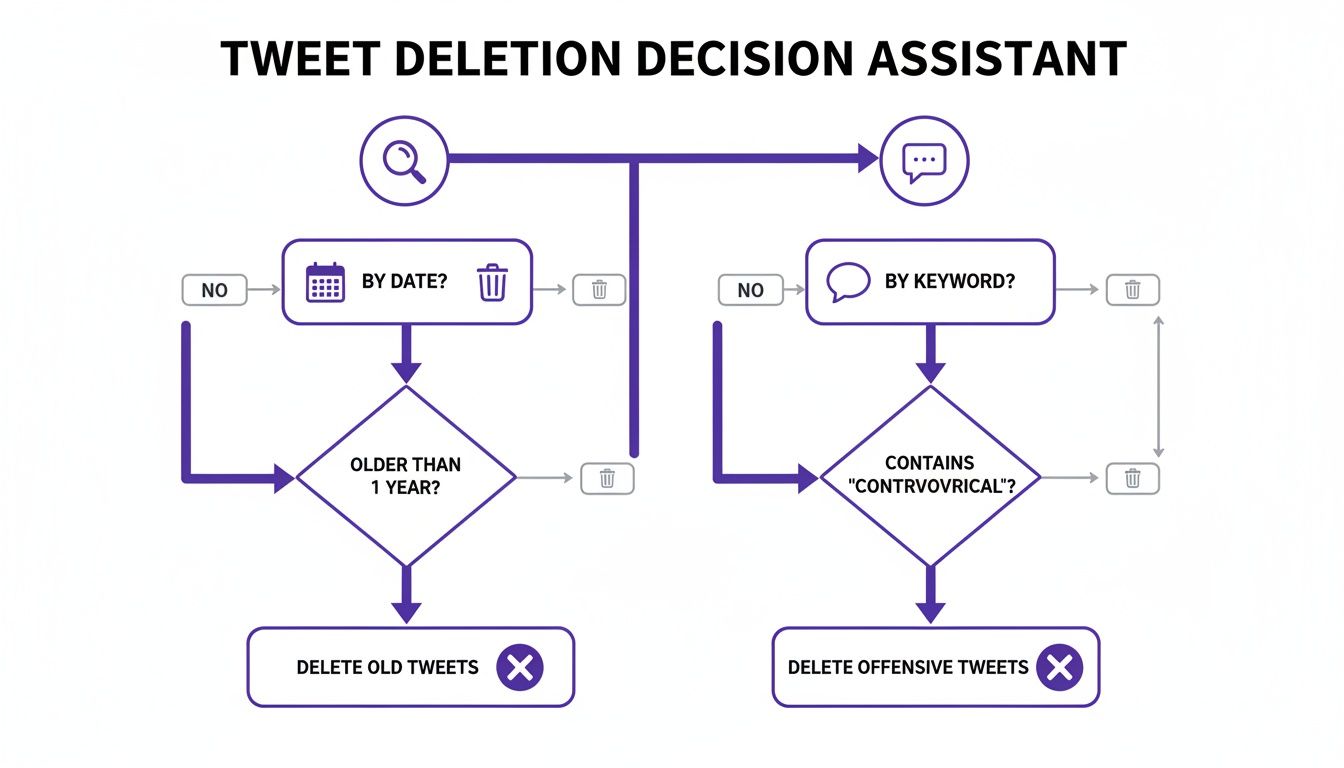
As you can see, figuring out whether you're targeting tweets by date or by keyword is the first fork in the road. That simple choice will shape your entire cleanup process.
Tweet Deletion Method Comparison
Deciding on the right method depends on your technical skills, budget, and how much control you want. Here’s a quick comparison to help you choose the best fit.
| Method | Best For | Pros | Cons |
|---|---|---|---|
| Manual Deletion | Very few tweets (under 50) | Free, full control | Extremely time-consuming, not feasible for bulk deletion |
| Third-Party Service | Most users, especially non-technical ones | Easy to use, fast, advanced filters | Usually requires a paid subscription for full features |
| Developer Script (API) | Developers, tech-savvy users | Maximum control, highly customizable | Requires coding skills, managing API keys, and rate limits |
Ultimately, a third-party service is the sweet spot for most people, offering a good balance of power and simplicity. If you're a developer who loves a good project, building your own script can be a rewarding (and free) alternative.
A Different Approach: Building Instead of Erasing
While deletion tools are great for wiping the slate clean, we take a different direction at Upvote.club. We believe that building a strong, positive future for your account is just as important as erasing the past. Instead of just cleaning up old posts, what if you could actively shape your profile's narrative going forward?
Our model is built around a community of real people helping each other grow. This isn't about buying fake engagement—it's about earning support by giving support. You help others, earn points, and then use those points to get real engagement on your own content.
With our Upvote.club service, you can create tasks for your new tweets to get likes, comments, and reposts from real, verified human accounts. This is very effective in the "Golden Hour"—that first hour after you post. Strong initial engagement signals to the algorithm that your content is good and worth showing to more people. It’s the same method top-tier agencies use for major influencers, and we've made it accessible to everyone.
Security is at the core of our platform. We will never ask for your account password. Our system uses a special emoji-based verification to link your social accounts securely. You can install our extension and see how the secure verification works for yourself.
By focusing on building positive momentum, you create an active and credible feed that naturally makes your old, buried content less relevant. It's a sustainable way to build a better online presence.
Rebuilding Your Presence After Deleting Tweets

Alright, you did it. You went through the process to delete tweets archive data and now your profile is a much cleaner, more accurate reflection of who you are today. But what now? A big cleanup can sometimes lead to a temporary dip in your account’s activity and discoverability.
The X algorithm likes active accounts. When your total tweet count suddenly drops, your visibility might take a small hit. Don't panic. Think of it as a clean slate, and now it's time to rebuild with intention. Your next move is to show the algorithm your account isn't just active—it's growing with fresh content people want to engage with.
Kickstarting Your Account Activity
After a major cleanup, your main goal is simple: send positive signals to the algorithm. That means getting back to posting high-quality content and, importantly, making sure that content gets immediate engagement. This is where the recovery phase really begins, and it's a perfect moment to get a little help from a community.
With a service like our Upvote.club, you can take control of this rebuilding process. Instead of posting into the void and hoping for the best, you can give your new tweets the initial boost they need. We let you create tasks for your new posts to receive likes, comments, and reposts from our community of real, verified users.
This whole method depends on the "Golden Hour"—that first 60 minutes after you post. A quick surge of engagement signals to the algorithm that your content is timely and interesting, which can massively increase its odds of reaching a wider audience. This is the exact method top-tier agencies use, and we’ve made it accessible to everyone.
A Community-Based Approach to Regaining Reach
Upvote.club operates on a simple, effective community model. This isn't about buying fake engagement; it's about participating in a system where real users help each other grow. You earn points by completing small tasks for others, like leaving a thoughtful comment or liking a post. You then spend those points to create your own tasks for the community to complete.
Here's how it works:
- When you register with us, we give you 13 free points and 2 task slots. You can use these to create your first task.
- If more points are needed, you must complete tasks for others. Our system will ask you to verify your social media accounts the first time. No passwords are required.
- Every 24 hours, we give users 1 free task slot. If more tasks are needed, you can purchase a subscription.
- By helping others, you earn the ability to promote your own content. For example, getting 2 likes on a new tweet might cost 4 points. Members of our community see your task, complete it, and give your post the initial burst of activity it needs to perform well.
This process sends all the right signals to the X algorithm, helping you quickly get your reach back and re-establish your account as an active, useful presence on the platform.
The impulse to clean up one's digital past isn't new. Back in 2020, for example, monthly tweet deletions shot up from 12 million in January to a staggering 36 million by July. This spike was largely driven by users wanting to align their public feeds with evolving personal and societal values, showing just how important it is to post timeless, engaging content that holds up over the years. You can dive deeper into these trends in this detailed statistical look at tweet deletion habits.
Building a Sustainable and Real Presence
Our entire system is built around safety and real interactions. We have strict anti-bot moderation, and we will never ask for your passwords. Instead, we use a special, emoji-based verification system to link your social accounts securely. You always know who is completing your tasks, which ensures every interaction is genuine.
When you register with us, you get 13 free points and 2 task slots to get started. You can use these right away to create your first task. If you need more points, you just complete a few tasks for others. It’s a sustainable cycle of real interaction where everyone benefits. For those who want to accelerate their results, we also offer subscriptions that provide a large number of points and task slots immediately.
If you're looking to automate some aspects of your renewed Twitter presence, setting up a Twitter bot for Discord can also help broadcast your new content and keep your community engaged.
Frequently Asked Questions
When you decide to wipe your tweet archive, a lot of questions can come up. I get it. This process involves your personal data, and it's smart to get some clarity before you begin. Here are the answers to the questions I hear most often.
How Long Does It Take to Receive My Twitter Archive?
After you navigate through your settings and hit that "Request archive" button, the waiting game begins. X (formerly Twitter) says it can take 24 hours or sometimes longer for your archive file to be ready. It takes time for the platform to pull together all your historical data—every post, like, and DM—into a single downloadable package.
The good news is you don't have to keep checking back. Once the file is good to go, you’ll get a push notification on your phone or an email with a secure link to download it. Just a heads up, the file size can be surprisingly large, depending on how long you've had your account and how active you've been.
Are Third-Party Tweet Deletion Apps Safe to Use?
Handing over access to your social media account always comes with some risk, which is why picking a reputable service is so important. The single most important security feature to look for is OAuth authentication. This is the industry-standard protocol that lets an app work on your behalf without you ever handing over your password.
If a deletion service asks you for your password directly, that's a massive red flag. Run. Always take a minute to review an app's privacy policy, too, so you understand exactly how it handles your data.
This focus on security is why, at Upvote.club, we designed our system to never require your password. We use a special, secure, emoji-based verification to link your social accounts instead, ensuring your credentials stay completely private.
Will Deleting My Old Tweets Affect My Follower Count?
Nope. Deleting your tweets, even thousands of them, will have zero direct impact on your follower count. The people who chose to follow you will still be there after the cleanup.
What it can change, however, is how your profile is perceived. A feed with very few posts might look inactive or brand new, which can temporarily affect how new visitors see you. This is why having a solid content plan to roll out after a major cleanup is so important—it helps maintain a sense of activity and momentum.
Can I Recover Tweets After I Delete Them?
Once a tweet is deleted from X's servers, it is gone for good. There is no "undo" button. No trash bin. No recovery option. This finality is precisely why downloading and saving your Twitter archive before you start deleting is a step you cannot skip.
Think of that downloaded archive file as your only personal backup. It's the sole record you'll have of your past activity once those tweets are scrubbed from the live site. Keep this file somewhere safe if you think you might ever want to look back on your old posts, whether for personal memories or professional reasons.
Ready to rebuild your online presence with real, genuine engagement? At Upvote Club, we help you get the visibility you deserve by connecting you with a community of real people. Start building your influence today, the right way.
