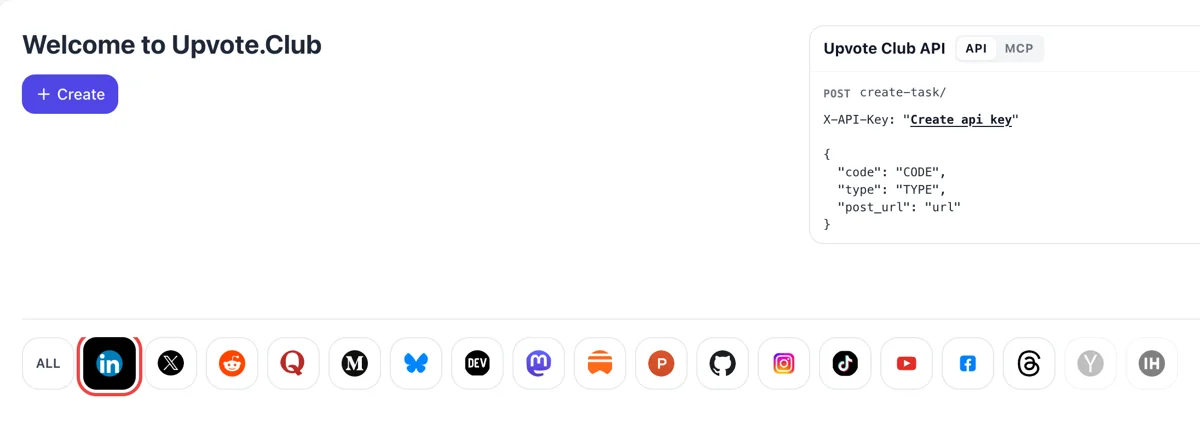
Google login and the LinkedIn mark
Enter Upvote.Club with Google, press Create and click the LinkedIn emblem among the networks. The form that opens is meant for posts. One account covers every network you use.
Add a post link, pick likes, and community members react through their own profiles.
Working with any agent




POSTcreate-task/
{
  "social_network_code": "LINKEDIN",
  "type": "LIKE",
  "post_url": "https://www.linkedin.com/posts/username_post-title-activity-123456789",
  "actions_required": 10
}
Trusted by 88,000+ community members
We are a community of people who help each other grow their personal brand on social media. How It Works Our top priority is a zero-bot policy. We are maintaining a clean and safe community with real people. A variety of GEOs and interests are available inside our community.
LinkedIn readers open profiles before they decide to follow. Reactions that come from accounts with photos and work history look like the audience you want to reach.
The post receives the same like or other reaction a colleague would give. Nothing on the page asks readers to behave differently from how they already use LinkedIn.
The answers below cover timing, reaction types, company pages and what to post next. If something is missing, the blog has longer guides on LinkedIn reach.
Most LinkedIn accounts have fewer than 1,000 followers, and a post from a small circle is shown to almost nobody. A handful of likes tells the feed that at least a few people found it worth a click, and that is where distribution starts. Without that first nudge a post can sit at zero for the whole of its short life in the feed.
Reactions that land soon after you publish count for more than ones that arrive next week. Ask for likes while the post is fresh and the feed still has time to decide how far to carry it.
Likes from accounts with photos, job titles and a history look like ordinary readers. Empty profiles add a number and nothing else, so the community behind a like matters more than the count.
Personal posts, company page updates, articles, videos, documents and carousels all take a like the same way. You paste the link to whichever one you want to lift.
People scrolling past tend to react to a post that already has reactions. A few early likes make it look alive and worth a second look, and readers who would have skipped it stop and leave a comment of their own.
The first request costs nothing, and the people who reacted to your post expect no like in return. Your time goes into the post, not into a rota of favors.
Enter Upvote.Club with Google, press Create and click the LinkedIn emblem among the networks. The form that opens is meant for posts. One account covers every network you use.
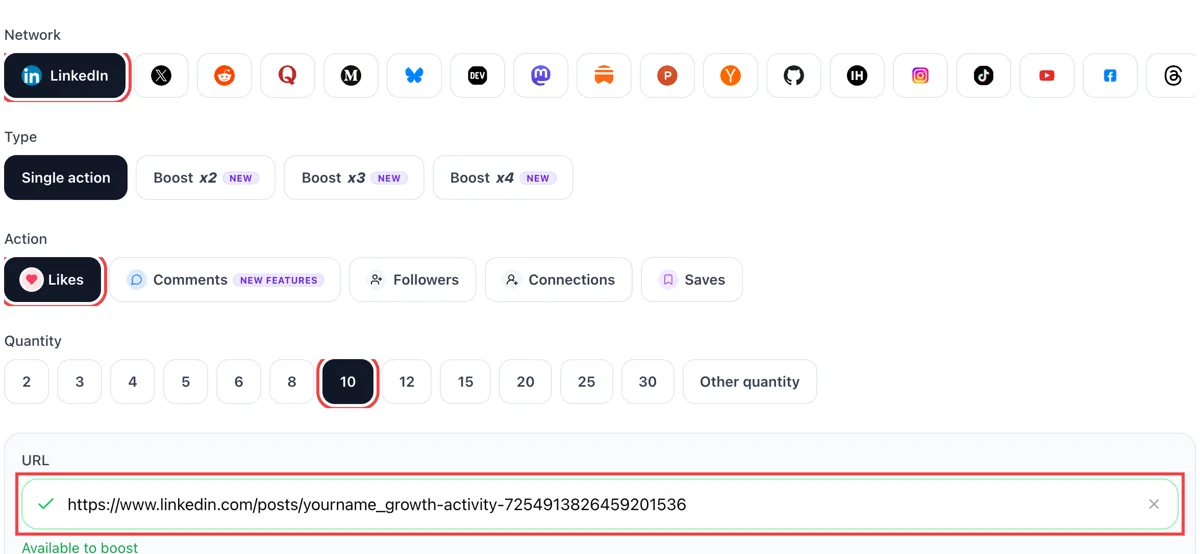
Select likes as the action and paste the public address of your post. When a tick appears, pick how many reactions you want on it. The address comes from the three dots menu, under copy link to post.
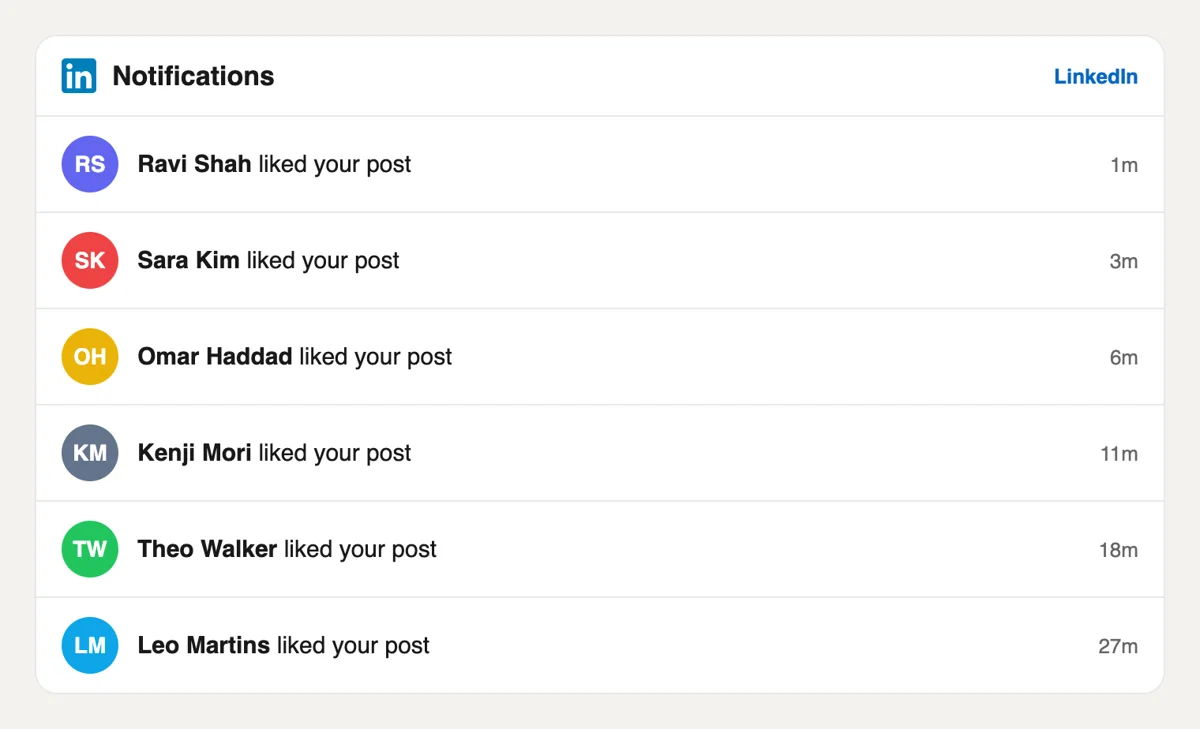
Open the bell on LinkedIn and read reacted to your post, each with a label of a few minutes ago. The names are ordinary members from many industries. You can thank a few of them in the comments, which adds reach.
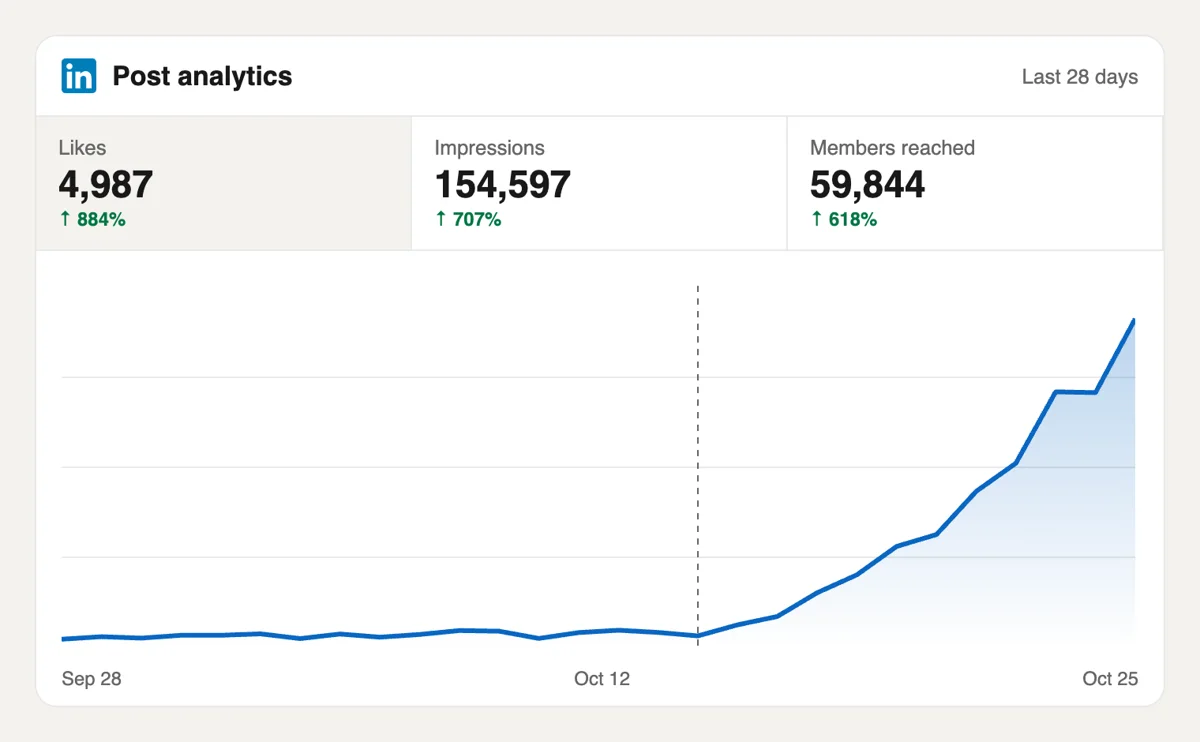
Read the reaction total at the foot of the post, then open post analytics for impressions. A post that opens with reactions is easier for the feed to keep showing. Compare it with your last three posts for a fair picture.
If you post on a schedule, reactions can be ordered from a script or an AI assistant using the MCP connectors. The request format is in the docs, and each call carries only a post address and a quantity. See the LinkedIn API request format
Get 5 free LinkedIn likes every 24 hours. Upgrade only when you need more.
Free
Forever
What's included
$59/ year
Billed annually
What's included
$0/ first 3 days
After $49 / month
What's included
Unlimited tasks per day. Unlimited connections to social media accounts. Pin your post at the top.
Promote posts to verified users. API access. Unlimited engagement actions per day.
Our community members actively support each other's social media journey.
Join 88,000+ creators, brands, founders, and marketers already growing their audience
Been using this for LinkedIn likes and it actually feels organic, no bots or cringe engagement
Nov 13, 2025
perfect for quick LinkedIn likes
Nov 13, 2025
got my 100 LinkedIn likes
Nov 18, 2025
Good
Nov 19, 2025
got it
Dec 5, 2025
I wanted more visibility to land a remote job, LinkedIn likes definitely helped
Nov 13, 2025
needed more LinkedIn likes to drive recruiter traffic. this gave my profile a solid push
Nov 29, 2025
good work
Jan 12, 2026
these likes helped promote my AI product
Nov 11, 2025
my LinkedIn posts were getting zero traction, not anymore
Apr 3, 2025
solid service for professionals fr
Jul 5, 2024
got likes on my LinkedIn article about our SaaS launch, people started reaching out after 🙌
Jul 19, 2024
works great for LinkedIn, fast delivery
May 4, 2024
didn't expect it to work this well on LinkedIn
Dec 2, 2025
I write about product management and startup growth on LinkedIn, trying to build an audience while also promoting our tool. The problem is LinkedIn heavily favors posts that get early engagement - if your first hour is slow, you're dead in the feed. Upvote Club solved exactly that problem for me. I set up a task before publishing, the likes start rolling in early, and the post gains its own momentum from there. Clean process, real profiles completing the tasks, no shady stuff. Exactly what a busy founder needs.
Aug 14, 2024
Blog
Guides and tips on growing social media with real community engagement.

Learn how to calculate LinkedIn engagement rate by impressions, reach, or followers. See 2026 benchmarks: a good rate is typically 3%-5% by impressions, with format and audience size shifting the base...
A LinkedIn connection request is a 1st-degree invitation with an optional personal note. This 2026 guide covers how to send one on desktop and mobile, LinkedIn's note limits, pending invites, and what...
I've watched smart people spend an hour polishing a LinkedIn post, hit publish, and get almost nothing back. Then they assume the problem is their writing, their experience, or their market. Most of t...
A LinkedIn connection message is the optional note on a connection request. Use these 8 templates, know the 200-character Help limit, and decide when a blank invite beats a generic note.
You open a LinkedIn profile to check someone out before a meeting, a hiring screen, or a pitch. The headline is decent. The profile photo is fine. Then the top of the page hits you with the default bl...
Your current LinkedIn headline probably says something accurate and forgettable. Something like "Marketing Manager at Acme" or "Software Engineer." I see that all the time, and I've fixed it on my own...
You've probably got a video ready right now. Maybe it's a client win, a product update, a conference clip, or a quick opinion you recorded on your phone. The part that trips people up isn't recording ...
LinkedIn Private Mode shows you as an Anonymous LinkedIn Member when you view profiles. Turn it on under Profile viewing options on desktop or mobile.
FAQ
Start with a post people want to open. A sharp first line, a clean image or a clear promise in the opening two lines makes readers open see more, and LinkedIn treats that as interest. Then add early reactions from colleagues, friends and the community here. Likes alone rarely carry a weak post, but they help a good one get seen.
Yes, when it is done right. A small account gives LinkedIn very little to judge, so early reactions give it something to work with. upvote.club is built for exactly that, since reactions arrive from profiles that look like ordinary readers. Pair it with a post worth reading and you get a better chance of wider reach.
LinkedIn offers like, celebrate, support, love, insightful and funny. People choose the one that fits what they read, so a new job announcement may collect celebrate while a how-to collects insightful. The count under the post adds them together, and all of them are visible to anyone who hovers over it.
As close to publishing as you can. The first hour is when the feed measures how readers respond, so reactions that arrive then matter more than ones added days later. Publish, paste the link straight away and, if you can, message a few colleagues at the same time.
Yes. Company page updates have a public link like any other post, and you paste it the same way. Pages often struggle most for reach, since the audience is smaller than a founder's profile, so a first wave of reactions helps there as well.
Posts with a reason to read past the opening: a short story, a number, a before and after, or a plain opinion. Carousels and documents reward readers who stay on the slides. A post with nothing to read gets a like and no follow-through, so improve the content before you add reactions.
They help. A post that already shows reactions invites more of them, and readers who see several people respond tend to add a comment. Followers come mostly from comments and from a clear profile. For that reason the comment and follow pages here cover those jobs separately.
Use both. Colleagues, friends and relatives are free apart from your time, and their reactions are welcome. Not everyone has a hundred people to ask each time. A community gives you reactions on days when your own circle is asleep or busy, and it does not wear out the goodwill of friends.
Readers have to be able to see the post, so set its visibility to anyone, then load it in an incognito tab to confirm. What you hand over is an address. Your sign-in and your inbox stay where they are.
Think about your usual numbers. If your posts normally collect ten reactions, a first block that doubles that is plenty for the feed to notice. Chasing a huge count on a post with no readers shows as a mismatch, since comments and views stay flat next to it.
Yes. Requests can come from your own workflow through the API, or from an assistant connected over MCP. The API page is the place to start. The guides on the blog explain how to set up a posting routine around it.
Click Me, then Posts and Activity, pick the Post tab and select the number of impressions under the post, or View analytics. The Post analytics page splits discovery into in network and out of network, so you can see whether reach went beyond your connections. Open it a few days after likes from Upvote.club arrive, and compare it with a post that did not get them to measure the change yourself. That comparison, made from the data under your own post, is more convincing than any general claim.
From our experience, almost every social network is now pushing back on autoposting and AI-written filler. If you publish through autoposting tools, you will likely lose a large part of your reach. We suggest posting from your own phone, where the post is yours. We even built a free autoposting tool for planning, with reminders. After the post is live, likes from Upvote.club add to it, and the reach stays with the post. Likes help the post, but the text and the first line are still yours to write.