

Table of Contents
- Why Most LinkedIn Connection Requests Fail
- People don’t accept requests out of politeness
- The real mistake is chasing volume
- A better standard for outreach
- How to Send a LinkedIn Connection Request
- Does a Connection Request Make Them Follow You?
- Why Can’t I Send a Connection Request?
- The Anatomy of a Successful Connection Request
- Your profile gets judged before your note
- Relevance beats cleverness
- The note should remove friction
- LinkedIn Connection Request Note Character Limit
- Message Templates and Personalization Tactics
- Template after a meeting or event
- Template for someone whose work you admire
- Template when you share a mutual connection
- Template for a cold but relevant industry outreach
- A simple personalization formula
- What not to send
- Desktop vs Mobile and Navigating LinkedIn’s Rules
- Desktop is better for deliberate outreach
- Pending invites need active management
- Stay careful with tools and extensions
- Beyond the Request Building Real Engagement
- What to do right after they accept
- The best follow-up is public, not private
- Build a support pattern
- Making Every Connection Request Count
- A final working checklist
You open LinkedIn, find the right person, hit Connect, type a quick note, and wait. Then nothing happens. No acceptance. No reply. No relationship.
A LinkedIn connection request is a 1st-degree invitation that asks someone to join your network, with an optional personal note that explains why you want to connect. The common mistake is treating that invite like a click. The recipient treats it like a judgment call.
A connection request isn’t a tiny admin task. It’s your first impression, your positioning, and a small test of whether you understand the other person’s time. If you want better results, stop thinking about sending more invites and start thinking about making one good reason to say yes.
Why Most LinkedIn Connection Requests Fail
Most failed LinkedIn requests look harmless. A decent profile. A polite note. No obvious mistakes. But they still die in the inbox because they ask for attention without giving context.
I see this all the time with founders, recruiters, marketers, and creators. They find someone relevant, send a generic request, and assume relevance is obvious. It usually isn’t. The recipient sees a stranger with no clear reason to connect, and the easiest move is to ignore it.
People don’t accept requests out of politeness
They accept when the request feels specific, credible, and low pressure.
That means the goal isn’t “get accepted.” The goal is to make the other person think, “Yes, this makes sense.”
Here’s what usually fails:
- Generic wording that could have been sent to anyone
- No context about where you found them
- Hidden agenda where the note smells like a pitch
- Weak profile credibility that makes the request feel random
- Bad timing when the person has no reason to notice you
A connection request should start a professional relationship, not force one.
That mindset changes everything. If you’re trying to build pipeline, hire talent, find media contacts, or meet peers in your field, the request is only the door. The real work is earning enough trust for the door to open.
The real mistake is chasing volume
A lot of LinkedIn advice still pushes people toward output over judgment. That’s a fast way to build a list of ignored invitations. If you want a better framework for outreach quality and targeting, Mastering B2B lead generation on LinkedIn is a useful read because it treats LinkedIn as a relationship channel, not just a contact database.
I’d put it this way. Good networking on LinkedIn looks less like cold traffic generation and more like warmed-up recognition. Someone has seen your name, your profile makes sense, and your request gives them an easy reason to accept.
A better standard for outreach
Use this quick filter before you send any request connection on linkedin:
| Check | Bad sign | Better sign |
|---|---|---|
| Relevance | “We’re in the same industry” | “I saw your post on X and work on the same problem” |
| Credibility | Empty or vague profile | Clear role, photo, and recent activity |
| Intent | Immediate ask | Simple reason to connect |
| Tone | Copy-paste | Personal and direct |
If a request doesn’t pass those checks, it probably shouldn’t be sent yet.
How to Send a LinkedIn Connection Request
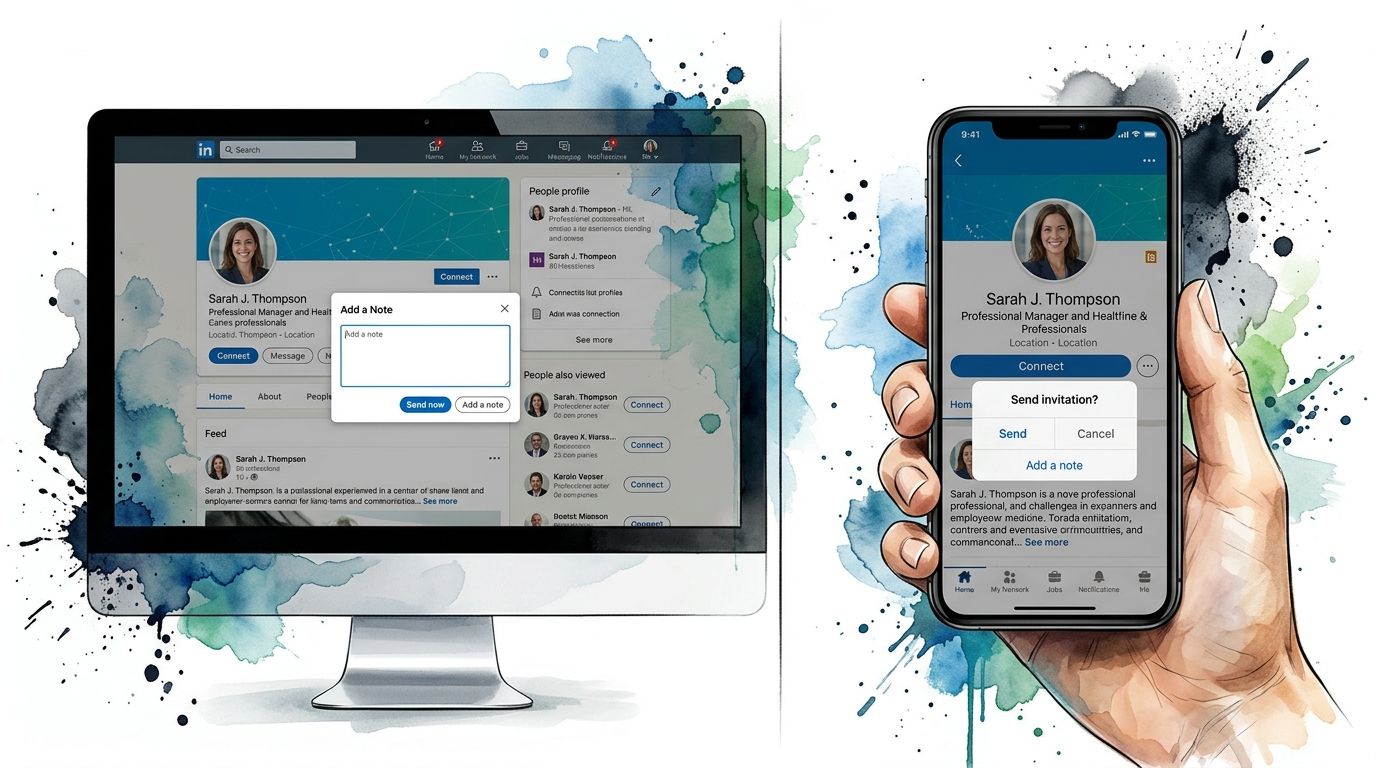
To send a LinkedIn connection request, open the person’s profile, choose Connect (or More → Connect if Connect isn’t shown), optionally add a personal note, then select Send invitation. That invite asks them to become a 1st-degree connection.
The steps are simple. The outcome depends on whether the note and your profile make the invite feel specific, credible, and low pressure.
On desktop:
- Open the member’s LinkedIn profile.
- Select Connect. If you don’t see it, open More and choose Connect.
- Click Add a note when you want to personalize the invite.
- Write a short note, then select Send invitation.
On mobile: don’t tap Connect if you want to add a note. That path often sends a blank invite. Open More, choose Personalize invite, write your note, then send.
If you’re already connected, LinkedIn won’t show Connect. If Follow is the only option, their settings may limit who can invite them, or you may need to use another path LinkedIn offers on that profile.
Does a Connection Request Make Them Follow You?
No. A connection request is not the same as a follow. Connect asks for a two-way 1st-degree relationship. Follow only lets you see their public posts and updates without becoming connections.
Someone can follow you without accepting a connection request, and they can accept a connection without that being the same action as Follow. If your goal is mutual messaging and a closer network tie, you need Connect—not only Follow.
Why Can’t I Send a Connection Request?
If Connect is missing or LinkedIn blocks the invite, the usual causes are practical:
- Invitation limits: LinkedIn caps how many requests you can send. Hitting the weekly or account limit pauses new invites until some pending ones clear or the window resets.
- Too many pending invites: A large Sent list can slow or block new requests. Withdraw stale invites before sending more.
- Account or feature restrictions: Temporary restrictions, incomplete profiles, or limited invitation settings on the recipient’s side can hide Connect.
- Email required: LinkedIn requires a primary email address on your account before you can send invitations.
Also check whether you’re already connected, whether an invite is already pending, or whether the profile only offers Follow. Fix the blocker first, then send a cleaner, more relevant request.
The Anatomy of a Successful Connection Request
A strong LinkedIn request gets judged in seconds. One benchmark says professionals may decide within 3 to 5 seconds whether a request is worth their time, and that personalization can more than double acceptance rates. In one reported case, switching from generic outreach to personalized requests increased acceptance from about 20% to just over 45% according to Bear Connect’s LinkedIn request benchmark.
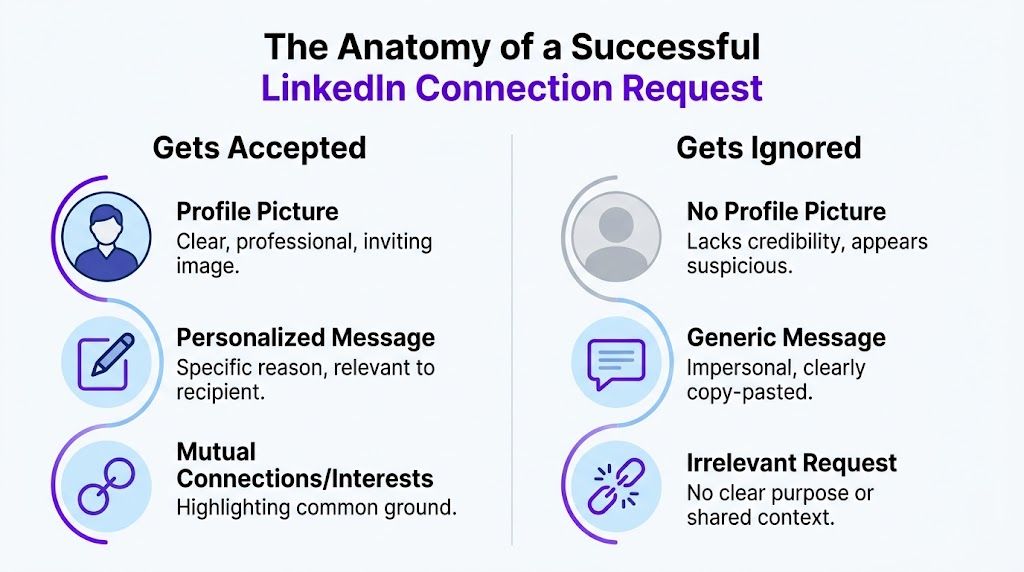
That short decision window means a successful request needs three things: a credible profile, an immediately relevant reason to connect, and a short note that removes uncertainty without adding pressure.
Your profile gets judged before your note
The note is often read last. First they scan your photo, headline, and whether your profile looks active and real.
If your headline is vague, your photo is missing, or your profile feels unfinished, even a decent note has to work harder. The request feels riskier because the recipient can’t quickly place you.
A simple way to think about it:
- Photo: Clear, professional, current
- Headline: Says what you do in plain English
- Profile activity: Shows you exist beyond one outbound request
Relevance beats cleverness
You don’t need a brilliant note. You need a reason that makes immediate sense.
Good reasons are usually tied to one of these:
- a recent post
- a shared event
- a mutual connection
- similar work
- a timely professional reason to stay in touch
That’s why I like guidance that shows how to connect on LinkedIn the right way. The useful part isn’t the wording alone. It’s the idea that your request should match the context of how you found the person.
The note should remove friction
The best notes don’t try to impress. They reduce uncertainty.
Use a simple structure:
-
Context
Where you found them or what prompted the outreach. -
Specific observation
One detail that proves this isn’t mass-sent. -
Light reason to connect
No pitch. No forced next step.
Practical rule: If your note could be pasted onto ten profiles with no edits, it’s too generic.
Before sending, I also like warming the contact slightly. Follow them, read a post, maybe leave a real comment. Then your name has a chance to look familiar when the request lands. If you want your profile to look more active before outreach, getting steady engagement on your LinkedIn posts can help. A simple option is LinkedIn likes through Upvote Club’s community page, which points to a human-driven engagement workflow rather than bot activity.
LinkedIn Connection Request Note Character Limit
According to LinkedIn Help on personalizing invitations, free accounts can add a personalized message to up to three connection requests per month, and each message can be up to 200 characters. LinkedIn Premium members can send unlimited personalized invitations, though connection request volume limits may still apply.
Always check the character counter in LinkedIn’s invite UI before you send. LinkedIn experiments with product limits, so the Help article and what you see in the product should win over older blog posts. Some third-party guides still cite a 300-character note limit; prefer the current LinkedIn Help figure of 200 characters for personalized invitations.
Message Templates and Personalization Tactics
Templates help. Blindly copying them hurts.
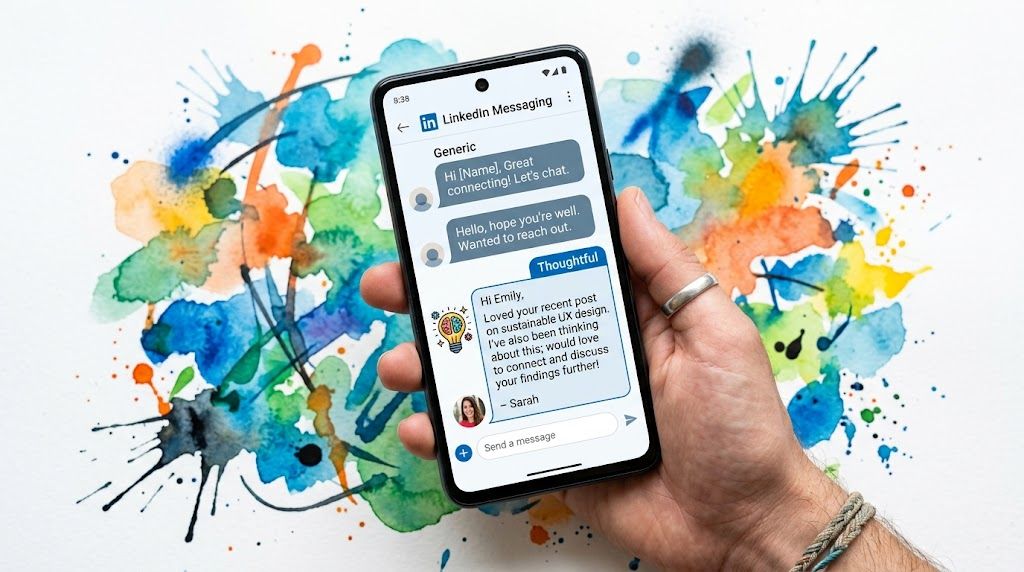
The right way to use a template is to keep the structure and swap in a real detail that only fits that person. That’s the difference between a message that feels thoughtful and one that gets dismissed on sight.
Benchmark data from PhantomBuster’s LinkedIn message analysis says a good benchmark is 40%+ acceptance, targeted requests with real personalization can reach 55–70%, and generic requests often sit around 12–18%. That gap is why message quality matters so much.
Template after a meeting or event
If you’ve met someone already, don’t waste the note on formal language. Help them remember you.
Template
Hi [Name], great meeting you at [event]. I liked your point about [specific topic]. Would love to stay connected here.
Why it works:
- It restores memory
- It references a shared moment
- It doesn’t turn the request into a sales move
Weak version: “Nice meeting you. Let’s connect.”
Better version: mention the panel they were on, the question they asked, or the topic you discussed for a minute after the event.
Template for someone whose work you admire
This works for industry leaders, writers, operators, and creators. The key is to avoid empty praise.
Template
Hi [Name], I read your post on [topic] and liked your point about [specific detail]. I work on similar problems and would be glad to connect.
What makes this strong is the middle sentence. “Loved your content” is forgettable. A specific takeaway shows you paid attention.
Template when you share a mutual connection
Mutuals can lower resistance, but only if the connection is relevant.
Template
Hi [Name], I noticed we’re both connected with [mutual connection]. I’ve also been following your work on [topic]. Would be glad to connect here.
Don’t name-drop randomly. If the mutual connection is weak or distant, skip it. Social proof works best when it feels natural.
Template for a cold but relevant industry outreach
Sometimes you haven’t met, haven’t commented, and don’t share a contact. You can still send a good request if the fit is obvious.
Template
Hi [Name], I’m in [industry/role] and came across your profile while researching [topic/company/space]. Your background in [specific area] stood out. I’d be glad to connect.
It’s common for individuals to become too aggressive at this point. Don’t ask for time. Don’t ask to pick their brain. Don’t attach a pitch.
The first note should create familiarity, not debt.
A simple personalization formula
When I write a request connection on linkedin, I usually pressure-test it with this formula:
- Context: why this person, why now
- Specificity: one detail from their work
- Reason: a low-pressure reason to connect
If one of those is missing, the note gets weaker.
A quick walkthrough helps:
What not to send
Here are the notes that usually underperform:
-
“I’d like to add you to my professional network”
It says nothing about why you chose them. -
“I think we could help each other”
Too vague. It sounds transactional. -
A mini pitch
The request isn’t the place for your offer. -
Forced flattery
People can spot filler praise fast.
The cleanest note is often the shortest one that still proves relevance.
Desktop vs Mobile and Navigating LinkedIn’s Rules
The device matters more than people think. On desktop, it’s usually easier to review the profile, add a note carefully, and catch mistakes before sending. On mobile, it’s easier to move fast and accidentally send a blank invite.
That one difference changes outcomes. A blank request can work if you’ve just met someone or already interacted with them. For colder outreach, it usually wastes the opportunity.
Desktop is better for deliberate outreach
If I’m sending high-intent requests, I prefer desktop for three reasons:
| Desktop | Mobile |
|---|---|
| Easier to review full profile | Easier to act too fast |
| Simpler note editing | More risk of skipped note |
| Better for batch planning | Better for quick follow-up |
Mobile is fine for warm connections. Desktop is better when the request itself needs care.
Pending invites need active management
Old pending requests gradually clog your workflow. They also make it harder to judge what’s working because your request list fills up with people who were never likely to accept.
To withdraw a pending invite: go to My Network → Manage → Sent, open the invitation, and choose Withdraw. After you withdraw, LinkedIn typically applies about a 3-week cooldown before you can send that person a new invitation, so don’t withdraw casually if you still want another shot soon.
According to Botdog’s invitation timing analysis, an analysis of 16,492 invitations found that 21% of acceptances happened within the first 60 minutes, 88% within 7 days, and after 30 days pending invitations were effectively dead and should be withdrawn.
That leads to a simple operating rule:
- Watch early acceptance speed
- Review pending invites after a week
- Withdraw stale requests after a month
- Retest with a better message or a better target list
Old pending requests aren’t neutral. They’re feedback.
Stay careful with tools and extensions
LinkedIn outreach tools can save time, but the wrong setup can push you into sloppy behavior. If you’re comparing workflow tools, Reachly’s LinkedIn extension review is a useful starting point because it helps you think about what belongs in your process and what should still stay manual.
I’d keep the actual request writing manual for anyone who matters. Use tools for organization, reminders, and research. Don’t outsource judgment.
If your focus is pure network growth, a page like LinkedIn connection support from Upvote Club can also give you another angle on building activity around your account. Just keep the request itself personal.
Beyond the Request Building Real Engagement
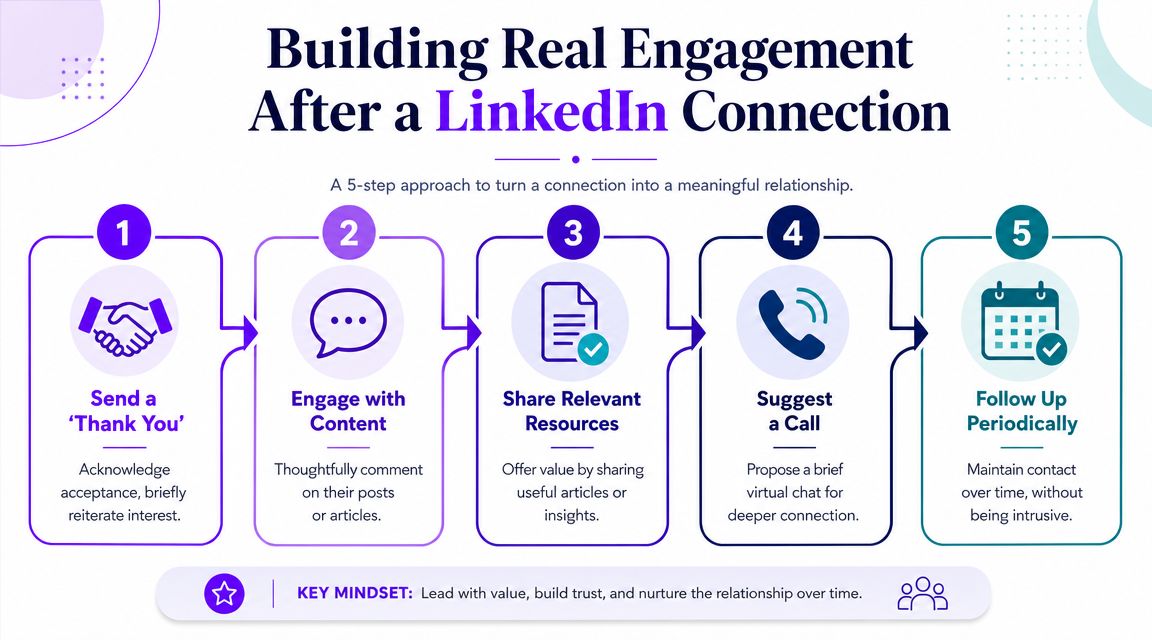
When someone accepts your LinkedIn connection request, you become 1st-degree connections. That usually unlocks direct messaging and more profile visibility than you had as a stranger or follower—so acceptance is access, not the finish line.
It’s the first signal that the person is open to seeing more from you.
That’s where most LinkedIn networking breaks down. People either do nothing after acceptance, or they rush in with a pitch. Both waste the moment.
Recent coverage collected by Try Kondo’s look at LinkedIn alternatives and community-led networking points to growing interest in specialized communities and broader relationship-building beyond LinkedIn alone. That matters because the best networkers don’t treat LinkedIn as a closed system. They use it as one touchpoint in a wider pattern of real interaction.
What to do right after they accept
You don’t always need a thank-you message. But when it fits, keep it short.
A good follow-up sounds like this:
- thanks for connecting
- quick reference to the original context
- no ask attached
That keeps the relationship easy. You’re acknowledging the connection, not trying to cash it in.
The best follow-up is public, not private
Private messages have a place. But comments are often stronger.
When you leave a useful comment on their next post, you do three things at once:
- remind them who you are
- show that your interest was real
- add visible value in public
That’s much better than dropping into their inbox with “Would love 15 minutes of your time.”
If you want a relationship, act like a peer in their orbit, not a stranger demanding access.
Build a support pattern
The strongest LinkedIn relationships come from repeated, light-touch interactions. Not one perfect message.
A simple pattern looks like this:
-
Connect with context
The request makes sense on its own. -
Acknowledge acceptance
Brief and low pressure. -
Engage with one or two posts
Add substance, not filler. -
Share something relevant later
Only if it fits their interests. -
Move off-platform only when there’s momentum
Call, collaboration, referral, or shared project.
This is also where comment activity matters. If part of your strategy is staying visible after new connections come in, LinkedIn comment support from Upvote Club points toward a community-style way to keep posts active and discussed. The broader lesson is simple. LinkedIn works better when your account looks alive, responsive, and part of ongoing conversation.
Making Every Connection Request Count
The best way to think about a request connection on linkedin is as a measurable professional skill. Not luck. Not charm. Not a copy-paste trick.
Modern LinkedIn guidance recommends tracking acceptance rate directly. If 40 out of 100 requests are accepted, the acceptance rate is 40%, according to LiSeller’s guide to tracking LinkedIn connection acceptance rates. That framing matters because it turns networking into something you can improve.
A final working checklist
- Clean up your profile first so the request has credibility
- Send fewer, better invites tied to real context
- Write notes that show relevance, not effort
- Use desktop for careful outreach when precision matters
- Withdraw stale pending requests instead of letting them pile up
- Treat acceptance as the start, then build familiarity through comments and steady interaction
- Track your results so you know which audiences and messages work
One more habit helps. Review your sent invites and accepted requests every week. Patterns show up fast. Certain roles, industries, and note styles will perform better than others. Keep what works. Drop what doesn’t.
If part of your strategy includes growing a network that engages with your posts after connecting, LinkedIn follower growth options on Upvote Club fit that bigger picture. The point isn’t vanity. It’s building a profile that looks active, credible, and worth responding to.
A good LinkedIn network isn’t the biggest one. It’s the one that answers, notices, and remembers you.
If you want help building real engagement across LinkedIn and other social platforms, try Upvote Club. With our Upvote.club service, you can join a community-driven system where real users help each other with likes, comments, reposts, saves, and followers across LinkedIn, X, Instagram, TikTok, YouTube, Reddit, Product Hunt, GitHub, and more. We don’t run on bots or password sharing. We use verified human participation, visible task completion, strict moderation, milestone rewards every 5 completed tasks, invite rewards, and a points model where helping others gives you the ability to promote your own content. New users get 13 free points and 2 task slots, and each social account only needs to be verified once through our emoji-based check. If you want a practical way to support posts during the first hour and keep your profile active through real community engagement, Upvote Club is built for that.
