

Table of Contents
- Why Your LinkedIn Profile is Invisible
- What invisible profiles usually look like
- What works better than writing “nicer”
- How LinkedIn Search Actually Works
- Internal search is about relevance and trust
- External search is about structure and clarity
- What this means in practice
- Optimizing Your LinkedIn Profile for Discovery
- Rewrite the headline first
- Make the About section do real work
- Clean up Experience and Skills
- Keep the profile readable
- Creating and Optimizing Content for Search
- Write for topic association, not just reach
- Format for readability and retrieval
- Hashtags still matter, but only when they fit
- Boosting Visibility with Early Engagement
- Why early response changes distribution
- What helps in the first hour
- The wrong way to chase traction
- Measuring Your LinkedIn SEO Performance
- What to watch after profile edits
- How to interpret mixed results
- Your LinkedIn SEO Checklist and FAQs
- The working checklist
- FAQs people usually ask late
- How often should I update keywords
- Can you over-optimize a LinkedIn profile
- Does linkedin search engine optimization help company pages too
- Should you focus on profile edits or content first
I've watched smart people spend an hour polishing a LinkedIn post, hit publish, and get almost nothing back. Then they assume the problem is their writing, their experience, or their market. Most of the time, the problem is simpler. They're hard to find.
Why Your LinkedIn Profile is Invisible
A profile can look polished and still stay hidden. That happens when it reads like a resume for people, but not like a search result for LinkedIn.
On LinkedIn, invisibility usually has three causes. The first is vague language. The second is weak keyword placement. The third is treating your profile like a static page instead of a live discovery asset.
I see this pattern all the time. Someone writes a headline like “Helping brands grow through digital” and an About section full of broad claims. It sounds fine in conversation. It doesn't match how recruiters, buyers, podcast hosts, or potential clients search.
What invisible profiles usually look like
A hidden profile often has these signs:
- A generic headline that says almost nothing specific about role, industry, or problem solved
- An About section written like a bio instead of a search-friendly summary
- Experience entries with soft wording but no role-specific terms
- A thin Skills section that leaves out the search language people commonly use
- No posting rhythm so LinkedIn gets few signals about the topics tied to that account
That last point matters more than many people think. LinkedIn search engine optimization isn't only about profile text. It's about whether the platform can confidently connect you to a topic, function, and audience.
Practical rule: If a stranger searched for the exact service you provide, your profile should make sense within the first few seconds.
There's also a mindset issue. People often think LinkedIn visibility is earned only through audience size or seniority. That's not how it works in practice. Discoverability starts with alignment. If your profile uses the same language your market uses, you give LinkedIn a clean signal.
What works better than writing “nicer”
The fix usually isn't a better adjective. It's better labeling.
Instead of “marketing leader,” use the specific role and category. Instead of “I help companies tell their story,” name the work: content strategy, B2B demand generation, lifecycle email, product marketing, founder branding, or whatever fits your lane.
A good LinkedIn profile doesn't try to impress everyone. It gives the algorithm and the reader a direct answer to one question: what should this person appear for?
Once you start thinking that way, linkedin search engine optimization stops feeling technical. It becomes message clarity with search intent built in.
How LinkedIn Search Actually Works
LinkedIn runs on two discovery systems. One is inside the platform. The other sits outside it in web search.
LinkedIn operates an internal catalog that helps members and recruiters find the right profile or content. Google functions as a global database that determines which LinkedIn pages to surface to a broader audience.

Internal search is about relevance and trust
Inside LinkedIn, your profile competes against a huge database of professionals. According to Backlinko's LinkedIn statistics breakdown, LinkedIn has over 1.2 billion members globally, and 28.51% of its traffic comes from search, while 67.37% comes directly. That matters because search isn't a side channel. It's one of the main ways people and content get discovered.
Internal search looks at whether your profile matches the query, but that's only part of it. LinkedIn also weighs signals tied to trust and relationship distance. A complete profile tends to perform better. Connection proximity matters too, since first-degree relationships often appear before second- or third-degree results. Mutual context helps LinkedIn decide who belongs near the top.
That's why a keyword-only tactic usually fails. If you stuff terms into your profile but ignore activity, network quality, and profile completion, your search positioning stays weak.
External search is about structure and clarity
Google and other web search systems don't see your profile exactly the way LinkedIn does. They rely more on how clearly your page communicates topic and identity. The first lines of your profile matter because they often shape what gets indexed and previewed.
Many LinkedIn users miss the bigger shift. Search behavior is moving toward AI-assisted answers, summaries, and citations. Search Engine Land describes LinkedIn's newer visibility model as “Be seen, be mentioned, be considered, be chosen” in its reporting on AI-driven discovery and answer visibility. If you want a practical frame for that shift beyond classic SEO, I like RoverLead's take on AI search optimization because it helps connect structured content with answer-engine discovery.
Your profile isn't just a page. It's a retrieval source for search, recommendations, and AI summaries.
What this means in practice
Treat LinkedIn search engine optimization as a layered system:
| Discovery layer | What it responds to most |
|---|---|
| LinkedIn internal search | profile relevance, completeness, connection proximity, activity |
| External search | clear topical language, strong opening text, structured information |
| AI-driven discovery | fresh content, semantic consistency, mentions, authority signals |
If you optimize only the profile, you're doing half the job. If you post constantly but your profile is vague, you still lose search opportunities. Strong visibility comes from matching all three layers.
Optimizing Your LinkedIn Profile for Discovery
The fastest gains usually come from fixing the fields LinkedIn weighs most heavily. The biggest ones are your headline, About section, job titles, and skills. Pursue Networking notes in its guide to LinkedIn profile SEO that the headline is the highest-weight element, and that using a target keyword 3-5 times naturally in the About section helps both internal and external search.

Rewrite the headline first
Most headlines waste the best real estate on the page. They either repeat a job title or drift into vague branding language.
A better headline includes a primary keyword, a secondary modifier, and a plain-English description of the work.
Weak example
- Marketing Consultant | Helping Businesses Grow
Better example
- B2B Content Strategist | LinkedIn SEO and Thought Leadership for SaaS Founders
The point isn't to sound clever. The point is to become searchable.
One practical benchmark from the verified guidance is that some profile optimization approaches recommend placing a primary keyword and a secondary keyword in the headline, within LinkedIn's 120-character limit, as covered in the LinkedIn SEO optimization guide.
Make the About section do real work
The About section should read like a positioning page, not a memoir. The first two sentences matter most. Put the main term there, then support it with context, specialization, and proof from your actual work.
A simple structure works well:
- State what you do with a clear keyword
- Name who you help or what space you work in
- List the kinds of problems you solve
- End with a light call to connect
If your target term is “LinkedIn SEO consultant,” don't bury it halfway down. Use it naturally near the top, then repeat it in a way that still sounds human.
Field test: Read your About section out loud. If it sounds stuffed or repetitive, search systems will understand it, but people won't trust it.
Clean up Experience and Skills
Many profiles lose relevance when people write experience entries like mini cover letters instead of search-friendly descriptions.
Use role-specific language in each job entry. Include industry terms where they fit. If you managed content operations for a SaaS company, say that. If you handled employer branding, creator partnerships, or demand generation, put those terms in the entry where they belong.
Your Skills section is also doing more work than it looks. Some optimization guidance suggests using up to 50 relevant keyword variations in Skills, as long as they match the work you do, in the same LinkedIn SEO optimization guide. Use that section to widen the range of terms tied to your profile without forcing them into the summary.
Keep the profile readable
There's always a trade-off between relevance and credibility. Search language matters, but stuffed profiles repel people.
I prefer this standard: every field should make sense to a recruiter scanning fast and to a client deciding whether to click. If a term helps search but weakens the read, replace it with a close variant.
For richer visuals in your Featured section, a simple demo clip or explainer can help reinforce topic alignment. If you want to turn a written post or case summary into a lightweight visual asset, a text to video platform can help you create something more dynamic without much production work.
Creating and Optimizing Content for Search
A polished profile gets you indexed. Content tells LinkedIn what you want to be known for now.
That difference matters. Your profile says who you are. Your posts, comments, and articles tell LinkedIn which topics belong to you week after week. If you want linkedin search engine optimization to work beyond profile edits, your content has to build topical consistency.
Write for topic association, not just reach
A lot of creators chase broad engagement and end up training the algorithm on the wrong signals. They post one week about remote work, the next about motivation, then jump into startup memes. That can grow attention, but it muddies search identity.
Content works better when it clusters around a few repeatable themes. Pick topics that line up with the searches you want to win. If your profile is built around LinkedIn lead generation, personal branding, or developer marketing, your content should keep returning to those lanes.
A simple content mix works well:
- Problem posts that name a clear issue your audience faces
- Process posts that show how you do the work
- Opinion posts that reveal judgment and point of view
- Proof posts that share outcomes qualitatively if you can't cite hard numbers
Format for readability and retrieval
LinkedIn content gets read fast. Dense blocks lose people. So does writing that hides the point.
Use short paragraphs, plain wording, and early keyword placement. Don't force terms in every line. One clear mention of the topic near the opening usually does more than repeating it awkwardly throughout the post.
Line breaks are more important for a clean visual layout than many realize. I have found that a tool like Scheduler for LinkedIn formatting is handy when a draft reads well in a document but turns messy once pasted into LinkedIn.
Write the opening of the post like a search result and the rest like a conversation.
Hashtags still matter, but only when they fit
Seosherpa notes in its LinkedIn SEO guide that profiles with All-Star status tend to rank better, and that posting with 3-5 relevant hashtags per post acts as a quality signal. The useful part there isn't the hashtag count by itself. It's the reminder that activity and profile strength work together.
Use hashtags to support the topic, not to cast a giant net. Broad and niche tags can both work, but they need to connect to the actual post. A polished carousel about B2B social content doesn't need random startup or productivity tags attached to it.
A clean post setup often looks like this:
- Opening line with the core topic or problem
- Body with one useful lesson, process, or observation
- Close that invites discussion without begging for comments
- Hashtags that match the topic directly
If reposting part of your own best content is part of your workflow, I'd keep it selective and tied to strong posts only. A controlled push can help sustain activity around the topics you want LinkedIn to associate with your account, and that's where LinkedIn repost support through Upvote Club can fit into a broader distribution routine.
Boosting Visibility with Early Engagement
Even good posts can stall if nobody interacts with them early. LinkedIn needs signals before it decides how widely to circulate a post, and those signals show up first in the opening stretch after publishing.

I've seen this play out many times. One post gets a few fast comments from relevant peers and keeps moving. Another post on the same topic, written just as well, sits cold because it didn't get that first wave of interaction.
Why early response changes distribution
Early engagement helps LinkedIn answer two questions.
First, is this post relevant to a real audience? Second, are people doing more than glancing at it?
That doesn't mean every post needs a pile of reactions. It means the algorithm is looking for enough initial evidence to justify broader exposure. Comments matter more than empty noise. Reposts matter when they come from accounts in the same topic cluster. Saves can be a strong quality signal, even if they're less visible.
The trade-off here is obvious. You can't fake sustained interest. But you can improve the odds that the right people see a post soon after it goes live.
What helps in the first hour
This part is operational, not magical. A few habits consistently help:
- Publish when your actual network is active instead of chasing generic timing advice
- Message close contacts selectively when a post is highly relevant to them
- Reply fast to comments so the post stays active
- Use a clear point of view because bland posts rarely spark discussion
- Avoid external-link-heavy openings that pull attention away too early
A thoughtful comment strategy also matters. If your post gets comments, don't answer with “thanks” and move on. Add a follow-up thought. Keep the thread useful.
Here's a practical explainer on how that first-wave dynamic works in social distribution:
The wrong way to chase traction
A lot of people ruin their own distribution by forcing engagement. They join low-quality pods, buy junk reactions, or stuff the comments with obvious reciprocity. That can create motion without trust.
What works better is topic-aligned interaction from real people who use the platform. If you need a structured way to support discussion on a post, LinkedIn comment activity through Upvote Club is more useful when it's treated as a distribution assist, not a substitute for substance.
Strong early engagement can't rescue a weak post forever. It can give a strong post a fair shot.
Measuring Your LinkedIn SEO Performance
If you change five things at once, you won't know what helped. LinkedIn SEO works best when you make focused edits, then watch the right indicators.
The two metrics I care about first are Search Appearances and Profile Views. Search Appearances tells you whether your keyword targeting is improving visibility. Profile Views tells you whether your headline and profile framing are good enough to earn the click once you appear.
What to watch after profile edits
A practical benchmark from the LinkedIn SEO optimization guide is that a well-optimized profile can see a 30–50% increase in search appearances within 2–4 weeks of targeted keyword placement, and the same source recommends checking Search Appearances weekly after making changes.
That timeline is useful because it keeps people from overreacting after two days. Search updates can show movement fairly quickly, but not instantly.
Use a simple review loop:
| Metric | What it usually tells you |
|---|---|
| Search Appearances | your keyword placement and profile relevance are improving |
| Profile Views | your headline and profile preview are earning clicks |
| Post engagement trends | your content topics and format are gaining traction |
How to interpret mixed results
If Search Appearances rise but Profile Views stay flat, your profile is being found but not chosen. The fix is usually the headline or first lines of the About section.
If profile views go up but inbound messages don't, your positioning may still be too broad. People can find you and still not understand what to contact you for.
If posts perform well but search visibility stays weak, the profile likely needs cleaner keyword alignment. Content and profile have to support each other. One can't fully cover for the other.
Your LinkedIn SEO Checklist and FAQs
A strong LinkedIn setup isn't a one-time rewrite. It's a system that ties profile clarity, content consistency, and activity together. That matters even more now that LinkedIn discovery is being shaped by AI-driven citations and semantic retrieval, not only old-school keyword matching. Search Engine Land's reporting on LinkedIn's AI visibility model frames that shift as “Be seen, be mentioned, be considered, be chosen.”
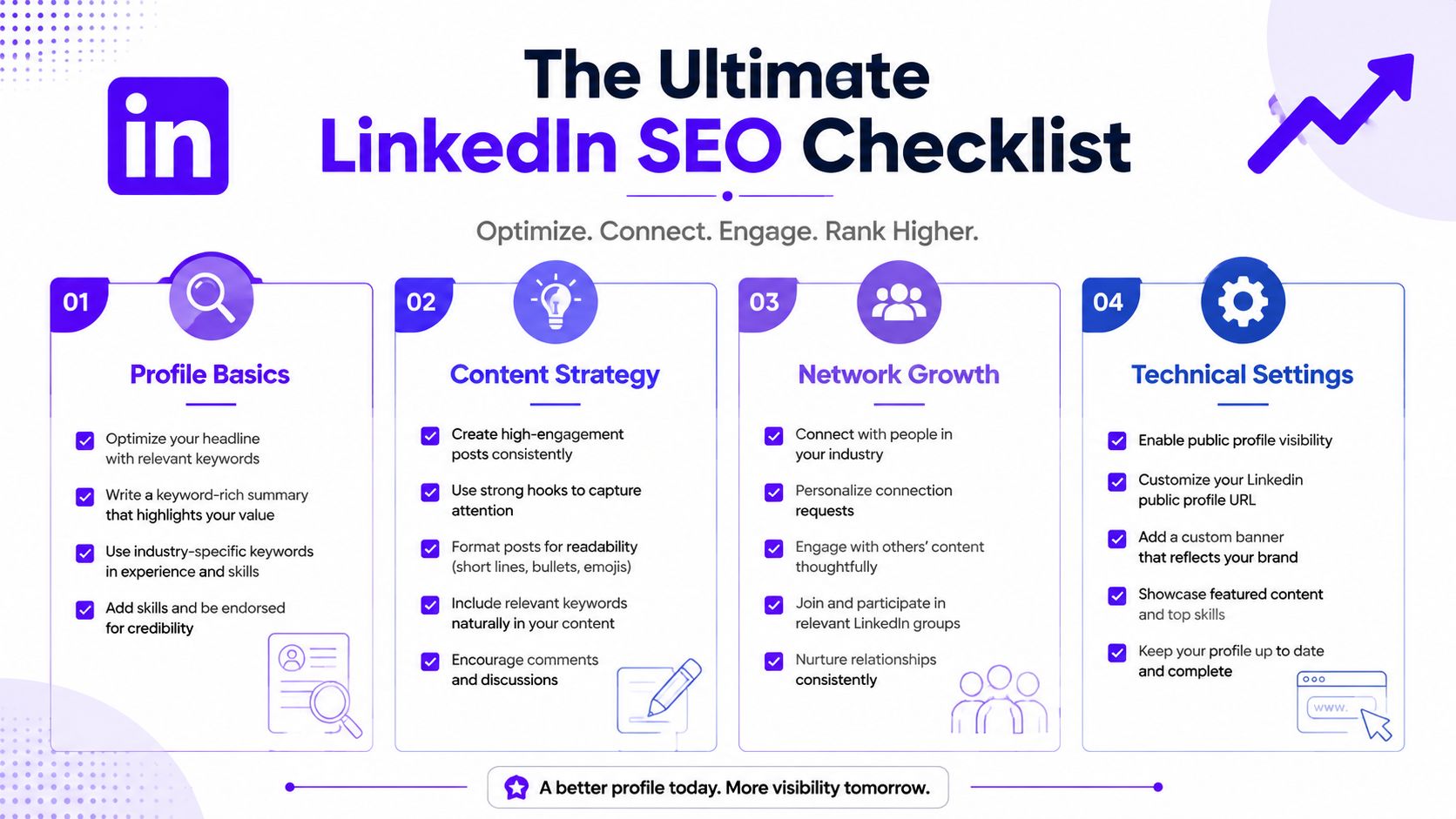
The working checklist
Profile basics
Rewrite your headline with a clear primary keyword. Tighten your About section so the first lines state exactly what you do and who it's for. Make sure job titles and skills match the work you want to be found for.Content strategy
Post around a small set of repeat topics. Keep formatting clean. Use hashtags only when they support the actual subject of the post.Network growth
Build relevant first-degree connections. Comment on posts in your niche. Treat conversations as part of search visibility, not separate from it.Technical settings
Keep your public profile visible and clean up your custom URL if needed. Make sure your profile is complete and easy to scan.
If follower growth is part of your broader social proof plan, some teams also use LinkedIn audience growth options through Upvote Club as one layer inside a wider content and engagement strategy.
FAQs people usually ask late
How often should I update keywords
Update them when your role, service, market, or audience language changes. Don't change them every week unless you're actively testing a new positioning angle.
Can you over-optimize a LinkedIn profile
Yes. If your profile reads like a keyword sheet, people will feel it right away. Use direct terms, but keep the writing natural.
Does linkedin search engine optimization help company pages too
Yes, but company pages usually need stronger support from employee profiles and ongoing content. A company page alone rarely carries the full discovery load.
Should you focus on profile edits or content first
Fix the profile first if it's vague. Then post consistently so LinkedIn keeps seeing the same topic signals attached to your account.
With our Upvote Club service, you can support the part of social growth many professionals struggle with: getting real engagement early from a real community. We built Upvote.club around participation, not fake metrics. Members complete tasks for each other, earn points, and use those points to request likes, comments, reposts, saves, and followers from verified human accounts across LinkedIn and many other platforms. You can start with free points and task slots, keep your accounts safe with our emoji-based verification flow instead of passwords, and build momentum through consistent interaction that fits how social algorithms already work.
