








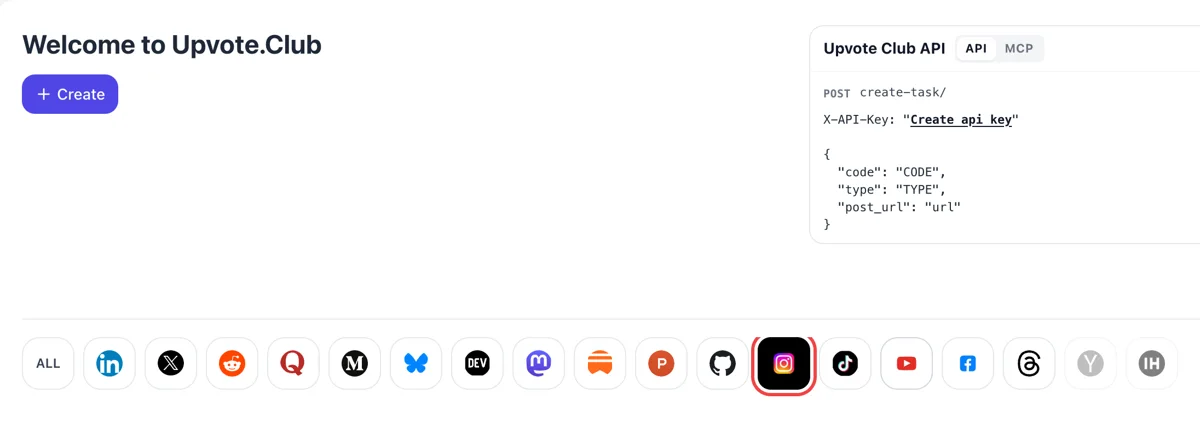
Sign in and press the Instagram icon
Log in using Google or Apple and a welcome screen appears with Create at the top and network icons below. Pressing Instagram highlights it, and the form that follows is about posts, Reels and profiles.
Hand over a public Instagram link, pick the response you need, and members of the community act from their personal profiles.
Working with any agent




POSTcreate-task/
{
  "social_network_code": "INSTAGRAM",
  "type": "LIKE",
  "post_url": "https://www.instagram.com/p/ABC123xyz/",
  "actions_required": 10
}
Trusted by 88,000+ community members
We are a community of people who help each other grow their personal brand on social media. How It Works Our top priority is a zero-bot policy. We are maintaining a clean and safe community with real people. A variety of GEOs and interests are available inside our community.
Hearts, comments, follows and saves on your Instagram content are produced by community members acting from personal accounts, which is why the activity looks like attention from everyday viewers.
The form needs only the address of your post or profile. Your login, drafts and direct messages stay with you, and you choose which posts and which actions get support.
The blog covers Instagram captions, carousel structure, Reels hooks and posting rhythm, so the response a post receives is matched by content that deserves a second look.
Adam Mosseri, who runs Instagram, has said the top three ranking signals are watch time, likes and sends. Hearts you can add early are the one of the three that you can influence without changing a single frame of the video.
Instagram ranks content for people who follow you, called connected reach, and for people who do not, called unconnected reach. Followers keep the first group growing, and Reels feed the second. Different actions on this site support each one.
Instagram says it looks at how likely someone is to comment when it ranks Feed posts. A thread beneath the post also gives a new visitor a reason to stay, and you can pin up to three comments to the top of the thread. Good ones set the tone for everyone who arrives later.
Carousels with steps, lists and templates are posts people keep. Instagram lists saves among the actions it predicts for discovery, and a total on your post stats shows which of your formats readers return to.
The Reels tab is mostly recommended content, so a Reel is where strangers first see an account. A decent heart count and a profile with followers give those strangers a reason to stay and press Follow. Pair that with a bio that says who the account is for.
Mosseri advises looking at rates, such as likes per reach, instead of a bare count. Support on every post makes rates comparable across posts, so Instagram's own stats screen can tell you which ideas your audience actually prefers, and which ones to retire.
Account owners with a steady routine can send requests through the API, and teams that work with an AI assistant can use the MCP connectors, so growth steps sit inside the same tools they use to plan posts.
Log in using Google or Apple and a welcome screen appears with Create at the top and network icons below. Pressing Instagram highlights it, and the form that follows is about posts, Reels and profiles.
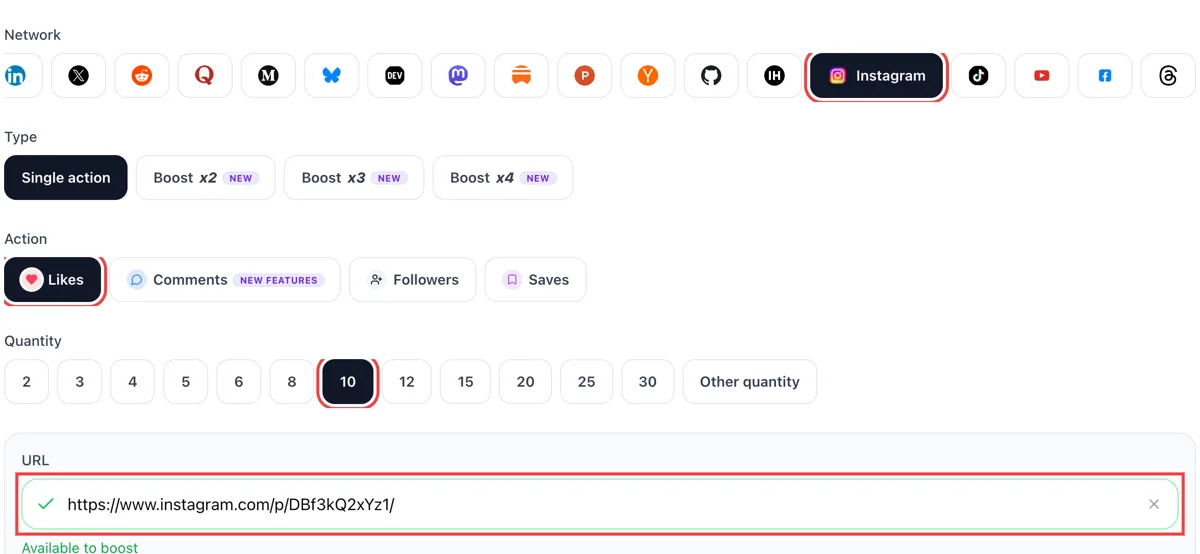
On a post, Reel or profile open the three-dot menu and copy the link. In the form pick what you want, paste the address and set the amount. The green check on the field means the address is public.
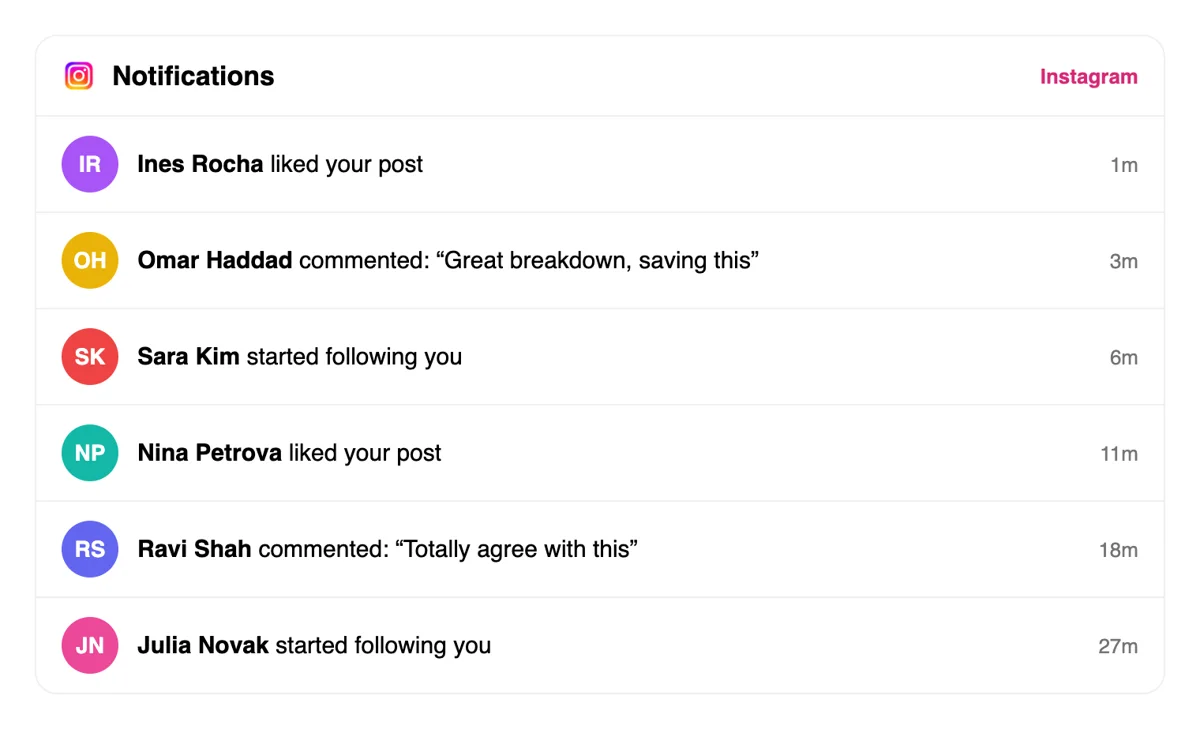
Responses come from other accounts, and the heart tab in Instagram lists likes, comments and new followers with short time stamps such as minutes or hours ago. Open any line to visit the profile behind it.
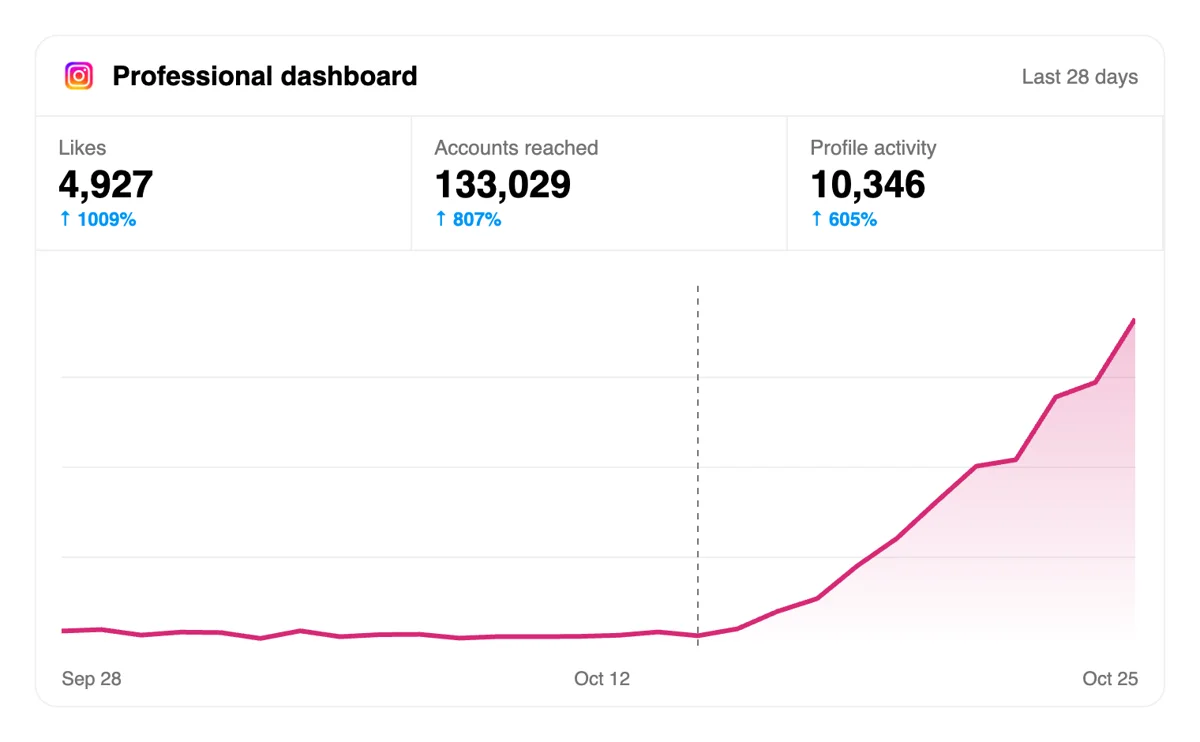
Open Stats on a professional account and check accounts reached, interactions and follower count. More reactions tend to widen reach, which pulls in viewers who do not follow you yet.
Accounts that publish every week can have requests sent from code or an AI assistant right after posting, and the dashboard needs only a quick look afterward to see what each post gathered. See Instagram in the API docs
Get 5 free Instagram likes, comments, followers, or saves every 24 hours. Upgrade only when you need more.
Free
Forever
What's included
$59/ year
Billed annually
What's included
$0/ first 3 days
After $49 / month
What's included
Unlimited tasks per day. Unlimited connections to social media accounts. Pin your post at the top.
Promote posts to verified users. API access. Unlimited engagement actions per day.
Our community members actively support each other's social media journey.
Join 88,000+ creators, brands, founders, and marketers already growing their audience
Blog
Guides and tips on growing social media with real community engagement.
"What do you think?" gets almost nothing.

People are having a marathon in their Instagram Reels tab.

Stories get more views when you post at the times your specific audience is already scrolling.
The fastest path to more Reels views is trending audio, and posting at your audience's peak activity times.

That means hooks built for identification and inside jokes, not just curiosity, paired with a posting cadence steady enough for Instagram's ranking systems to trust your account.
FAQ
It does, when done the right way. Instagram names likes among its top three signals and looks at comments in Feed ranking. Upvote.club does it the right way: community members respond from personal accounts, so each post opens with visible activity and a fair chance of reaching both followers and strangers.
Growth, using the right tool. Followers widen the group that sees posts first, hearts lift likes per reach, comments build threads and saves mark posts that people keep. Mix them per post, then read the outcome on Instagram's stats screen, where reach, likes, shares and saves sit side by side. Expect the biggest change when the post itself is strong.
Start with what the post lacks. A new account usually needs followers first, since every post then has first viewers. An established account with quiet posts needs hearts and comments at launch. A teaching carousel needs saves. A Reel aimed at strangers needs hearts and a profile that is ready for them. Whatever you pick, post by hand and add the response while the post is new.
A send is a post shared to a friend by direct message, which Instagram labels shares in the stats. Mosseri says sends matter slightly more for reaching people who do not follow you. You cannot add them here, but you can write posts worth forwarding: useful tips, relatable moments and clear comparisons are the usual candidates.
Use rates. Open the stats of a post, divide likes by accounts reached and do the same for sends. Compare with your own last thirty days, not with other creators. A post that beats your own normal rate is a winner, whatever the raw number looks like, and a series on its topic is worth planning.
Yes. Instagram gives a growing share of each day's impressions to newer posts, so the first hours matter. Publish when you can stay around, support the post at launch and answer the first comments. Build a routine around the hours when your own audience is usually online. Check the stats after a week to see how the first hours compared.
Reels suit reaching strangers, because the Reels tab is mostly recommended content. Carousels suit teaching and earning saves. Feed photos and Stories suit keeping current followers close. Many accounts mix all three, then check the stats after a few weeks and write more of whatever produced the best rates.
Skip it. Auto-posting software and machine-written filler are what networks are trying to weed out, and accounts relying on them tend to see reach shrink. Publish from your phone. For timing, the free scheduler on the site pings you at the hour you choose, and your own thumb does the posting.
Original work with a clear subject. Nothing grows an account like a strong post, and every response you add works best on one that already earns attention. Instagram favours original creators over reposters, so show your own work, name the topic in the caption and open with a strong first frame.
They can help. Friends, colleagues and reaction groups, including like-for-like and follow-for-follow threads, give early responses and cost only time. They come in short bursts and depend on who is around. Upvote.club covers the steady part from one pasted address, with no duty to return each favour, and the two approaches combine well.
Yes. The site offers an API and MCP connectors, so scripts and AI assistants can request the same actions without the web form. That suits people who publish often or manage several accounts, and the API page on the site has the Instagram notes. Everything else about the account works the same as through the form.
Nothing is charged to begin: a Google or Apple sign-in, one public link and an action are all it takes. If you later want more volume, paid plans are described on their own page. Test on a single post and set its stats beside your usual ones before you decide.
Instagram lets you pin up to three posts to the top of your grid, and they stay there as newer posts are added. Use them as a front door: one post that explains what the account is about, one that earned the most attention, and one that shows a series or product. A visitor who arrives after a post draws reactions sees these three first, so they decide whether the profile feels worth following. Unpin a post any time and it returns to its original spot in the grid. Refresh the three when your best work changes.
With a public professional-style account, the analytics view is free and shows views, interactions, new followers and the content you shared. Once you have at least 100 followers, the Total followers view adds growth, top locations, age range and the times your followers are most active. Use it to choose posting times and to see whether the people arriving match the people you want. After a round of likes, comments, saves or follows on a post, compare the numbers for that post with your usual ones, and note what changed so the next post can build on it.