








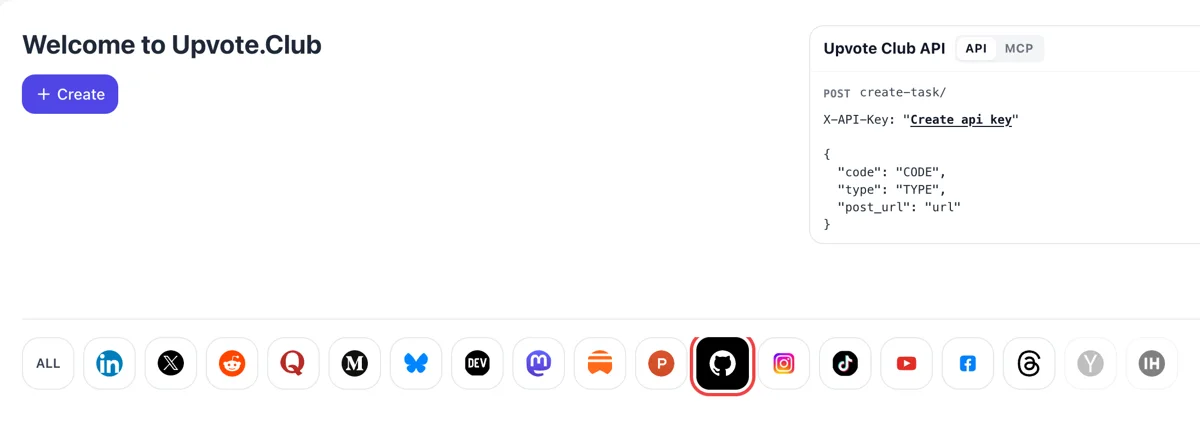
Log in, then select GitHub
Come to upvote.club, sign in with Google or Apple and press Create. Choose the GitHub mark in the row. Your first request is free, and one account covers every other network.
Paste the link to a public repository and collect stars from active developers.
Working with any agent




POSTcreate-task/
{
  "social_network_code": "GITHUB",
  "type": "STAR",
  "post_url": "https://github.com/username/repository",
  "actions_required": 10
}
Trusted by 88,000+ community members
We are a community of people who help each other grow their personal brand on social media. How It Works Our top priority is a zero-bot policy. We are maintaining a clean and safe community with real people. A variety of GEOs and interests are available inside our community.
Those who star are active community members, so the stargazers page lists accounts with repositories, forks and contribution graphs.
One public repository link is the whole exchange. Your GitHub credentials remain private, and our own sign-in goes through a Google or Apple login.
The star total and the stargazers page sit on GitHub, open to anyone, so the change is something you confirm there yourself.
Every repository page shows its star total near the top. Developers comparing libraries often glance at it before reading anything else, so a low number can lose you a visit even when the code is stronger than its neighbors. The score works as a shortcut for trust when someone has ten tabs open and no time.
GitHub notes that many of its repository rankings depend on stars. A rising count can lift a project in searches, topic pages and lists of popular work, which brings visitors who did not know the project existed.
Each star adds your repository to somebody's own list, which they can sort, filter and revisit. That list is a quiet source of return visits, since people open starred projects again when they need a solution.
Anyone can open the stargazers page of a public repository and see who starred it. A list of developers with their own projects looks reassuring to a newcomer deciding whether to try your tool, and it shows you who your users are.
A release announced with a count of zero asks visitors to trust you blindly. A starting group of stars changes the first screen and gives the people your post reaches a project that already looks tried.
Developers who star a tool often return to report a bug or suggest a change. A bigger count means more feedback on your plans, and that feedback is a sign the project is used.
Come to upvote.club, sign in with Google or Apple and press Create. Choose the GitHub mark in the row. Your first request is free, and one account covers every other network.
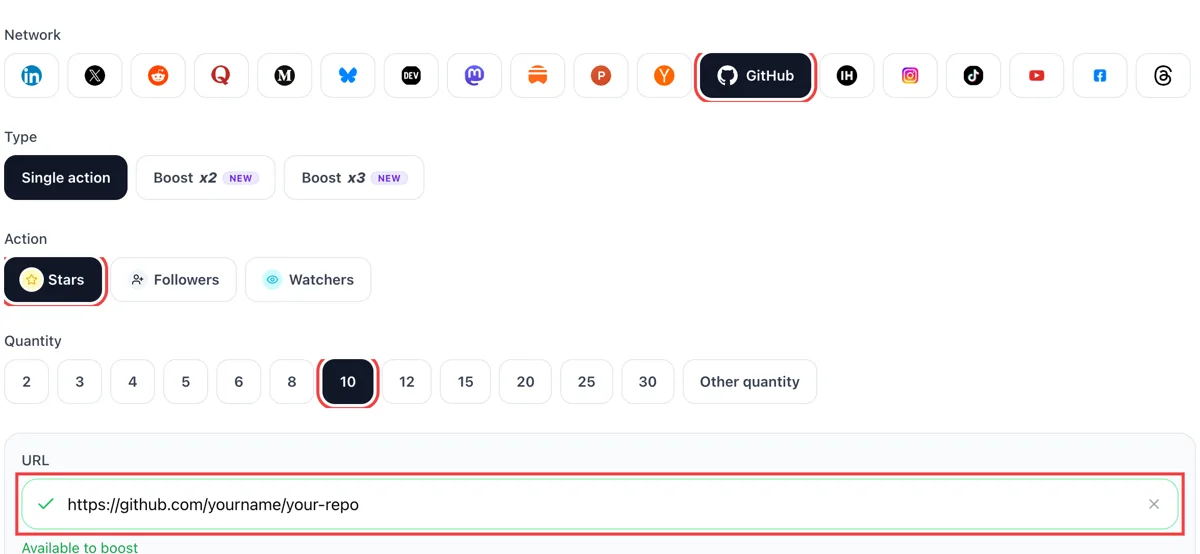
Set stars as the action and decide how many. Add the repository's address. If the field turns green, GitHub opened the repo and the request can go ahead.
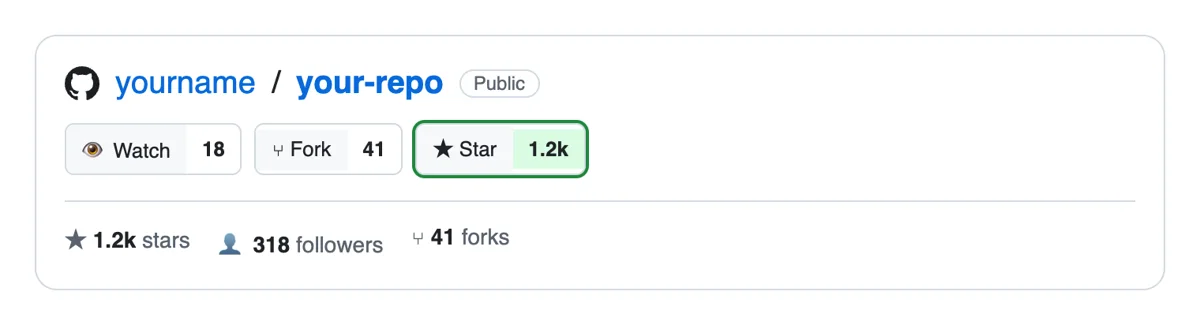
Stars are given from separate GitHub accounts. They show on the repository's stargazers list with each username, and in your notifications and activity feed, so you can see who starred the project.
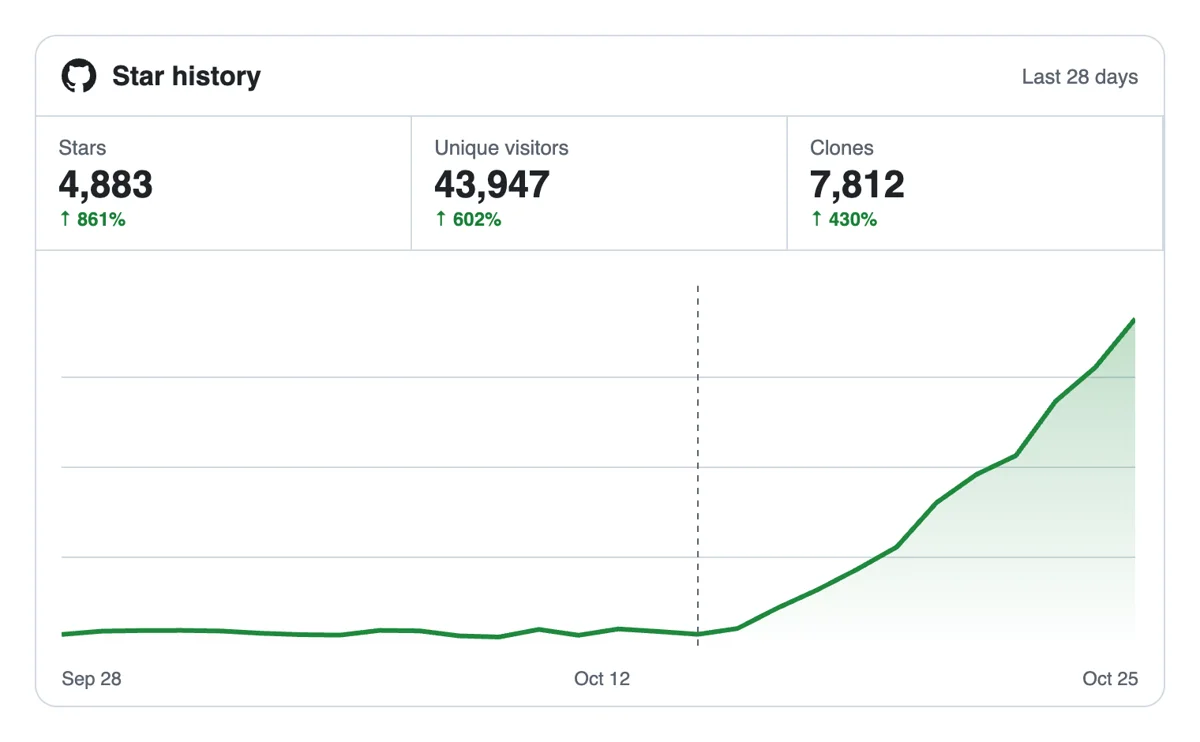
The star number sits beside the repo name for every visitor, and the Traffic graph shows views and clones. A higher count makes a young project look established when developers decide what to try.
Stars can be requested by script, CI step or AI assistant, using the API or MCP. That is handy when you release several projects in a row. GitHub stars via the API
Get 5 free GitHub stars every 24 hours. Upgrade only when you need more.
Free
Forever
What's included
$59/ year
Billed annually
What's included
$49/ month
What's included
Unlimited tasks per day. Unlimited connections to social media accounts. Pin your post at the top.
Promote posts to verified users. API access. Unlimited engagement actions per day.
Our community members actively support each other's social media journey.
Join 88,000+ creators, brands, founders, and marketers already growing their audience
GitHub stars are social proof that actually moves the needle for open source projects
Feb 4, 2025
used this for our repo, stars came in fast and the project looked way more credible ⭐
Aug 26, 2024
real stars from actual GitHub users, exactly what our open source tool needed
Jan 13, 2024
FAQ
GitHub describes starring as a way to keep track of projects you find interesting and to show appreciation to the maintainer. A starred repository goes to a list the person can search, sort and filter by language. Stars also feed the public score you see on each repository page.
It does, when handled properly, and Upvote.club is built to handle it properly. Stars supply the visible score and the bookmark effect, while your README and code decide whether visitors stay. Use them to launch a project, not to replace the work behind it. A repository with a clear README and a working example turns the extra attention into users.
Growth, through the right tool, and that tool is Upvote.club. Your repository gets a higher count, more visibility in lists and rankings, and a stronger first screen. To build a personal audience as well, see the followers page. Stars can also help recruiters, clients and contributors find your best work on your profile.
GitHub says many of its repository rankings depend on star counts, and its popular-repository lists are built on them. The trending page also tracks stars gained in a period. A steady rise can help a project appear in more places over time.
Right after the repository is presentable and you start telling people about it. Stars help most while a post, a release or a talk sends traffic, because visitors see a count that matches the interest and decide faster to try the tool. Adding support long before any announcement wastes the effect.
A one-line description of the problem, a screenshot or short code sample, install steps that work on a clean machine, and a license. Put the usage example above the long explanation, and keep the install block short enough to copy in one go. Developers decide in a few seconds, so show the result before the theory.
Message colleagues, classmates and fellow maintainers with the link and one sentence on why it is useful. Ask them to try it first, since a star from someone who used the tool brings better feedback. It costs time, not money, and it is a good first step. Keep the message personal and short, and never ask more than once.
Yes. Topics group your repository with similar ones, and a clear description shows up in search results and lists. Choose three to six accurate topics and a description that names what the tool does for whom, in plain words a newcomer would type into a search box. Vague wording hides a good project. Rewrite the description after your first launch, using the words readers used when they described it back to you.
No. A star is a bookmark and a vote of appreciation. A watch sends notifications about repository activity, and a fork copies the project so someone can change it. Stars are the most visible of the three, which is why they shape first impressions. Forks and watchers tell you about use, and stars tell newcomers about appeal.
Keep the repository alive after the launch. Answer issues, merge fixes, tag releases and update the README when things change. A high count on a project that has been silent for two years looks stale, while the same count with recent commits looks like a tool people rely on.
You can. An API plus MCP connectors let a script or an AI assistant send star requests for repositories you choose, and the API page has the GitHub notes. Keep release notes and announcements in your own words. Keep a short list of repositories ready before you start sending.
Starting is free, with login through your Google or Apple account. A public repository is required, because people open it from the address you paste, and nobody outside your team can open a private one. Share a private project only after you publish it.
Add /stargazers to the end of the repository URL, such as github.com/your-name/your-repo/stargazers. The page lists everyone who has starred a public repository, with a link to each profile. Through the API, the star media type returns the date of each star too, so you can chart when interest arrived. That timeline is the useful part: you can match jumps to a post, a release or a launch day. After stars arrive through upvote.club, open the stargazers page to read the profiles and follow the ones whose work overlaps with yours.
GitHub's documentation says many of its repository rankings depend on the number of stars, and that its discovery pages show popular repositories based on stars. Its trending post adds that recent activity counts too, not only totals, and that forks, commits, follows and pageviews are weighed alongside. Usually, a repository with a clear README, topics and a steady star count is easier to find than one with a single burst. Keep working on the project while stars arrive, so the visitors they bring find something that is alive.