Table of Contents
- Table of Contents
- Why Most LinkedIn Posts Stall Before They Start
- The first hour decides whether the post gets a second chance
- Setting Up Your Profile and Network to Convert
- Tighten the surface area before you publish
- Choosing the Right Format for Maximum Likes
- Pick the format that matches the job
- Writing Hooks, Bodies, and CTAs That Earn Reactions
- Use a simple three-part writing pattern
- Rewrite the post around one reader and one idea
- Timing, Cadence, and the Golden Hour Workflow
- Post when the feed is more responsive
- Don't confuse more posting with better posting
- Driving Real Engagement in the First Hour
- Warm the room before you hit publish
- Use community help without losing the plot
- A/B Testing, Analytics, and Troubleshooting
- Run a clean test, not a messy experiment
- Fix the most common problems first

You hit publish, refresh the tab, and watch the likes crawl in. A few people react, then the post goes quiet while your feed keeps moving. That's the part that makes LinkedIn feel harder than it should, because the post didn't fail in the first minute, it just didn't get enough early proof to earn another look.
That's why how to get more likes on LinkedIn posts is less about clever phrasing and more about shaping the first wave of attention. The feed rewards posts that give people a reason to stop, react, and stay in the thread. If you can control what happens in that opening window, the rest of the post has a chance to work.
Table of Contents
- Why Most LinkedIn Posts Stall Before They Start
- Setting Up Your Profile and Network to Convert
- Choosing the Right Format for Maximum Likes
- Writing Hooks, Bodies, and CTAs That Earn Reactions
- Timing, Cadence, and the Golden Hour Workflow
- Driving Real Engagement in the First Hour
- A/B Testing, Analytics, and Troubleshooting
Why Most LinkedIn Posts Stall Before They Start
You've probably seen it happen. A post looks fine, maybe even sharp, and the first few people who see it give polite likes. Then nothing. No second wave, no steady trickle, just a flat line that makes the post feel older than it is.
That stall usually isn't about talent. It's about the first screen and the first reactions, because LinkedIn creators are pushed to use strong opening visuals and hooks since the first screen of a post helps decide whether someone stops scrolling and reacts. The same benchmark framing says multi-image posts are the strongest format for earning likes in 2026 benchmark data, and a separate analysis of 10,000+ posts found an 87% engagement advantage for posts with images or carousels versus text-only posts, which tells you the feed keeps rewarding posts that look alive fast enough to earn a second look. SocialInsider benchmark, Viral Brain analysis
The first hour decides whether the post gets a second chance
The practical version is simple. LinkedIn doesn't need your post to be universally loved, it needs early signals that real people found it worth touching. Likes are a low-friction signal, so they often serve as the first proof that the post is worth wider distribution.
Practical rule: treat the first hour like a live test, not a passive waiting period.
If the post gets a few reactions from the right people quickly, it usually has a better shot at a second push. If it sits there with no movement, the feed has less reason to keep spending attention on it. That's why the problem is not just writing better posts, it's building posts that can earn early reactions from people who care.
Setting Up Your Profile and Network to Convert
A strong post still has to pass a quick profile check. Someone sees your content, taps your name, and decides within seconds whether you are the kind of account they want to follow, trust, or like again. The profile has to do part of the selling before the post ever lands.
Keep the setup direct. Make the headline say who you help or what problem you solve, not a puffed-up job title. Your banner should match the feed you want to create, and the About section should read like a short explanation of why your posts exist. If your profile feels vague, people may enjoy the post but still skip the follow, and that weakens the starting point for the next post.
Tighten the surface area before you publish
The people who see your post in the first 30 minutes matter more than the people who discover it later. A connected network of relevant contacts does more for early reactions than a giant list of random connections. If your network is full of inactive accounts or people outside your topic, the early window gets noisier and weaker.
A fast self-audit helps:
- Headline: does it name a real audience or problem?
- Banner: does it match the content you post?
- Featured section: does it point to one strong proof point or offer?
- Connections: are enough of your recent connections relevant?
- Old contacts: are you still connected to people who never react to your posts?
If your profile needs a cleaner connection path, LinkedIn connection setup guidance for surface area optimization can help you think through the networking side of that surface area. For people who want a reference point on product terminology, LinkedIn Likes (catalog name) is the catalog name, with no short description attached.
Choosing the Right Format for Maximum Likes
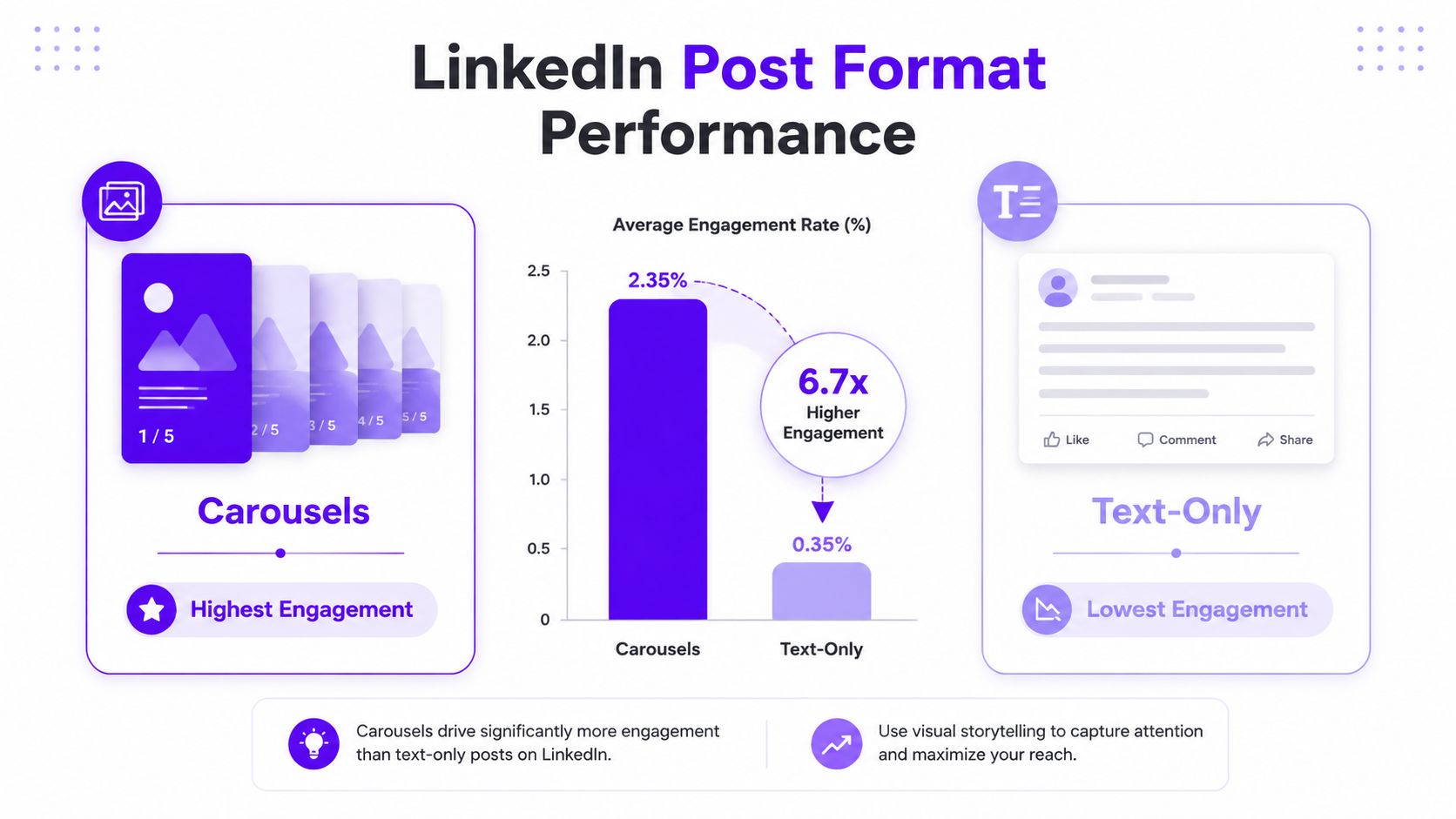
Format is where a lot of LinkedIn posts lose momentum before the writing even gets a chance. The container shapes whether people stop, skim, or keep moving. Benchmark data from SocialInsider benchmark and the independent Viral Brain analysis point in the same direction, image-led posts, especially multi-image posts and carousels, outperform text-only updates for likes. The chart below shows the same pattern visually.
Pick the format that matches the job
If the goal is likes, carousels and single-image posts should usually be the default. They create a visual stop sign in the feed and make the first screen feel deliberate instead of generic. Text-only posts can still work, but they need a sharper hook and cleaner pacing because they do not get the same immediate lift from a visual cue.
A practical rule:
- Carousel: use it for a process, framework, checklist, or before-and-after story.
- Single image: use it when one chart, quote card, screenshot, or visual proof point can carry the point.
- Text-only: use it when the idea is strong enough to hold attention without visual support.
- Video: skip it if the message is easier to scan than to watch, unless motion or voice is doing real work.
Caption length matters too. The same analysis found the 500 to 1,200 character range performed best, which lines up with how LinkedIn hides longer copy behind the see more fold. A caption that wanders before it gets to the point has already lost people before the second line lands.
For creators who want examples of how visual pacing works in short-form hooks, engaging video content tips is a useful cross-reference, even though the platform is different. The lesson is the same, get to the point early and keep the next beat obvious. For a complementary channel reference, LinkedIn video posting guidance is the internal product page.
Writing Hooks, Bodies, and CTAs That Earn Reactions
A post usually wins or loses in the first line. If the opening feels vague, polite, or self-contained, people keep scrolling. The hook has one job, create tension fast enough that the next line feels worth reading.
Use a simple three-part writing pattern
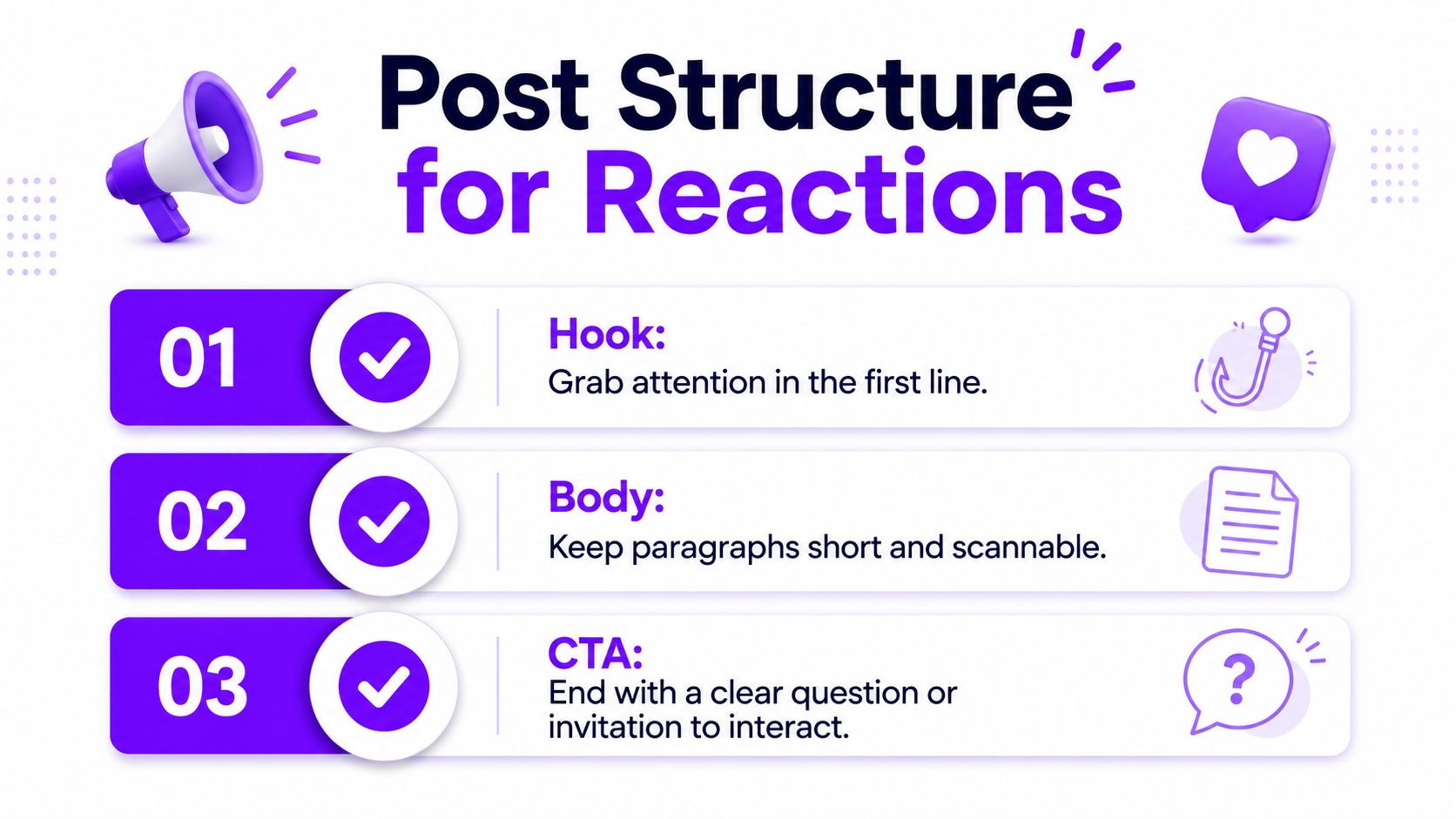
Open with a hook that makes a clear promise or takes a pointed position. Keep the body tight enough to scan in chunks, then end with a CTA that asks for a specific reaction instead of a loose “thoughts?” The pattern is hook, proof, reaction, and it gives the reader a clean path through the post.
A structure that works well:
- Hook: name the tension, mistake, or contradiction right away.
- Body: make one point, support it with a detail, and keep paragraphs short.
- CTA: ask one specific question, request a choice, or invite a direct reaction.
A stronger closing prompt is, “Which format gets you more reactions, carousels or single-image posts?” That is easier to answer than a generic “agree?” because it gives the reader a clear lane.
The same discipline shows up in short-form video hooks, and the principles in engaging video content tips translate well to LinkedIn copywriting. Get to the point early, then make the next beat obvious.
Practical rule: if the reader cannot tell what the post is about by the second line, the hook is doing too much work.
Rewrite the post around one reader and one idea
The advice that keeps proving itself on LinkedIn is simple. Narrow the audience and keep one idea per post. Molly Stovold's post argues that generic advice doesn't land anymore, while Artem Chetverykov pushes people to mention only the people who care about the topic. The useful decision is figuring out who to leave out so the right readers feel the post was written for them. Molly Stovold's LinkedIn post
Here's the kind of rewrite I'd make:
- Bad version: “A few thoughts on content creation and why consistency matters.”
- Better version: “If your LinkedIn posts get polite likes but no real discussion, your hook is probably too broad.”
- Body: “One idea per post works better than trying to cover your entire opinion stack in one update. Give the reader one reason to react.”
- CTA: “What's the post format that gets you the fastest first-hour reaction?”
For structure ideas beyond LinkedIn, the LinkedIn post framework example adds a shared enemy, specific numbers, a picture or infographic, and a question or PS to reduce friction.
If you care about reaction quality, not just raw volume, keep the hashtags tight. A few relevant hashtags can help, but overtagging and spammy promotion make the post feel sloppy. engaging post saving guidance fits that workflow because saves often show the post had enough weight to stick.
Timing, Cadence, and the Golden Hour Workflow
The Tuesday-versus-Saturday data is hard to ignore. In the analysis of 10,000+ posts, Tuesday roughly doubled engagement compared with Saturday, with 0.92% vs. 0.46%. That doesn't mean Tuesday is magic, but it does mean timing is not random noise. Viral Brain analysis
Post when the feed is more responsive
If you want a practical window, post on a weekday when your audience is already in work mode. The benchmark framing points to the first screen as a key driver of reactions, so a strong post published into a responsive window has a better shot at earning the early proof it needs. I'd choose a consistent weekday slot rather than changing times every week, because consistency makes it easier to see what moved the result.
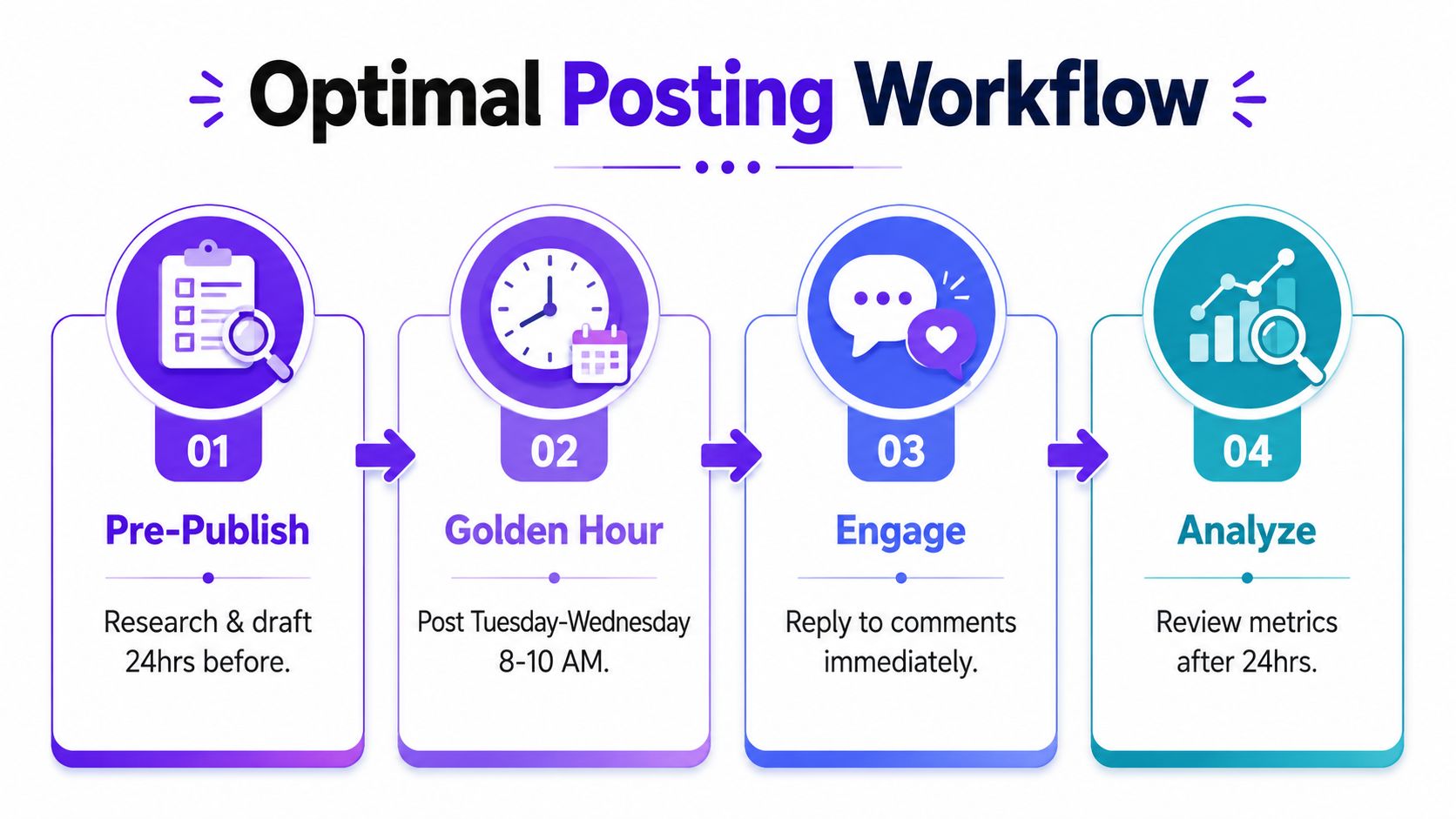
A clean routine looks like this:
- Pre-publish: draft the post ahead of time and comment on relevant posts in your niche before you publish.
- Publish: post in a weekday window when your audience is active.
- Engage fast: reply to early comments right away so the thread keeps moving.
- Review later: compare the post against your recent baseline after it has had time to settle.
Don't confuse more posting with better posting
Posting too often can hurt the attention each post gets. LinkedIn's guidance warns against overuse of hashtags and too-frequent posting because both can hurt visibility, and the same logic applies to cadence. A feed full of rushed posts can train your audience to skim instead of stop. LinkedIn visibility guidance
The better move is to publish fewer posts that are cleaner, sharper, and easier to react to. Then spend the rest of your energy on the first hour.
Driving Real Engagement in the First Hour
The first hour is where a good post becomes a visible post. If nobody reacts early, the post can still be useful, but it has a harder path to broader circulation. That's why I treat the first-hour window as something to engineer, not hope for.
Warm the room before you hit publish
Before posting, spend a few minutes in the same niche. Leave thoughtful comments on posts from people your audience already reads, because that puts your name in circulation before your own post goes live. Then publish when those same people are more likely to still be active.
After the post goes live, reply quickly to the first comments. That's not about gaming the system, it's about turning the post into a conversation while the topic is still fresh. If the thread feels alive, more people stop to read it.
With our Upvote.club service, you can also seed that opening window through a community-based workflow. We let members earn points by completing tasks for others, then use those points to create their own tasks, so the likes and comments come from verified human accounts without bots or password sharing. Accounts are verified with an emoji-based system, and the platform is built around transparent task completion rather than fake automation.
Real early engagement doesn't replace a good post, but it can give a good post the first push it needs.
If you want the same logic applied to comment velocity on LinkedIn, LinkedIn comment workflow is the internal product page I'd point to. The point is to support the Golden Hour, not to substitute for relevance, because a weak post with fake energy still doesn't turn into a durable result.
Use community help without losing the plot
The trade-off matters. Early engagement helps most when the post already has a clear audience and a sharp hook. If the post is vague, extra reactions won't fix the core problem.
That's why I'd use community-driven support only after the post is already built to earn reactions naturally. The goal is to seed the first wave so the algorithm shows the post to more organic viewers, not to hide a weak idea under activity. For a walkthrough of how the same mechanics can support other platforms in the same family, there's also a live demo-style reference embedded in the workflow video below.
A/B Testing, Analytics, and Troubleshooting
Once the post machine is running, measurement keeps you from guessing. I test one variable at a time. Change the hook, the format, the length, or the posting time, then compare results a week later so one lucky post does not get mistaken for a real pattern.
Run a clean test, not a messy experiment
The loop is simple.
- Pick one variable. Keep the hook and the format fixed if you are testing timing.
- Create two versions. Make the rest of the post as close as possible.
- Publish apart. Give each version its own week or post slot.
- Compare the winner. Review likes, impressions-to-like ratio, and comment quality.
If you want a sharper benchmark for reaction quality on B2B accounts, the guide for B2B LinkedIn growth is a useful companion reference. It helps when you care about how audience fit and engagement quality work together, not just the like count alone.
Fix the most common problems first
When a post underperforms, I look at three things first.
- Low impressions: the likely cause is a weak first screen or a network that does not match the topic. Fix the opening visual or narrow the audience.
- Low reaction rate: the post probably asked too much from the reader or felt too broad. Fix the hook and format before you rewrite the whole idea.
- Low comment rate: the CTA may be too vague. Ask a sharper question or ask readers to choose between two clear options.
The larger lesson is straightforward. Likes are not the whole point, but they are an early signal that your post is heading in the right direction. When the reaction rate improves, the rest of the distribution usually starts from a better position.
If you want a cleaner way to seed the first hour without bot risk, we built Upvote.club for community-driven engagement across social platforms, including LinkedIn. Visit Upvote Club if you want real task-based engagement, verified human completion, and a workflow you can plug into your next LinkedIn post instead of guessing what to do after publish.