

Table of Contents
- What Is Social Media Engagement?
- What Are Social Media Engagement Metrics?
- Matching Your Metrics to Your Mission
- From Big Goals to Specific KPIs
- Real-World Goals and the Metrics That Matter
- How to Calculate Social Media Engagement Rate
- What Is Engagement Rate?
- Engagement Rate by Reach (ERR)
- Engagement Rate by Post (ER Post)
- Platform-Specific Calculations
- Engagement Rate Formulas by Social Media Platform
- Setting Benchmarks That Make Sense
- Looking Inward with Historical Benchmarking
- Sizing Up the Competition
- Finding and Using Industry Data
- Turning Your Numbers Into a Story: How to Build a Simple Reporting Dashboard
- What Should Go In Your Dashboard?
- Setting a Rhythm for Your Reporting
- Early Engagement: Why the First Hour Matters
- Got Questions About Measuring Engagement?
- “So, What’s a Good Engagement Rate, Anyway?”
- “Should I Use Engagement Rate by Reach or by Followers?”
- “How Often Should I Be Reporting on This Stuff?”

Measuring social media engagement means tracking how people interact with your content and comparing those interactions with reach, impressions, views, or followers. Rate-based engagement metrics usually reveal more than raw counts because they show performance relative to audience exposure or size.
Start with the outcome you want—awareness, consideration, traffic, leads, or sales—and select metrics that reflect progress toward it. A thousand likes may look impressive, but the right engagement rate and conversion metrics tell you whether the content actually supported your goal.
What Is Social Media Engagement?
Social media engagement is the collection of actions people take in response to your content. Depending on the platform, those actions can include likes, reactions, comments, replies, saves, shares, reposts, link clicks, profile visits, video interactions, and follows.
Engagement shows that someone did more than passively view a post. However, not every interaction carries the same value: a save may indicate lasting interest, a comment may start a conversation, and a link click may move someone closer to conversion. For a broader definition, see what engagement rate measures and why the denominator matters.
What Are Social Media Engagement Metrics?
Social media engagement metrics are the individual counts and rates used to evaluate how audiences respond to content. Core metrics include likes, comments, replies, saves, shares, reposts, clicks, reach, impressions, views, follower growth, and engagement rate.
- Likes and reactions: Quick indicators that people noticed and responded positively to a post.
- Comments and replies: Signals of active conversation, questions, or stronger audience interest.
- Saves: Evidence that users found the content valuable enough to revisit.
- Shares and reposts: Measures of how often users distributed content to another audience.
- Link clicks: Actions that move users from a social platform to a website or landing page.
- Reach: The number of unique accounts that saw the content.
- Impressions or views: The total number of times content was displayed or viewed, depending on the platform.
- Follower growth rate: The pace at which an account gains or loses followers.
- Engagement rate: Total interactions expressed as a percentage of reach, impressions, views, or followers.
Raw metrics describe what happened. Rate-based metrics add context, making it easier to compare accounts, posts, campaigns, and reporting periods of different sizes.
Matching Your Metrics to Your Mission
The right social media metrics depend on your objective. Measurement becomes useful when each KPI answers whether your strategy is moving toward a defined business or communication goal.
Avoid vague targets such as “get more followers.” Decide whether you need broader awareness, stronger audience relationships, more website traffic, qualified leads, or completed purchases, then track the actions closest to that result.
From Big Goals to Specific KPIs
A marketing funnel provides a practical way to turn broad goals into measurable KPIs. Each stage requires a different view of performance:
- Awareness: Track reach, impressions, video views, mentions, and follower growth to understand visibility.
- Consideration: Track comments, replies, saves, shares, profile visits, and engagement rate to measure active interest.
- Conversion: Track link clicks, click-through rate, sign-ups, leads, purchases, and conversion rate to measure completed actions.
The process is straightforward: define the goal, match it to an appropriate metric, and analyze the resulting data.
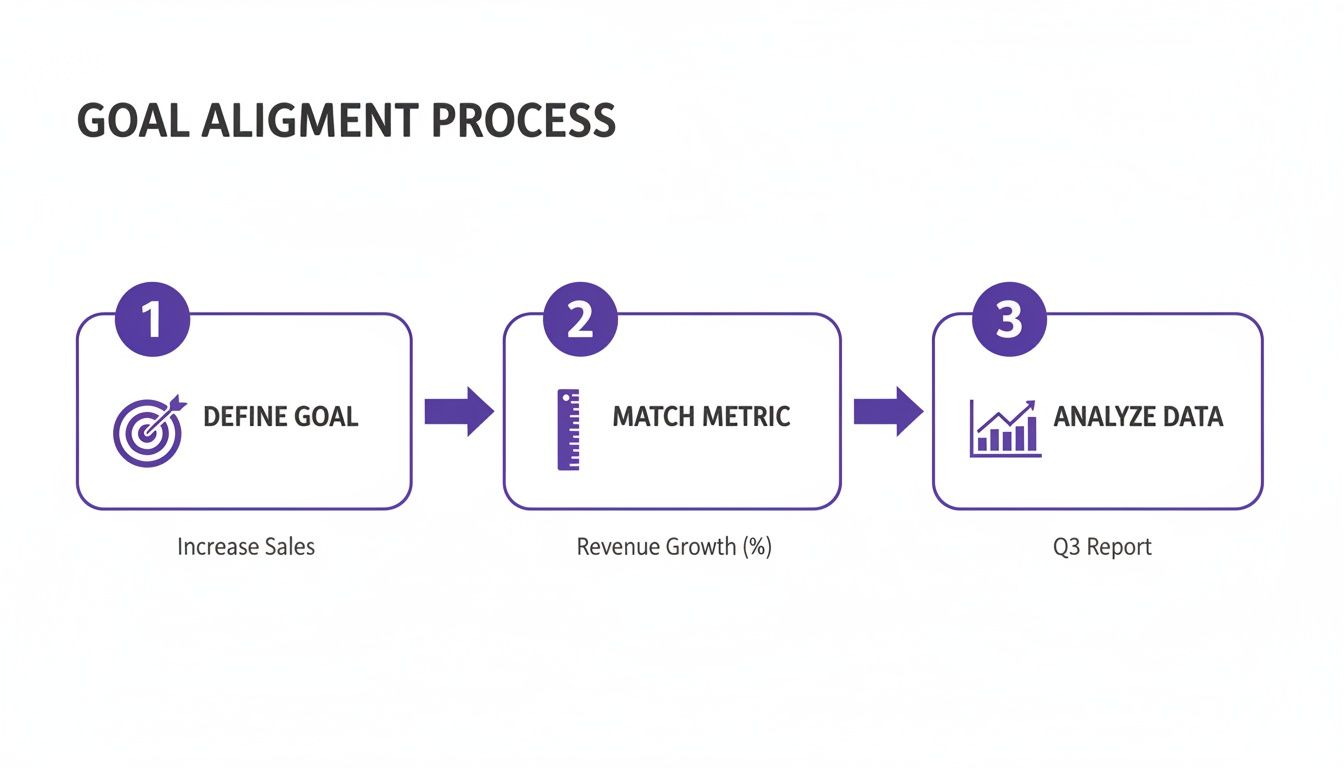
This sequence prevents teams from collecting numbers without knowing what decisions those numbers should support.
Real-World Goals and the Metrics That Matter
Match each real-world goal with metrics that directly show progress toward that outcome. For brand awareness, track reach, impressions, and follower growth; for consideration, track comments, saves, shares, profile visits, and video interactions; for conversion, track link clicks, leads, purchases, and conversion rate.
If your primary goal is brand awareness, focus on metrics that show how widely your content is being distributed:
- Reach: How many unique accounts saw the post?
- Impressions: How many total times was the content displayed?
- Follower growth rate: How quickly is the audience expanding?
If your goal is website traffic, your measurement should shift toward actions that take users beyond the social platform:
- Click-through rate: What percentage of impressions or viewers resulted in a link click?
- Website referral traffic: How many visitors arrived from each social channel?
- On-site conversions: How many social visitors completed the desired action?
The core principle is simple: if a metric does not help you understand progress toward a specific goal, it should not dominate your report.
If you want to supplement your normal publishing workflow, Upvote.club uses an earn-and-spend community model. New accounts start with 13 free points and 2 task slots; members complete tasks for others to earn points and can create tasks for likes, comments, saves, or followers. Optional plans add capacity.
How to Calculate Social Media Engagement Rate
To calculate social media engagement rate, add the interactions included in your measurement and divide that total by reach, impressions, views, or followers. Multiply the result by 100 to express it as a percentage.
The denominator must match your question. Reach or impressions help evaluate response among exposed users, while follower count offers a stable account-level denominator for tracking over time.
What Is Engagement Rate?
Engagement rate is the percentage of an audience that interacted with a post or account relative to a selected denominator. It turns raw interactions into a comparable measure of how effectively content prompted a response.
The way marketers evaluate engagement has changed. A decade ago, many reports focused heavily on follower counts and total likes. Rate-based measurement became more useful because it exposed the limits of those vanity metrics.
For example, 1,000 likes on an account with one million followers represents 0.1% of that follower base. The same 1,000 likes on an account with 10,000 followers represents 10%. The raw count is identical, but the relative performance is completely different.
Two widely used post-level formulas are Engagement Rate by Reach and Engagement Rate by Post. They answer different questions, so label the chosen formula clearly in every report.
Engagement Rate by Reach (ERR)
Engagement Rate by Reach shows what percentage of the unique people reached by a post interacted with it. It is generally the stronger choice when you want to evaluate how compelling the content was to people who actually saw it.
ERR = (Total engagements on a post ÷ Total reach of the post) × 100
Use ERR to compare content quality across posts. Because it excludes followers who never received the post, it reduces distortion from inactive followers and uneven algorithmic distribution.
Engagement Rate by Post (ER Post)
Engagement Rate by Post measures a post’s interactions relative to the account’s total follower or subscriber count. It provides a consistent denominator for monitoring the overall responsiveness of an audience over time.
ER Post = (Total engagements on a post ÷ Total followers) × 100
ER Post can be affected by inactive followers and changes in distribution. Use it for a stable account-level benchmark, but do not assume every follower had an opportunity to see the post.
Use ERR when judging how exposed users responded to individual content. Use ER Post when monitoring engagement relative to total audience size. Tracking both can provide a more complete view.
Platform-Specific Calculations
Platform-specific engagement calculations use the interactions and exposure metric available on each network. Decide which actions count as engagements, select reach, impressions, views, or followers as the denominator, and keep that definition consistent.
Shares and reposts remain valid engagement metrics on platforms that report them, even when a separate community or analytics tool does not offer those actions as a product feature.
Engagement Rate Formulas by Social Media Platform
The following table provides practical starting formulas for major platforms. Platform analytics and terminology can change, so record the exact metrics included in your report.
| Platform | Engagement Rate by Reach or Exposure | Engagement Rate by Post |
|---|---|---|
| (Likes + Comments + Saves) ÷ Reach × 100 | (Likes + Comments + Saves) ÷ Followers × 100 | |
| X/Twitter | (Likes + Replies + Reposts) ÷ Impressions × 100 | (Likes + Replies + Reposts) ÷ Followers × 100 |
| TikTok | (Likes + Comments + Shares) ÷ Views × 100 | (Likes + Comments + Shares) ÷ Followers × 100 |
| (Reactions + Comments + Shares) ÷ Views or Impressions × 100 | (Reactions + Comments + Shares) ÷ Followers × 100 | |
| YouTube | (Likes + Comments + Shares) ÷ Views × 100 | (Likes + Comments + Shares) ÷ Subscribers × 100 |
Instagram engagement example: Suppose a Reel reaches 5,000 accounts and receives 400 likes, 50 comments, and 50 saves.
- Total engagements: 400 + 50 + 50 = 500
- ERR: (500 ÷ 5,000) × 100 = 10%
- ER Post with 10,000 followers: (500 ÷ 10,000) × 100 = 5%
X/Twitter engagement example: Suppose a post records 20,000 impressions, 800 likes, 100 replies, and 100 reposts.
- Total engagements: 800 + 100 + 100 = 1,000
- Rate by impressions: (1,000 ÷ 20,000) × 100 = 5%
- ER Post with 15,000 followers: (1,000 ÷ 15,000) × 100 = 6.67%
For an optional community-based way to support early X activity, members can complete tasks to earn points and use those points to create tasks for Twitter likes. At the minimum price, two X likes cost approximately four points. Sign-in is available through Google or Apple, and Upvote.club does not ask for social account passwords.
TikTok engagement example: Suppose a video receives 100,000 views, 8,000 likes, 500 comments, 1,000 shares, and 500 saves.
- Total engagements: 8,000 + 500 + 1,000 + 500 = 10,000
- Rate by views: (10,000 ÷ 100,000) × 100 = 10%
- ER Post with 50,000 followers: (10,000 ÷ 50,000) × 100 = 20%
LinkedIn engagement example: Suppose a post records 2,500 views or impressions, 150 reactions, 40 comments, and 10 shares.
- Total engagements: 150 + 40 + 10 = 200
- Rate by views or impressions: (200 ÷ 2,500) × 100 = 8%
- ER Post with 5,000 followers: (200 ÷ 5,000) × 100 = 4%
These formulas make performance easier to compare, but consistency is essential. If one report includes saves and another does not, or one uses reach while another uses followers, the resulting rates are not directly comparable.
Setting Benchmarks That Make Sense
A useful social media engagement benchmark compares your rate with relevant historical, competitor, or industry data calculated using the same formula. A 4% rate has little meaning until you know the platform, audience size, content type, denominator, and prior performance.
Use internal history as your primary baseline, then add external comparisons for context rather than treating one universal percentage as the definition of success.

Looking Inward with Historical Benchmarking
Historical benchmarking compares current engagement with your own results from previous weeks, months, or quarters. It creates a baseline tailored to your account, audience, platform mix, and publishing habits.
Ask whether engagement rates are trending upward, whether a new format increased saves or comments, and whether campaign content performed better than evergreen posts. Your history is often the most reliable way to determine whether strategic changes are producing progress.
Sizing Up the Competition
Competitive benchmarking compares your engagement rates with similar accounts or broader industry averages. It helps establish realistic targets and shows where your content sits within its immediate market.
Compare like with like. Account size can materially affect engagement rates because smaller accounts often reach a more concentrated or responsive portion of their audience. A 10,000-follower account should not be assessed against a global brand with millions of followers without adjusting for that difference.
Formula choice also matters. A competitor rate calculated against followers cannot be compared directly with your rate calculated against reach. Match the platform, denominator, account size, post type, and reporting period wherever possible.
Finding and Using Industry Data
Industry benchmark data can help you understand the wider market, but it should supplement your internal baseline. Use current sources, review their methodology, and confirm that their engagement definitions match yours.
- Conduct manual research: Select five to ten close competitors and calculate rates for a consistent sample, such as their latest ten posts.
- Review industry reports: Analytics providers often publish annual platform and sector benchmarks. Check the publication date, sample size, and formula.
- Use analytics tools: Paid tools can automate competitor tracking and reduce the time required to maintain external benchmarks.
If your historical average is 2% and comparable competitors average 3.5% using the same formula, a target of 3% next quarter may be ambitious but credible. Avoid turning an external average into a guarantee for every post.
Upvote.club members can create tasks for likes, comments, saves, or followers when those actions fit their campaign. Members earn points by completing tasks for others, while optional plans add capacity. Track any resulting activity in the same dashboard as your other content and compare it with your existing baseline.
Turning Your Numbers Into a Story: How to Build a Simple Reporting Dashboard
A simple social media reporting dashboard organizes goals, engagement metrics, benchmarks, and trends in one place. Its purpose is to show what changed, why it may have changed, and what action the team should take next.
You do not need expensive software to begin. Google Sheets can handle tables, formulas, and charts, while Looker Studio can turn those data sources into interactive reports.
- Google Sheets: Use it to collect post-level data, calculate rates, and chart performance over time.
- Looker Studio: Use it to combine data sources and build shareable visual reports.
A good dashboard replaces a collection of disconnected numbers with a clear view of account health, content performance, and progress toward defined goals.
What Should Go In Your Dashboard?
Your dashboard should contain a high-level summary, platform-specific performance, and a list of top-performing posts. Together, these views show overall progress and the individual content responsible for it.
Start with a high-level summary for the reporting period:
- Total follower growth
- Overall engagement rate, with the formula labeled
- Total reach, impressions, or views
- Website clicks from social channels
- Conversions tied to social traffic, when applicable
Add a platform-specific breakdown so you can compare channels without mixing their definitions. This view might show that Instagram is producing strong saves while X is generating more website clicks, helping you decide where each platform fits in the strategy.
Finish with a top-performing posts section. Rank three to five posts by the metric connected to your goal, such as ERR, saves, comments, or click-through rate. Include the post date, format, topic, exposure metric, total engagements, and calculated rate.
Setting a Rhythm for Your Reporting
A useful reporting rhythm combines quick weekly checks, deeper monthly analysis, and strategic quarterly reviews. Use the same definitions and date ranges each time so trends remain comparable.
- Weekly: Identify top posts, unusual spikes, and sudden declines that may require a quick adjustment.
- Monthly: Review broader trends, content formats, audience growth, and progress toward campaign goals.
- Quarterly: Reassess targets, channel priorities, budget allocation, and long-term content themes.
Automation can reduce manual data collection, but every automated report still needs consistent definitions. Record whether each rate uses reach, impressions, views, followers, or subscribers.
For members using Upvote.club tasks, dashboard progress can be reviewed alongside the rest of the campaign data. The Chrome extension can make task completion faster; your reporting dashboard should still focus on aggregate performance and movement toward the chosen KPI.
Early Engagement: Why the First Hour Matters
Early interactions can help a platform assess initial audience response, although ranking systems use many signals and no first-hour result guarantees wider distribution. Monitor likes, comments, saves, shares, watch time, and clicks soon after publishing, then compare that early response with the post’s eventual reach and engagement rate.
If an earn-and-spend community fits your workflow, Upvote.club accounts begin with 13 free points and 2 task slots. Members complete tasks for others to earn points and can create tasks for likes, comments, saves, or followers; optional plans add capacity. You can sign in with Google or Apple without providing social passwords.
Got Questions About Measuring Engagement?
The best measurement approach depends on your platform, audience, goals, and available analytics. These answers address three common reporting decisions.
“So, What’s a Good Engagement Rate, Anyway?”
There is no universal good engagement rate. A useful benchmark depends on the platform, industry, audience size, content format, and denominator used in the calculation.
Smaller accounts often record higher rates than very large brands because their audiences can be more concentrated and responsive. Instead of chasing one percentage, compare your results with your historical baseline and competitors of a similar size using the same formula.
“Should I Use Engagement Rate by Reach or by Followers?”
Use Engagement Rate by Reach when you want to evaluate how people who actually saw a post responded to it. Use follower-based ER Post when you need a stable denominator for tracking the responsiveness of the overall audience.
ERR reduces distortion from followers who were inactive or never received the post. Follower-based rates remain useful for long-term comparisons, but they should not be interpreted as the percentage of exposed users who engaged.
“How Often Should I Be Reporting on This Stuff?”
Report often enough to support decisions without reacting to every minor fluctuation. For many teams, weekly monitoring, monthly analysis, and quarterly strategic reviews provide a practical cadence.
- Weekly check-in: Spot posts that are outperforming or underperforming and make immediate adjustments.
- Monthly report: Analyze patterns across formats, topics, platforms, and campaign goals.
- Quarterly review: Use longer-term data to change priorities, budgets, or content pillars.
Consistency matters more than report volume. Use the same engagement definitions, formulas, and comparison periods so every update measures genuine change.
When you are ready to test a community-based workflow, join Upvote.club with 13 free points and 2 task slots. Complete tasks to earn points, use those points for supported likes, comments, saves, or follower tasks, and measure the results with the same engagement-rate framework used throughout this guide.
