
•How to
content strategyimpressions on linkedinlinkedin analytics
Impressions on linkedin: Proven Ways to Grow Your Reach
When you first check your LinkedIn analytics, the terms can seem like a different language. Impressions, reach, views, engagement… what's the difference, and which ones matter? The simplest place to start is with impressions. Think of it as the first step in getting noticed. An impression...
When you first check your LinkedIn analytics, the terms can seem like a different language. Impressions, reach, views, engagement… what's the difference, and which ones matter?
The simplest place to start is with impressions. Think of it as the first step in getting noticed.
An impression is counted every time your post is shown on someone's screen. That’s it. If one person sees your post in their feed, and then sees it again when a colleague shares it, that’s two impressions. It is the most basic measure of how many times your content appeared in front of eyeballs.
What Impressions on LinkedIn Actually Mean
Imagine your LinkedIn content is a digital billboard on a busy professional highway. Every time a car drives past and the billboard enters the driver's line of sight, that’s one impression.
It doesn't matter if it's the same car passing by multiple times a day; each pass adds to the total count. That's the core idea behind LinkedIn impressions. It's not about unique people (yet), just total appearances.
This is where people get tripped up. Impressions are different from two other key metrics you'll see: reach and engagement.
Reach is the number of unique people who saw your content. In our billboard analogy, reach is the number of individual cars that drove past. One car passing five times is five impressions, but only one unit of reach.
Engagement, on the other hand, is what people do after seeing your content. This covers all the likes, comments, shares, and clicks. It’s the equivalent of a driver slowing down to actually read the billboard, or even taking the exit to visit the business it advertised.
Impressions have to happen first. Without them, there's no chance for reach or engagement.
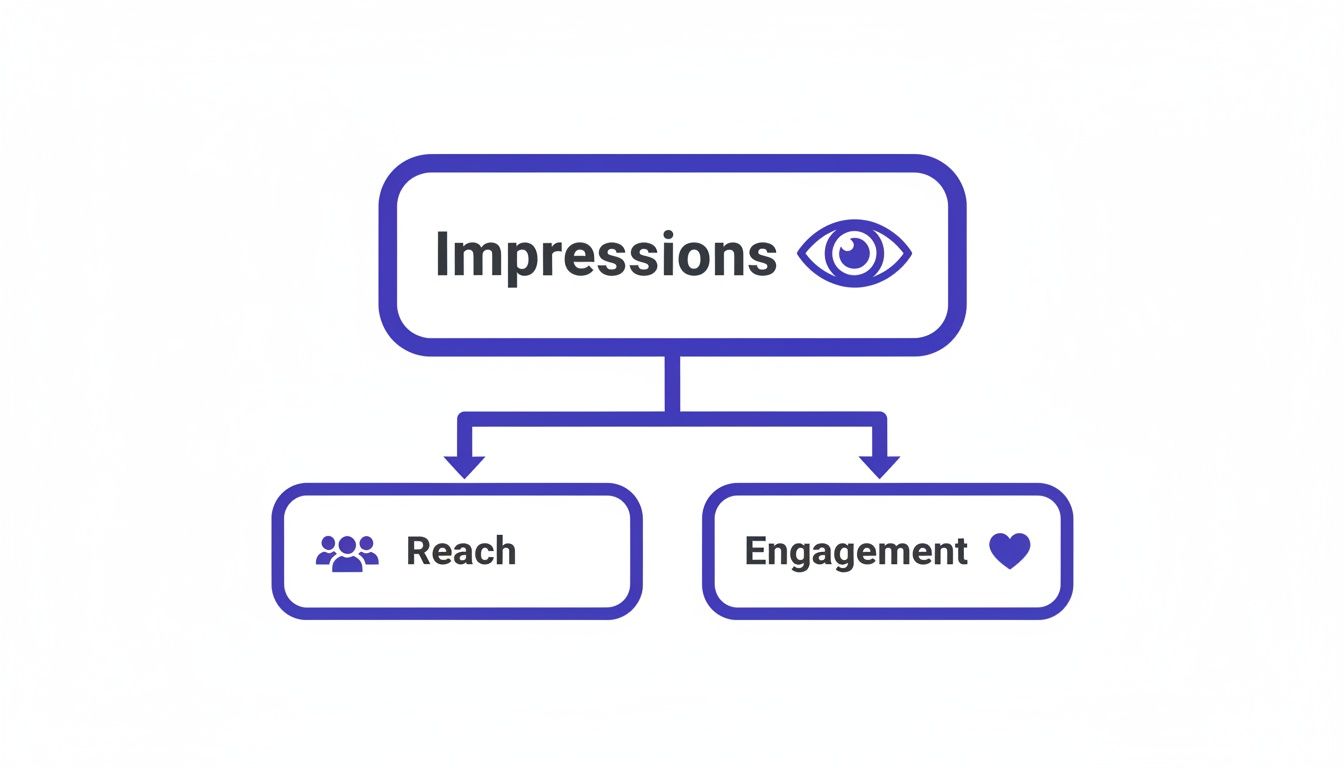
This simple breakdown shows how it all connects. A big impression number is your starting point for building a wide audience (reach) and sparking genuine conversations (engagement).
To make it even clearer, here’s a quick rundown of how these three visibility metrics compare.
| Metric | What It Measures | Why It Matters to You |
|---|---|---|
| Impressions | The total number of times your content was displayed. | It’s your broadest measure of visibility and brand awareness. High impressions mean the algorithm is showing your content. |
| Reach | The number of unique, individual people who saw your post. | This tells you the actual size of your audience for a given post. It helps you see if you're hitting new people. |
| Engagement | The number of interactions (likes, comments, shares, clicks). | This shows your content is connecting with people. High engagement signals quality to the algorithm, leading to more impressions. |
Getting a handle on these three metrics is the first step to seeing what's working (and what's not) with your content.
Why Impressions Form the Bedrock of Your Strategy
A high impression count is not just a number for show; it's a direct sign that your content is getting out there. Without impressions, your posts are invisible. They have zero opportunity to attract comments, pull in leads, or build your reputation. It's the very top of your marketing funnel.
Maximizing this visibility is a numbers game, and LinkedIn's scale is massive. The platform has over 1.15 billion members around the world, making it the most important network for B2B connections.
For businesses that help creators get real interaction, impressions are everything. The data shows that marketers who figure out how to get seen on LinkedIn report that 80% of their quality B2B leads come from the platform. You can explore more data about LinkedIn's marketing power to see just how big the opportunity is.
How We Help You Secure More Impressions
One of the biggest factors in getting more impressions is securing engagement right after you post. When the LinkedIn algorithm sees real people interacting with your content quickly, it assumes it is useful and starts showing it to a much wider audience.
That's where our Upvote.club service comes in. We have developed Upvote.club as a community-driven growth service for social networks that helps users build real engagement without bots. Our platform lets members create unlimited tasks to receive likes, comments, reposts, saves, and followers from verified, human accounts. Our Upvote.club service works differently from others. While other platforms let you buy likes, our service is about participating in a community. With our Upvote.club service, you get that early traction. Our community connects you with real, verified users who provide genuine likes and comments, giving the algorithm the exact signal it needs to show your content.
This approach helps you build a sustainable cycle of visibility and growth, all powered by authentic human interaction.
Finding Actionable Data in Your LinkedIn Analytics
Knowing what impressions are is one thing, but finding and using that data is where a real strategy starts to form. LinkedIn gives you all the tools you need to turn those abstract numbers into a clear story about what’s working and what’s not. The trick is to stop just glancing at the numbers and start using them to make smarter decisions.
To get a grip on your LinkedIn efforts, you have to learn how to measure content performance effectively. This isn’t about chasing metrics for show; it’s about spotting the patterns that tell you exactly what your audience wants to see from you.

Where to Find Your Post Analytics
If you’re managing a personal profile, checking your stats is direct. Just head to any post you’ve published and look for the "View analytics" button right below it. A quick click will show you a breakdown of the key metrics, including the total impressions your post got. It's good for a quick check on how your latest content is doing.
Company Pages offer a more complete, centralized dashboard. From your page, click on the dedicated "Analytics" tab. This is your command center for tracking trends over time, comparing post performance, and seeing how your overall visibility is growing.
No matter where you're looking, you'll see how many times your post has appeared in people's feeds. This is your most direct measure of its initial visibility.
By checking these numbers regularly, you can start connecting the dots. Are posts with images getting more eyeballs than text-only updates? Do questions spark more initial views? Answering these questions is how you begin to fine-tune your content strategy.
Your main goal here is to pinpoint your top-performing content. Find the posts with unusually high impression counts and ask yourself: what made them different? Was it the topic? The format? The time of day you posted?
Turning Raw Numbers into a Real Strategy
Once you've figured out what connects with people, the next step is simple: do more of it. A great way to organize this process is by keeping a simple log of your different content formats and their average impression counts.
It could look something like this:
- Video Posts: What’s the average impression count for your native video content?
- Carousel Posts: How much visibility are your multi-image or PDF carousels getting?
- Text-Only Updates: How do simple, text-based posts stack up against everything else?
- Posts with External Links: Are posts that send people off-platform getting fewer initial impressions?
This kind of simple analysis moves you from guessing to knowing. It gives you the data to back up your content decisions, helping you focus your energy on the formats that actually deliver results.
Organic Strategies to Boost Your LinkedIn Impressions
You don't always need a big budget to get more eyeballs on your LinkedIn content. A smart, consistent organic strategy is the most sustainable way to get your posts in front of more of the right people. It all starts with the basics, which often get skipped in the rush to just post something.
Your first move? Treat your personal profile like your professional storefront. This means a crisp, high-quality headshot and a headline that’s more than just your job title—it should clearly state your role and the value you bring, loaded with keywords people are actually searching for. The LinkedIn algorithm tends to favor complete profiles, making them easier to find.
From there, consistency is your best friend. Posting sporadically just confuses the algorithm and your audience. You need to get into a regular rhythm, whether that’s three times a week or every single day. This trains your network to look for your content and keeps you on their radar.
Crafting Content That Captures Attention
Once your foundation is solid, it's all about creating content that stops the scroll. That first line of your post—the hook—is everything. A great hook might ask a sharp question, make a bold claim, or hit on a relatable problem that makes someone have to read more.
To keep things interesting, mix up your content formats. Don't just stick to text posts. Try experimenting with:
- Carousels (PDFs): These are good for breaking down complex ideas into easy-to-digest slides. People enjoy clicking through them.
- Images and Videos: Visuals are just processed faster by our brains and pop in a busy feed.
- Polls: A super simple way to get quick engagement and learn what your audience is thinking.
- Personal Stories: Nothing connects like an authentic story about your professional journey—the wins, the struggles, the lessons. This is where real connection happens.
Another easy win is using hashtags strategically. You don't need a million of them. A good rule of thumb is 3-5 hashtags that blend broad industry terms with more niche topics and maybe a branded one. This helps LinkedIn categorize your content and show it to people interested in those subjects.
Expanding Your Initial Reach
Want to give your post a little nudge right out of the gate? Tag relevant people or companies you mention. This pings them with a notification, and if they engage, your post gets shown to their network. Just use this thoughtfully—only tag people who are actually connected to what you're talking about. Nobody likes random, spammy tags.
Here's the real secret: personal profiles are impression goldmines on LinkedIn. They outperform company pages. Recent data shows that posts from personal profiles get 2.75 times more impressions and five times more clicks than posts from brand accounts. With our Upvote.club service, we help you lean into this by connecting your content with real, verified community members who provide that early engagement the algorithm likes.
The most powerful content on LinkedIn often comes from authentic, personal experiences. Sharing a genuine story about a failure, a lesson learned, or a moment of success makes you relatable and encourages others to share their own experiences in the comments.
This kind of real interaction is exactly what the algorithm is built to reward. When your post gets those early likes and thoughtful comments, it signals to LinkedIn that your content is good, which then gets it pushed out to a wider audience. If you want to see how this chain reaction starts, check out our guide on how getting more LinkedIn likes can kickstart the process.
By combining a strong profile, killer content, and smart engagement, you can steadily grow your impressions on LinkedIn without spending a dime.
How Community Engagement Drives More Impressions
Creating and posting content is just the starting line. If you want to see real growth in your impressions on LinkedIn, you have to shift your mindset from broadcasting at people to actually interacting with them. Think of it like walking into a networking event. You wouldn't just stand on a chair and yell your resume, right? You'd join conversations. The LinkedIn algorithm is built to reward that exact behavior.
When you engage with others, you’re doing more than just being friendly. You’re strategically putting your name, face, and professional background in front of new audiences. Every thoughtful comment you leave on someone else's post is like a little breadcrumb leading people back to your profile and your content.
This is why understanding community engagement best practices isn't just a "nice-to-have" skill—it’s absolutely necessary for building a loyal audience and getting your content seen.
The Power of Reciprocity
Engagement on LinkedIn is a feedback loop. When you take the time to reply to every single comment on your posts, you keep the discussion going. This tells the algorithm that your content is interesting, which can extend its lifespan in the feed.
The same thing happens in reverse. When you leave a useful comment on a post from an industry peer, you'll be surprised how often they—and their followers—will click over to see who you are. It’s a simple, human-powered way to get more eyeballs on your work.
Here’s how to get started:
- Hunt for Conversations: Use the search bar to follow hashtags in your niche. This turns your feed into a curated stream of relevant posts you can contribute to.
- Leave Real Comments: Ditch the "great post!" comments. Add your own perspective, ask a smart question, or share a related story. That’s what makes you stand out.
- Reply Quickly: When someone comments on your stuff, jump on it. A quick reply keeps the momentum going and encourages more people to chime in.
Mastering the Golden Hour
The first 60 minutes after you hit "post" are make-or-break. This is what many call the Golden Hour.
Why is it so important? Because a quick burst of likes and comments is a massive signal to the LinkedIn algorithm that you've shared something good. If your post gets that early traction, LinkedIn is far more likely to show it to people outside your immediate network.
But here’s the thing—getting that initial surge is tough. It can feel totally random. If you just post and hope for the best, you risk your content getting buried before it ever gets a chance. A slow start often means a dead post.
This is exactly why we built Upvote.club. Our service is designed to help you nail the Golden Hour every time. With our Upvote.club service, you can create tasks for other real, verified members to engage with your content. You earn points by helping others, and then you spend those points to get genuine likes and comments on your own posts. When a user registers, they receive 13 free points and 2 task slots. These can be used to create the first task. For example, getting 2 likes on Twitter might cost 4 points. If more points are needed, the user must complete tasks for others. Every 24 hours, users receive 1 free task slot.
The goal is not to buy fake engagement. It's to earn it within a real community. We provide the platform for real people to give each other that early boost, telling the algorithm your content is worth seeing from the second it goes live.
This approach gives your posts the best possible shot at success. By securing that initial wave of interaction, you signal to LinkedIn that your content is sparking immediate interest. Our guide on how to get more LinkedIn comments breaks down exactly how this process translates into more impressions. We help you turn the Golden Hour from a source of anxiety into your biggest strategic advantage.
Using Paid Methods to Amplify Your Reach
While building your organic presence is the long game, sometimes you just need guaranteed visibility right now. This is where paid advertising on LinkedIn comes in. It’s not about replacing your organic efforts, but giving them a strategic shot in the arm when it matters.
Think of it like this: organic is word-of-mouth, while paid is a targeted TV commercial. Both work, but a paid ad lets you handpick exactly who sees your message and ensures it gets delivered. For time-sensitive news like a product launch or a webinar promotion, paid is the fastest way to cut through the noise.
When Paid Promotion Makes Sense
Even a small ad budget can be a game-changer. It lets you put your best content directly in front of key decision-makers, test which messages land with a specific professional demographic, or just get that initial spark of engagement needed for the algorithm to take notice.
Consider pulling the trigger on paid promotion when you’re:
- Making Major Announcements: Ensure your biggest updates reach the widest possible audience.
- Running Targeted Campaigns: Reach professionals in a niche industry, location, or with a specific job title that you can't easily access organically.
- Showing Off Content: Breathe new life into a top-performing organic post by showing it to a fresh audience.
- Generating Leads: Drive traffic to a landing page or event registration form with a clear call-to-action.
This approach perfectly complements your organic strategy. Paid impressions can lead to more followers, which in turn strengthens your organic reach for future posts. You can learn more about strategies for building your audience in our guide on how to grow your LinkedIn followers.
Comparing Organic and Paid Impressions on LinkedIn
So, when do you lean on your organic content, and when does it make sense to open the wallet for paid ads? Here’s a quick breakdown to help you decide.
| Feature | Organic Impressions | Paid Impressions |
|---|---|---|
| Cost | Free (requires time and effort) | Requires a budget |
| Reach | Depends on the algorithm and engagement | Guaranteed and highly targeted |
| Speed | Slow and steady growth over time | Immediate and rapid visibility |
| Audience | Primarily your existing network | Precisely defined by you (e.g., job title, company) |
| Best For | Building long-term authority and trust | Time-sensitive campaigns and lead generation |
Ultimately, the most effective strategies use a mix of both. They rely on organic content to build a loyal community and then use paid ads to strategically show their most important messages to a targeted audience.
Common Mistakes That Limit Your LinkedIn Impressions
Getting solid impressions on LinkedIn is not just about what you do—it's also about what you don't do. Many people pour their energy into creating great content, only to trip over a few simple, fixable mistakes that quietly kill their visibility.
Let's walk through some of the most common pitfalls and how to steer clear of them. Avoiding these can make a big difference in how many people see your posts.
One of the biggest offenders? Content that's just one big sales pitch. It's fine to share company wins or talk about what you do, but if your feed feels like a constant commercial, people will tune out fast. LinkedIn users—and the algorithm—are looking for content that teaches, inspires, or starts a real conversation, not something that just screams, "buy my stuff!"
Another visibility killer is playing peekaboo with your posting schedule. If you post five times one week and then vanish for the next two, you’re telling the algorithm you’re not a reliable source of content. That inconsistency kills your momentum and can lead to your future posts getting buried.
Using External Links Incorrectly
This one is a classic, and it directly tanks your impression count. The mistake? Dropping an external link right in the body of your post. Think about it from LinkedIn's perspective: their whole business model is based on keeping you on their site. When you post a link that immediately sends people away, the algorithm has a built-in incentive not to show that post to a wider audience.
The Fix: Post the link in the first comment. You've probably seen this workaround many times, and there's a good reason for it. Just add a little note in your post like, "Link in the comments!" to direct people.
This simple tweak does two things. First, it avoids the immediate penalty from the algorithm. Second, it encourages that first wave of engagement as people go looking for the link, which signals to LinkedIn that your post is worth showing to more people.
Ignoring Your Audience and Community
Ever started a conversation and then just walked away? That's what it feels like when you ignore the comments on your posts. When someone takes the time to reply, leaving them hanging sends a terrible signal to both your audience and the algorithm. It says you're not there to build a community, which is a huge part of the game on LinkedIn.
Using the wrong hashtags is another common misstep. Stuffing your post with vague, oversaturated tags like #business or #success is basically shouting into a hurricane. You're better off using a smart mix of niche and moderately popular hashtags that are actually relevant to your topic. This helps you attract a more targeted, and therefore more engaged, audience.
Finally, one of the most serious errors is fumbling the first hour. That initial window after you post is make-or-break. You need likes and comments—and you need them fast—to signal to the algorithm that your content is a winner. This is where a little help from a community can go a long way. With our service at Upvote.club, we connect you with real, verified users who give your content that necessary early boost. It’s not about buying fake engagement; it's about getting real people from a dedicated community to provide the initial likes and comments needed to get the ball rolling. This ensures all your hard work gets the impressions it deserves right from the start.
Frequently Asked Questions About LinkedIn Impressions
Let's clear up some of the questions that always pop up around LinkedIn impressions. Nailing these details can make a huge difference in how you approach your content.
Impressions vs. Views — What's the Real Difference?
This one trips up a lot of people, especially with video content. Think of it like this: an impression is just a drive-by. It’s counted the second your post shows up on someone's screen (even if it's just for a moment and only half-visible). It means your post was delivered, but that’s it.
A view, on the other hand, means someone actually stopped and paid attention. For a video, LinkedIn counts a view only after someone watches for three seconds straight. For an article, it’s when they click the link to actually open it.
So, all views begin their life as impressions, but only a fraction of impressions ever become a view.
So, What's a Good Number of Impressions for a Post?
There's no magic number here. "Good" is completely relative to your goals, your industry, and how big your network is.
If you have 500 connections and your post hits 1,000 impressions, you're doing great! But if a major influencer with 100,000 followers got those same numbers, they’d probably see it as a flop.
Instead of obsessing over a specific number, focus on two things: your impression-to-follower ratio and your engagement rate. If your posts are consistently pulling in impressions that are two or three times your follower count, you’re getting solid reach from the algorithm. And if your engagement rate (likes + comments ÷ impressions) is hanging out above 2-3%, your content is definitely hitting the mark.
The real measure of success isn't one viral post; it's consistent growth. Your goal should be to steadily bump up your average impression count over time by applying the strategies we’ve talked about—posting regularly, creating stuff that gets people talking, and so on.
Can I Use Automation to Get More Impressions Without Getting Banned?
Let’s be direct: using bots or fake accounts to pump up your numbers is a fast track to getting your account restricted or even permanently banned. It's a clear violation of LinkedIn's User Agreement, and their systems are built to find this kind of inauthentic activity. It's all risk, no reward—it kills your credibility and brings you zero actual business.
This is exactly why we built Upvote.club around a community of real people, not bots. It is not automation; it's a way to arrange genuine engagement. We connect you with a network of verified, active professionals. When you post a task, real humans from our community complete it, giving your content the authentic boost the algorithm loves. The first time a user on our service completes a task, the system will ask them to verify their social media accounts. Each social network only needs to be verified once. No passwords are required—instead, we have added a unique emoji-based verification system.
We founded our platform on safety. Because our members help each other grow, the interactions are completely real. We have a zero-tolerance policy for bots, and you can see exactly who is engaging with your posts. This way, you get that early engagement to spike your impressions, all without ever putting your account on the line.
Ready to get your content seen by the right people, the right way? With Upvote.club, you can tap into a community of real professionals who are all about mutual growth. Get the genuine likes and comments you need to conquer the Golden Hour and send your impressions soaring. Start building real engagement on Upvote.club today.
#content strategy#impressions on linkedin#linkedin analytics#linkedin growth#linkedin marketing
More articles
A
alexeympw
Published December 27, 2025
Get Free social Media Engagement
Grow your personal brand with authentic engagement: likes, follows, reposts, and comments from real people!