

Table of Contents
- Why LinkedIn Is Your Strongest Prospecting Tool
- The Foundation: Your Ideal Customer Profile
- LinkedIn Prospecting Performance vs Other Platforms
- The Power of Network Effects and Engagement
- Turning Your Profile Into a Lead Magnet
- Crafting a Problem-Focused Headline
- Writing a Summary That Tells a Story
- Using the Featured Section for Social Proof
- Finding and Qualifying Prospects with Precision
- Mastering Boolean Search for Better Lists
- Qualifying Prospects Beyond the Title
- Crafting Messages That Actually Get Replies
- The Anatomy of a Successful Connection Request
- Developing a Follow-Up Sequence That Adds Information
- Amplifying Your First Impression with Content
- Building Authority with Content and Engagement
- The Power of the Golden Hour
- Using Community-Driven Engagement
- Common LinkedIn Prospecting Questions
- How Many Connection Requests Should I Send Per Day?
- Is LinkedIn Sales Navigator Worth The Cost?
- What Is The Best Way To Follow Up Without Being Annoying?
Prospecting on LinkedIn isn’t just about sending connection requests. It’s the method of finding and talking to potential B2B customers on the one platform built for that purpose. You’re not just sending generic messages; you’re starting targeted conversations with decision-makers who want to talk business. It works because you can be surgically precise in a professional setting.
Why LinkedIn Is Your Strongest Prospecting Tool

Let's be blunt: LinkedIn isn't just another social network. It's the central hub for B2B sales—a living database of professional relationships. Its real power comes from the depth of its data and the context. People are here to talk business, share what they know, and make professional connections.
That unique atmosphere makes it the perfect ground for finding key decision-makers. The platform is designed for users to lay out their entire professional story—work history, skills, current role—giving you a clear look into their world before you ever type a single word. If you want to understand why this platform beats all others, check out this ultimate guide to LinkedIn for B2B lead generation.
The Foundation: Your Ideal Customer Profile
Before you even think about sending a single message, you need to define your Ideal Customer Profile (ICP). This isn't just a vague idea; it's a detailed sketch of the perfect customer for your business. We're talking firmographics, professional pain points, buying habits—the works. Without a sharp ICP, you’re just shooting in the dark.
Think of it like this: prospecting without an ICP is like trying to navigate a city without a map. You’ll be busy, sure, but you’ll get nowhere fast. A clear target lets you filter searches with precision, write messages that hit on real problems, and save countless hours chasing leads who were never going to convert anyway.
LinkedIn Prospecting Performance vs Other Platforms
It's not just a hunch that LinkedIn is better; the numbers back it up. When it comes to B2B, no other platform even comes close to its effectiveness.
| Metric | Facebook/X (Combined Average) | |
|---|---|---|
| B2B Lead Generation Effectiveness | 277% More Effective | Baseline |
| Primary Audience Focus | Professional & Career | Social & Entertainment |
| Data Quality for Prospecting | High (Self-Reported Job Titles, Industries) | Low (Interest-Based, Less Reliable) |
| User Intent | Business, Networking, Learning | Personal Updates, News, Distraction |
This isn't to say other platforms are useless, but for finding and connecting with professional decision-makers, LinkedIn is in a league of its own. The context and user intent make all the difference.
The Power of Network Effects and Engagement
The platform’s sheer scale creates a massive advantage. As of 2025, LinkedIn is the undisputed king of B2B prospecting, with somewhere around 1.1–1.2 billion members. That huge user base translates directly into results. In fact, studies show LinkedIn is 277% more effective at generating B2B leads than other social platforms.
Engagement is where you find the real gold. When a prospect likes a post, joins a group, or comments on a trending topic, they’re telling you exactly what’s on their mind. You can use these signals to craft an approach that’s relevant and timely. This is the whole idea behind services like ours. With our Upvote.club service, you can get the initial burst of engagement on your content which is needed for expanding its reach. To see how this works in practice, check out our guide on how to amplify your LinkedIn presence at https://upvote.club/linkedin.
Turning Your Profile Into a Lead Magnet
Let’s be honest, your LinkedIn profile isn't just a digital resume anymore. It’s the landing page for every single prospecting move you make. Before a potential client ever reads your message, you can bet they’re taking a quick look at your profile. This is your first—and maybe only—shot to build credibility and show them you belong in their world.
A generic profile listing your past achievements is a surefire way to get ignored. You have to reframe every section to speak directly to your Ideal Customer Profile (ICP). Your headline, summary, and even your background image should all work together to answer one question for the prospect: "What's in it for me?"
Crafting a Problem-Focused Headline
Your headline is the most seen piece of real estate on your profile. It shows up everywhere: in search results, next to your comments, and on every connection request you send. Don't waste this space with just your job title.
Instead of something like "Sales Director at XYZ Company," try a formula that immediately flags the problem you solve for a specific audience. A much stronger headline would be: "Helping SaaS Founders Reduce Churn and Increase LTV with Data-Driven Retention Strategies." This instantly qualifies you to the right people and, just as importantly, repels the wrong ones.
Writing a Summary That Tells a Story
Think of your "About" section as the place to deliver on the promise you made in your headline. Ditch the dry list of skills and responsibilities. Instead, tell a short story that frames the problem your prospects are wrestling with and positions you as the expert guide who can lead them to a solution.
Keep the structure simple:
- The Hook: Kick things off with a sentence that nails a common pain point your ICP feels every day.
- The Solution: Briefly explain your approach to solving that problem. Keep it high-level, no jargon.
- The Proof: Drop in a specific result or a killer outcome you helped a client achieve. Numbers work great here.
- The Call to Action: End with a clear, low-friction next step. Invite them to connect or check out a case study—make it easy for them to say yes.
Using the Featured Section for Social Proof
The "Featured" section is where you get to show, not just tell. This is prime territory for pinning content that proves you can walk the walk. Think of it as your mini-portfolio, ready for inspection.
A well-curated Featured section acts as undeniable social proof. It moves the conversation from what you claim you can do to what you have already done.
Here’s what you should be featuring:
- Case Studies: Detailed examples showing exactly how you helped a client win.
- Testimonials: Short video clips or written recommendations from genuinely happy customers.
- Lead Magnets: Links to whitepapers, webinars, or guides that offer immediate help to your prospects.
By optimizing these core elements, your profile stops being a passive document and starts working for you. To really make sure your profile is pulling its weight, it pays to dive deeper into optimizing your LinkedIn profile for inbound leads. This is how you transform it into an active, lead-generating part of your sales process.
Finding and Qualifying Prospects with Precision
Alright, so your profile is dialed in and ready to make a great first impression. Now it’s time to stop waiting for people to find you and start actively hunting for the right prospects.
This isn’t about spraying and praying. Effective prospecting on LinkedIn is a game of specifics, not volume. The goal is to build a hyper-relevant list so your outreach doesn’t just get ignored by people who were never a good fit in the first place.
LinkedIn’s built-in search filters are fine for a first pass. You can get a basic list by filtering for job titles, industries, and locations. But to really cut through the noise and find your ideal customer, you need to get comfortable with Boolean search operators. These are simple commands that give your search surgical precision.
Mastering Boolean Search for Better Lists
Think of Boolean search as giving LinkedIn super-specific instructions. It uses a few simple words to combine or exclude keywords, filtering out all the irrelevant profiles that clutter your results.
Here’s a quick rundown of the operators you'll actually use:
- "Quotation Marks": Use these to lock in an exact phrase. Searching for "Product Marketing Manager" ensures you only see people with that exact title, cutting out "Product Manager" or "Marketing Manager."
- AND: This operator is for when you need multiple things to be true. A search for "Sales Director" AND "SaaS" will only show you profiles that have both of those terms somewhere in them. It's a great way to narrow down your results.
- OR: Use this to broaden your search when multiple titles could be a fit. For example, "CEO" OR "Founder" will pull up profiles that have either one of those roles.
- NOT: This is your exclusion tool. Searching for "Director" NOT "Assistant" is a smart way to filter out more junior roles and keep your list focused on decision-makers.
When you start combining these, you can build incredibly targeted searches that zero in on the exact people who fit your Ideal Customer Profile.
Before you even start that search, though, remember that your own profile is the first thing they'll see. This visual flow hits on the key areas to optimize.
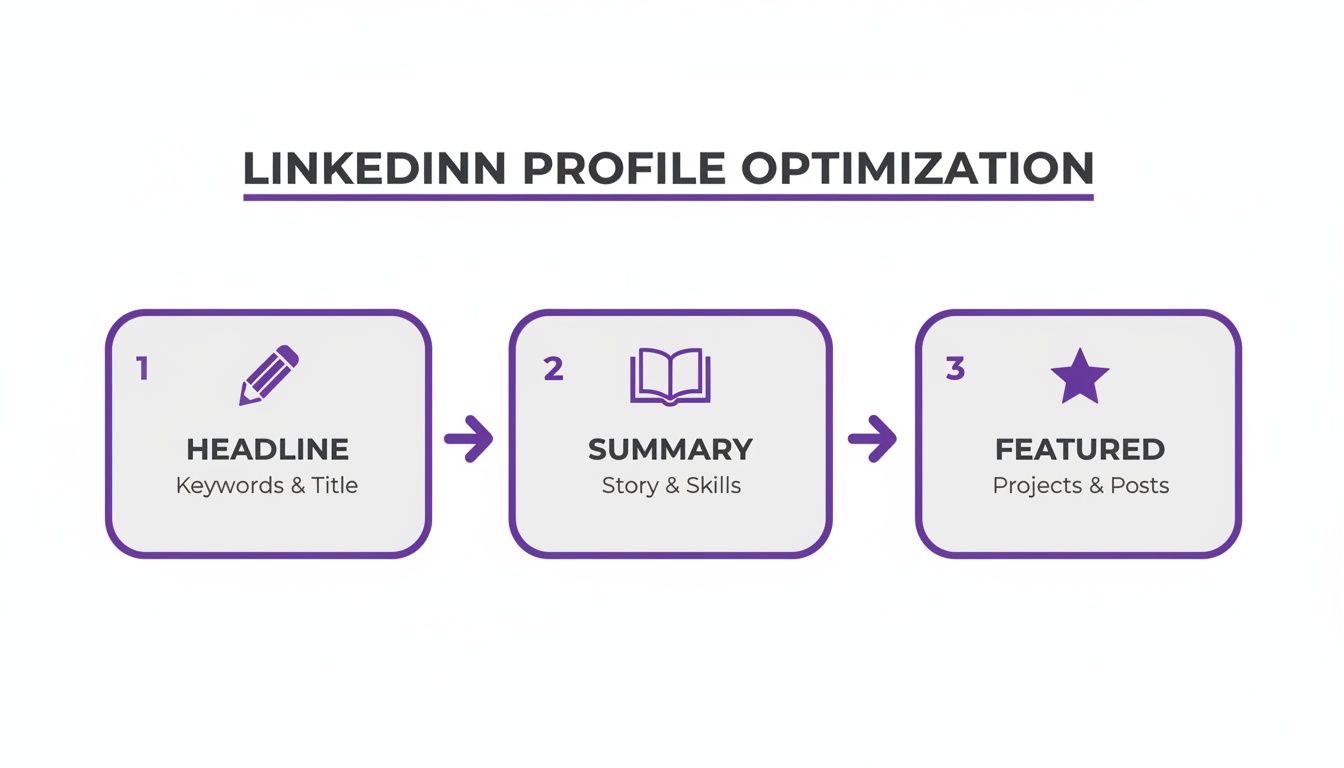
From your headline down to the featured section, every piece works together to build credibility before you ever send a single message.
Qualifying Prospects Beyond the Title
Look, finding someone with the right job title is just step one. The real qualification—the part that tells you if they're a warm lead—comes from looking at what they're actually doing on the platform. A prospect’s recent activity tells you what's on their mind right now.
Before you add someone to your outreach list, do a quick investigation into these three areas:
- Recent Activity: Pop over to their "Activity" tab. Are they posting content, dropping thoughtful comments, or liking posts relevant to your industry? Active engagement is a massive buying signal.
- Group Memberships: Check out the groups they’ve joined. If they're hanging out in niche groups related to the problems your product solves, that’s a pretty good sign they’re actively looking for solutions.
- Content Engagement: Pay close attention to the topics of the posts they're interacting with. If you see a marketing director consistently liking and commenting on posts about marketing automation, you've just found the perfect, timely reason to start a conversation.
Building a list of engaged prospects is half the battle, but getting their attention is the other. Our Upvote.club service works differently from other services. While other platforms let you buy likes, Upvote.club is not about buying engagement — it's about participating in a community. Our platform operates on a community-based model where users help each other grow. We maintain strict moderation, and bot accounts are not allowed. When your content gets a quick burst of engagement from real people in our community, it signals to the LinkedIn algorithm that your post is worthy. This can boost its visibility, making sure the qualified prospects you just found actually see what you have to say.
For more ideas on building out your network, check out our tips for gaining more LinkedIn followers.
Crafting Messages That Actually Get Replies
Let's be blunt: a generic, copy-pasted outreach message is the fastest way to get your profile ignored or, worse, flagged. If you're serious about prospecting on LinkedIn, you have to ditch the default "I'd like to connect" and craft something that shows you've invested more than ten seconds of your time.
The best messages are built on a single, powerful principle: relevance. Find a hook. Did you see them speak at a virtual event? Are you both members of the same industry group? Did their company just hit a major milestone? Mentioning this right away proves you aren't just another bot blasting out invites.
The Anatomy of a Successful Connection Request
A strong connection request is short, specific, and makes the other person the hero. It is not a sales pitch. Think of it as a simple, human-to-human introduction that gives them a clear reason to hit "accept."
Here’s a simple structure I’ve seen work time and again:
- Reference a commonality: "Hi [Name], I saw your recent comment in the [Group Name] about [Topic]."
- Offer a genuine compliment: "Your post on [Subject] was sharp, especially your point about…"
- State a clear, low-pressure reason to link up: "I'm always looking to connect with other pros in the [Industry] space."
This approach respects their time and shows you've done the bare minimum of homework, which is more than most people do. It dramatically increases your acceptance rate. In fact, a recent analysis found that even automated LinkedIn connection requests see an average acceptance rate of around 29.6%. You can dig deeper into these benchmarks and outreach performance metrics to see how you stack up.
Developing a Follow-Up Sequence That Adds Information
Once a prospect connects, the real work begins. Your follow-up messages should never feel like you’re just "checking in." That's lazy and adds zero information. Each message needs to provide new, useful information that moves the conversation forward without being pushy.
A follow-up without new information is just noise. A follow-up with a relevant article, case study, or industry report is a conversation starter.
Think of your follow-ups as a sequence, with each message building on the last. The goal isn't to be persistent; it's to stay top-of-mind by being helpful. A simple three-step sequence might look like this:
- Message 1 (Day 1): Thank them for connecting and briefly reiterate your interest in their work or industry. Keep it short.
- Message 2 (Day 4): Share a piece of relevant content—a blog post, a webinar, or a case study—that addresses a pain point common to their role. No strings attached.
- Message 3 (Day 8): Ask a thoughtful, open-ended question about a recent company announcement or industry trend. This is your invitation for them to finally engage.
Amplifying Your First Impression with Content
Let’s face it, getting your initial message seen can be tough, especially with busy decision-makers. One of the best ways to warm up a new connection is to make sure they see your content pop up in their feed before you even start messaging them.
This is where a service like ours can make a real difference. With our Upvote.club service, you can give your introductory content an immediate boost. After you publish a post, you create a task for our community of real, verified users to engage with it. When that post gets immediate likes and comments, the LinkedIn algorithm sees it as relevant and pushes it to a wider audience—including your new connections and their networks. Users earn points for completing tasks — an internal currency that can be used to create their own tasks. By helping others, you earn the ability to promote your own content.
If you want to learn more, check out our guide on how to get more LinkedIn comments. This strategy helps build your credibility from day one, turning a cold connection into a much warmer lead before you’ve even sent your first follow-up.
Building Authority with Content and Engagement

Smart prospecting on LinkedIn is so much more than just firing off messages into the void. It's about being visible, credible, and becoming the first person prospects think of when they run into a problem you can solve.
Building authority with content is how you warm up your entire network. It attracts interest so you're not always the one starting the conversation.
This doesn't mean you need to become a full-time content creator. A simple, consistent plan is surprisingly effective. Start by sharing industry news with your own spin, posting original thoughts, or creating short text and video posts that hit on a common pain point for your ideal customer. Remember, consistency beats volume every time.
The Power of the Golden Hour
On LinkedIn, timing is everything. The platform's algorithm is intensely focused on how a post performs within the first hour it goes live. This window is what we call the "Golden Hour."
When a post gets a quick burst of likes and comments, LinkedIn shows it to a much wider audience. The algorithm takes this early interaction as a sign of quality content, pushing it far beyond your immediate network. This is how you start reaching prospects you haven't even connected with yet. Getting engagement within the first hour is how your content has the best chance to reach a wider audience. Influencer agencies use this exact strategy to boost their clients’ content.
Securing immediate interaction during the Golden Hour is the single most effective way to expand your content's reach. It tells the platform that your post is worth showing to more people, creating a snowball effect of visibility.
Using Community-Driven Engagement
Let's be real—getting that initial burst of interaction is tough, especially when you're just getting started. This is the exact problem we designed our Upvote.club service to solve. It’s a tool built specifically to help you own the Golden Hour.
When you share a new post on LinkedIn, you can create a task inside our community. Real, verified members will then drop likes and comments, giving your content the immediate push it needs to get noticed by the algorithm. Because every interaction comes from a genuine account, it sends a powerful, positive signal. When a user registers with us, they receive 13 free points and 2 task slots. These can be used to create the first task. For example, getting 2 likes on a post might cost 4 points. If more points are needed, the user must complete tasks for others.
With our Upvote.club service, you can systematically ensure your content gets the visibility it deserves. This isn't about buying fake engagement; it's about joining a community where everyone helps each other grow. You help others, and in turn, you earn the ability to get your own posts in front of a much larger, relevant audience. This same principle of community support is what helps creators succeed on other text-heavy platforms, which you can see in our guide to growth on Medium.
Ultimately, this method solidifies your authority and makes every other prospecting effort on LinkedIn far more effective.
Common LinkedIn Prospecting Questions
Even the slickest LinkedIn strategy runs into questions. When you're in the trenches, a few specific answers can be the difference between hitting your numbers and wasting a week.
Let’s tackle some of the most common ones that pop up.
How Many Connection Requests Should I Send Per Day?
Think weekly, not daily. LinkedIn enforces its limits on a weekly basis, and the sweet spot to keep your account safe is somewhere under 100-200 connection requests per week. Pushing past that number is a fast track to getting your account flagged.
But honestly, the number is a distraction. The real game is quality, not quantity. A handful of sharp, personalized requests will always crush a mass blast of generic invites. Always.
Is LinkedIn Sales Navigator Worth The Cost?
For anyone who's actually serious about B2B sales, the answer is an unqualified yes. Sales Navigator isn't just a nice-to-have; it's a fundamental upgrade. While the free version of LinkedIn gets you in the door, Sales Navigator is what lets you find the right people in the room.
Its advanced search filters are the main event. You can drill down with a level of precision that’s impossible with the standard search—think company size, seniority, recent job changes, and even keywords in profiles. It moves you from aimless scrolling to surgical, systematic prospecting.
The real power of Sales Navigator is the time it saves. It lets you build hyper-specific lead lists so you're not wasting outreach on prospects who are a bad fit from the start.
What Is The Best Way To Follow Up Without Being Annoying?
This is the million-dollar question. The secret is simple: never show up empty-handed. A follow-up that just says "checking in" is lazy and adds zero information. It's basically digital nagging.
Instead, every single follow-up needs to offer something useful. Frame it as another chance to be helpful, not another ask for a response.
- Share a sharp article about a headache their industry is dealing with.
- Link to a quick case study showing how a similar company got a specific win.
- Mention their company's latest announcement to prove you're paying attention.
Give it a few days between messages. By making every touchpoint helpful, you stay on their radar while showing respect for their time. This is how you build a relationship, not just beg for a reply. Plenty of prospecting tasks can be streamlined with the right browser setup; check out our review of the best social media chrome extensions to see what works.
At Upvote.club, we focus on building genuine engagement that supports your outreach efforts. By participating in our community, you help others grow, and in return, you earn the points needed to get your own content seen by a wider, more relevant audience. Learn more about our community-driven approach at https://upvote.club/twitter.
