

Table of Contents
- Why Tracking a Tweet's Journey Matters
- What the tweet journey actually tells you
- Guesswork creates bad habits
- The practical payoff
- Accessing Performance Data with Native X Analytics
- Where to find the data
- How I read each metric
- A practical framework for judging a tweet
- What native analytics does well
- Expanding Your View with Third-Party Monitoring Tools
- When native data stops being enough
- Native vs third-party in plain English
- Tools that change the job
- What to monitor beyond your own handle
- How I set up a campaign watchlist
- Technical Methods for Advanced Tweet Analysis
- What the API is actually good for
- Why automation breaks
- A workable technical pipeline
- Where advanced teams connect data and workflow
- How We Verify and Manage Authentic Engagement at Upvote.club
- What we do differently
- Why this matters for tracked tweets
- How our workflow works in practice
- Where this fits in a serious tweet workflow
- Responsible Tracking Practices and Final Takeaways
- Stop relying on precise location data
- Match the method to the question
- What matters more than most creators think
- My direct recommendations
You post a tweet, refresh twice, then start guessing. Was the hook weak? Did the timing kill it? Did people see it and ignore it, or did X barely distribute it at all?
That guessing loop wastes more time than bad writing.
If you want to track a tweet properly, stop treating posting as the finish line. Posting is the start of the job. The essential work involves reading what happened next, deciding why it happened, and changing the next tweet on purpose. That means watching native analytics, checking reply quality, comparing formats, and, if you need more than surface data, using monitoring tools or the API.
There's a tendency to watch likes. That’s lazy. Likes tell part of the story. They don’t tell you whether the tweet reached the right people, sparked replies, drove profile visits, or pulled in the kind of engagement you can build on.
Why Tracking a Tweet's Journey Matters
A tweet rarely fails for just one reason. Sometimes the idea is weak. Sometimes the timing is wrong. Sometimes the post gets impressions but no replies, which tells you people saw it and moved on. Sometimes the tweet gets solid engagement, but from the wrong crowd, so it does nothing for your long-term audience.
That’s why I treat tweet tracking as listening, not reporting.
A simple example. You publish a strong opinion post with a clean graphic. The tweet gets attention fast, but the replies are thin and the people interacting never come back. The next day you post a plain text question on the same topic. Fewer people see it, but the replies are sharper, your notifications stay active longer, and people start visiting your profile. If you only compare like counts, you’ll back the wrong format.
What the tweet journey actually tells you
When I track a tweet, I’m looking for four answers:
- Did X distribute it? Impressions answer that.
- Did people react at all? Engagements answer that.
- Did the right people react? Reply quality, profile visits, reposts, and follows answer that.
- Did it lead anywhere useful? Link clicks, conversation depth, and follower movement answer that.
That last part matters most. A tweet can look busy and still be a dead end.
Track tweets to find patterns, not to admire dashboards.
If you’re new to this, it helps to frame tweet tracking inside the broader practice of what is social media monitoring. The same logic applies here. You’re not just checking your own output. You’re watching audience response, conversation signals, and repeat behavior.
Guesswork creates bad habits
Creators who don’t track tweets usually make the same three mistakes.
- They repeat low-quality wins. A tweet gets likes, so they copy it, even though it produced no meaningful conversation.
- They kill good formats too early. A post type that brings better replies may get dropped because it didn’t pop instantly.
- They blame the algorithm for everything. Sometimes distribution is the issue. Sometimes the post just didn’t give people a reason to respond.
I’ve seen accounts stall because they never separate visibility from impact. That’s the core reason to track a tweet. You need to know where the drop happened. Was the problem reach, response, or relevance?
The practical payoff
Tracking helps you write better posts because it forces honesty. You stop saying “my audience likes threads” and start saying “my audience replies to questions, clicks on commentary posts, and ignores polished promos.”
That changes your calendar fast. It also saves you from spending weeks on a format your audience doesn’t care about.
Accessing Performance Data with Native X Analytics
You post a tweet at 9:05 a.m. By lunch, it has plenty of impressions, a pile of likes, and almost no replies. Another tweet from the same week gets fewer views but drives profile visits, link clicks, and a useful thread of responses from people in your niche. If you treat those tweets as equal, you will keep publishing the wrong thing.
Native X analytics is where you separate attention from actual response. It gives you the clearest read on how one tweet performed, what action it triggered, and whether that action matched the goal of the post.

Where to find the data
Open analytics.twitter.com or the analytics view inside X if that is how you manage publishing. Start with tweet-level results. Account summaries are useful for trends, but they blur the reason a specific post worked or failed.
For each tweet, review these metrics in this order:
- Impressions
- Engagements
- Engagement rate
- Replies
- Profile visits
- Link clicks
- Follows tied to the tweet
If you need a quick refresher before comparing posts, read this explainer on how Twitter impressions work.
How I read each metric
Impressions show distribution. A tweet with weak impressions usually had poor timing, a weak opening, or a topic that failed to earn early interaction.
Engagements combine every action. Likes, reposts, replies, follows, detail expands, and clicks all sit inside this number. Useful, but incomplete.
Engagement rate adds context fast. Two tweets can post similar engagement totals while producing very different results per view.
Replies matter more than marketers admit. If your goal is authentic engagement, replies beat surface-level likes. A thoughtful response from the right person can start a conversation, attract more qualified viewers, and improve the next post you publish.
Profile visits show curiosity. The tweet did enough to make someone check who you are.
Link clicks measure intent. If the tweet was supposed to send people to a newsletter, landing page, or article, this metric tells you whether the copy did its job.
Follows from the tweet tell you whether the post built momentum beyond one impression cycle.
A practical framework for judging a tweet
I use a simple table and make a decision right away.
| Metric pattern | What it usually means | What I do next |
|---|---|---|
| High impressions, weak engagement | Good reach, weak hook or weak relevance | Rewrite the first line and tighten the angle |
| Low impressions, decent engagement rate | Strong post, limited distribution | Test a different posting time and improve first-hour interaction |
| Strong replies, average likes | Real conversation value | Repeat that format and invite sharper responses |
| High likes, weak replies, weak clicks | Passive approval | Do not copy it unless awareness was the only goal |
| Strong profile visits | Positioning worked | Review bio, pinned post, and recent tweets for conversion gaps |
This method keeps you honest. It also keeps you from chasing vanity wins.
A tweet with lots of likes can still be a poor business post. A tweet with modest reach but strong replies can be far more useful if it builds trust, pulls in the right audience, or opens direct conversations. That distinction matters if you care about engagement that lasts.
A practical walkthrough helps if you haven’t opened the dashboard in a while:
What native analytics does well
Native analytics is strong at post diagnosis. Use it to answer specific questions.
- Did the tweet get seen?
- Did people interact?
- What kind of interaction did it create?
- Did that interaction match the job of the post?
That is enough to improve content fast. You can spot patterns like question tweets earning better replies, short opinion posts driving profile visits, or promo tweets getting seen but ignored.
It also gives you the baseline you need before you try to influence results. At Upvote.club, teams use Twitter engagement task workflows to organize likes, reposts, comments, and follower activity from verified human accounts. The important part is not the activity alone. It is the feedback loop. You check native analytics, see where the drop-off happened, then focus effort on generating the kind of response that signals real interest, especially replies and conversation.
Practical rule: Judge every tweet by the action it created, not by the biggest number on the screen.
Expanding Your View with Third-Party Monitoring Tools
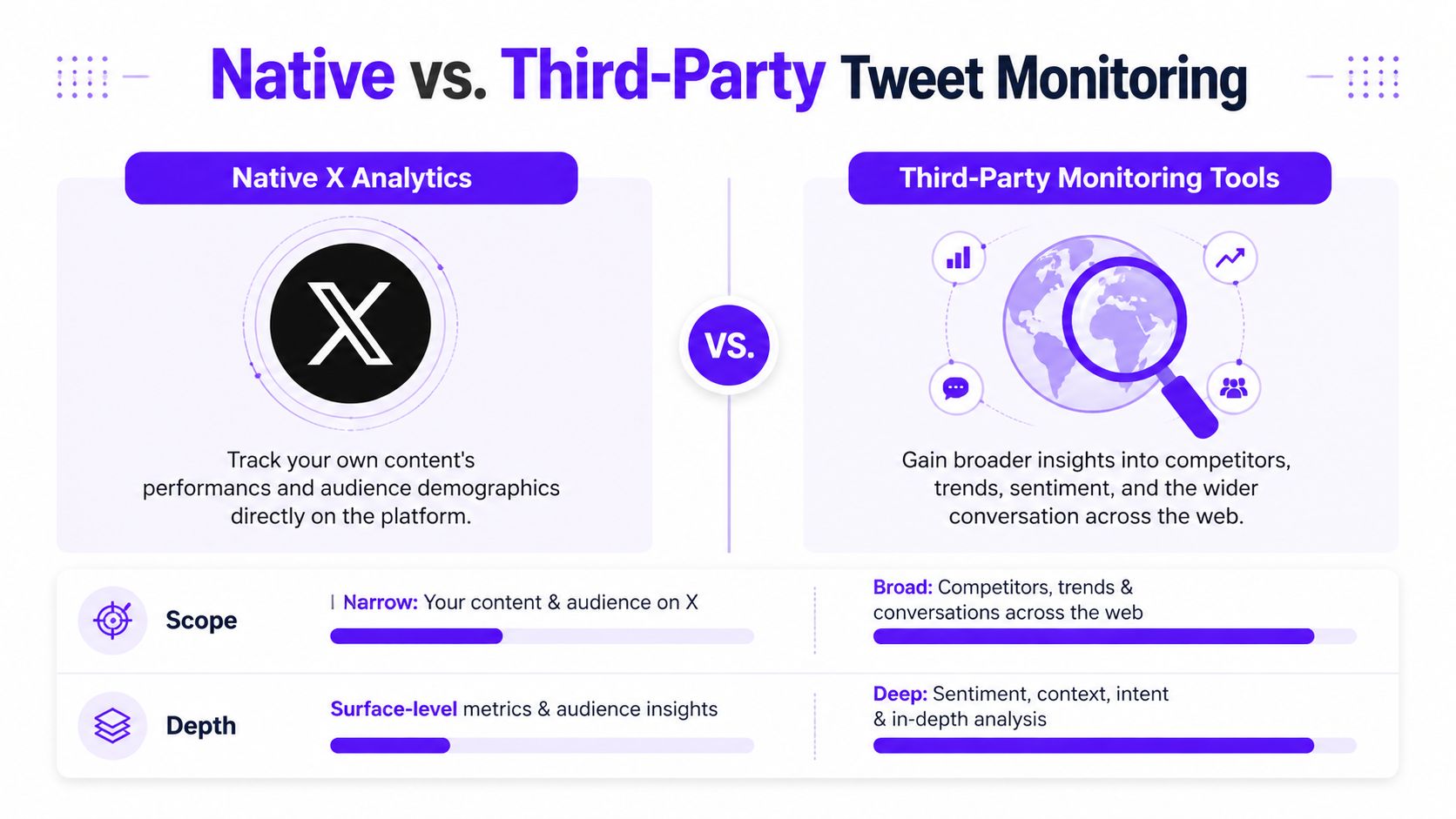
Native analytics shows what happened to your posts. Third-party monitoring tools show what’s happening around your posts, your niche, your brand terms, and your rivals. That difference matters.
If you only watch your own tweets, you miss half the signal. You won’t catch untagged brand mentions, shifts in hashtag activity, or a competitor appropriating a topic you think belongs to you.
When native data stops being enough
You need outside tools when your questions change from “how did my tweet do?” to questions like:
- Who else is getting traction on this keyword?
- Which hashtags are heating up right now?
- Are people mentioning my brand name without tagging me?
- How does my engagement compare with similar accounts?
- Is a campaign creating conversation outside my own audience?
That’s a different job. Native analytics won’t cover it well.
X had over 550 million monthly active users by 2023, and follower growth remains a useful account-health signal. Data summarized by Tweet Archivist on Twitter statistics says accounts posting 3-5 times daily see 30% higher retention, while tools such as Rival IQ and Keyhole show top performers reaching 1.5% engagement rates compared with 0.06% industry averages.
Native vs third-party in plain English
Here’s the simple comparison I use with clients.
| Method | Best For | Key Metrics | Cost |
|---|---|---|---|
| Native X Analytics | Your own tweet performance | Impressions, engagements, engagement rate, replies, profile visits, clicks | Free inside X |
| X Pro or monitoring dashboards | Real-time conversation tracking | Mentions, keywords, lists, hashtag flow | Varies by plan |
| Competitor analytics tools | Benchmarking against similar accounts | Relative engagement, posting volume, mention trends | Paid |
| Hashtag tracking tools | Campaign and event monitoring | Hashtag usage, reposts, replies, likes | Paid or limited free tiers |
The decision is simple. If you’re a solo creator, native analytics may be enough for a while. If you run campaigns, manage a brand, or report performance to a team, you need more.
Tools that change the job
X Pro is useful when you need live columns. I use it for keyword searches, mentions, private lists, and event coverage. It’s practical, not fancy. Good for staying on top of fast-moving conversations.
Keyhole and Rival IQ are more useful when benchmarking matters. They help you compare posting volume, engagement patterns, and campaign traction against other accounts.
Tweet Binder is useful when hashtags are central to the campaign. If you’re tracking a product launch, conference tag, or movement-based discussion, hashtag visibility matters more than one tweet’s like count.
You can also add lightweight workflow support with our Chrome social workflow page if your team wants a simple way to manage community-driven interaction tasks across platforms without jumping between too many tabs.
What to monitor beyond your own handle
Many teams track only direct mentions. That’s a mistake. Public conversation is messy. People misspell names, use product names without tagging the company, or discuss a campaign through a hashtag only.
Monitor these buckets separately:
- Direct mentions. Easy to catch and usually urgent.
- Plain-text brand mentions. Harder to track, often more honest.
- Hashtags. Useful during launches, events, and trend spikes.
- Competitor names. Good for message positioning.
- Category keywords. Useful if you want to enter discussions before they mention you.
Most tweet tracking problems aren’t data problems. They’re scope problems. People watch only their own account and call that monitoring.
How I set up a campaign watchlist
For a launch or event, I build a small dashboard with:
- Brand handle mentions
- Brand name without @
- Campaign hashtag
- Main product term
- Two competitor names
- A private list of accounts worth watching
That setup tells me more than any single analytics page. I can see whether interest is growing, whether the wrong message is spreading, and whether a competitor has found a stronger hook.
Third-party tools don’t replace native analytics. They fix its blind spots.
Technical Methods for Advanced Tweet Analysis
At some point, dashboards stop answering the questions you care about. You may want to track tweet clusters around an event, build your own reporting layer, score message themes, or create alerts when certain accounts mention a keyword. That’s where API work starts.
For reproducible event tracking, researchers and analysts use Twitter API v2. According to the PMC paper on reproducible Twitter event tracking, automated methods can fall to 60% F1 score because of semantic drift, manual evaluation is more accurate but hard to scale, and the lack of a universal ground truth makes over 90% of academic papers in this area hard to reproduce.
What the API is actually good for
The API is useful when you need raw tweet data, not dashboard summaries.
That includes:
- Event tracking for a breaking topic or campaign
- Custom dashboards for internal teams
- Keyword clustering across a large tweet set
- Alert systems for account mentions or topic spikes
- Network analysis to see which users spread a post or idea
If you’re a developer, don’t start by trying to build a giant sentiment engine. Start smaller. Pull tweet IDs and metadata for one campaign, label a sample manually, and compare what your script thinks happened against the true outcome.
Why automation breaks
Automation sounds clean until language gets messy. People joke, quote, paraphrase, use slang, post screenshots of text, or refer to a topic without using your chosen keyword. That’s where semantic drift wrecks neat rules.
If your model says a tweet belongs in one topic cluster and a human reviewer says it belongs somewhere else, the issue often isn’t the code. The issue is that real public conversation doesn’t stay in one format.
That’s why I don’t trust fully automated classification on its own for campaign analysis.
Field note: Build a manual review step into any serious tweet-monitoring pipeline. If you skip that, you’ll ship clean charts based on dirty assumptions.
A workable technical pipeline
A sensible setup looks like this:
- Pull recent tweets or tweet IDs related to a keyword, account, or event.
- Store the raw data cleanly and document the query rules.
- Group tweets by keyword set or clustering logic.
- Manually review a subset for relevance.
- Score the output and fix the query before reporting anything important.
This approach is slower than auto-tagging everything. It’s also less likely to embarrass you.
If you’re writing or testing tweet copy on macOS before pushing it into a tracked workflow, this prompt set for macOS AI writing for tweets is a practical drafting shortcut. It won’t replace analysis, but it can speed up variant creation for test posts.
Where advanced teams connect data and workflow
Technical analysis gets more useful when it feeds an action system. For teams that already use code repositories and internal tooling, our GitHub support page fits that operational style by adding a task-based way to coordinate engagement activity across communities without needing account passwords.
The main point is simple. API work should answer a decision, not just create a dataset. If the output doesn’t tell you what to post, who to reply to, what to track next, or which campaign signal matters, you built a reporting toy.
How We Verify and Manage Authentic Engagement at Upvote.club
Tracking is passive. Useful, yes. Enough, no.
We built Upvote.club for the part that comes after measurement. If a tweet has potential, it needs early activity from real people, not fake inflation and not a dead dashboard screenshot that tells you what went wrong after the window has already closed.

What we do differently
We don’t sell bots. We run a community model where members help each other grow.
With our Upvote.club service, users create tasks to receive likes, comments, reposts, saves, and followers from verified human accounts across social platforms. Members earn points by completing tasks for others, then use those points to create their own tasks. That changes the incentive structure. People participate. They don’t just purchase a hollow number.
We also keep visibility into who completed each task and use strict moderation to remove bot behavior. Account verification happens through an emoji-based system, so users don’t need to hand over passwords.
Why this matters for tracked tweets
The first hour after posting matters because early interaction shapes distribution. If you track a tweet and see that your strongest posts stall before anyone reacts, the issue may not be the post itself. It may be the lack of early momentum.
That’s where active community participation matters more than passive reporting.
A lot of creators confuse visible activity with useful activity. That’s a bad habit. Data summarized by X Beast on tweet analytics pitfalls says 80% of viral tweets with over 500 likes have less than a 0.1% reply rate, and 70% of B2B users get misled by likes instead of stronger reply signals.
We agree with that completely. A tweet packed with likes and no meaningful replies can look healthy while doing very little for your actual goals.
How our workflow works in practice
Our setup is straightforward:
- Start with entry access. New users get 13 free points and 2 task slots.
- Create a first task. A simple example from our system is that 2 likes on Twitter might cost 4 points.
- Earn more by helping others. Complete community tasks, earn points, and use them on your own posts.
- Verify once per platform. We ask users to verify each social network only one time through our emoji-based process.
- Get another slot every day. Users receive 1 free task slot every 24 hours.
- Scale if needed. If someone wants more slots and points immediately, subscriptions are available.
That system keeps participation active and visible. It also keeps the exchange grounded in real accounts instead of ghost activity.
Where this fits in a serious tweet workflow
We recommend using community-driven engagement carefully and with a clear purpose.
Use it when:
- a tweet already fits your audience and needs early traction
- you’re testing several formats and want cleaner first-hour feedback
- you want replies, reposts, and interaction from real users rather than empty spikes
Don’t use it as a substitute for writing well. If the post is weak, no tool fixes that.
For users who want a task-based option tied directly to Twitter audience growth, our Twitter follower task page shows how this works inside the platform’s community system.
Good tweet tracking tells you what happened. Real community participation helps change what happens next.
Responsible Tracking Practices and Final Takeaways
The more ways you find to track a tweet, the easier it is to cross the line from smart monitoring into pointless surveillance. Don’t do that.
You do not need to know everything about individual users to improve your posting. You need enough public signal to understand audience response, conversation quality, and campaign movement. That’s a narrower goal, and it leads to better decisions.
Stop relying on precise location data
A lot of old tweet tracking advice still tells people to build local targeting around geotagged posts. That advice is outdated.
Only about 1-2% of tweets now include precise location information because of X privacy changes, according to Tweet Binder on the decline of Twitter geocode tracking. That makes traditional location-based tweet tracking unreliable.
If local relevance matters, use alternatives that don’t depend on shrinking geotag data:
- Profile-declared locations. Messy, but often still useful.
- Local community lists. Build or follow lists of region-specific accounts.
- Reply networks. Watch who consistently engages in a city, region, or niche scene.
- Campaign-specific audience signals. Event hashtags, local organizations, and recurring local terms often tell you more than raw geodata now.
Match the method to the question
The best tweet tracking setup depends on what you need answered.
If you want to know whether one post worked, native analytics is enough.
If you need to understand a wider conversation, use third-party monitoring tools.
If you need custom reporting, event clustering, or research-grade data handling, use the API and add manual checks.
If you need to influence early momentum, pair tracking with a real engagement workflow instead of staring at dashboards after the fact.
Here’s the decision logic I use:
| Goal | Best approach | What to watch |
|---|---|---|
| Improve your next tweet | Native analytics | Impressions, engagement rate, replies, profile visits |
| Track campaign chatter | Third-party monitoring | Hashtags, keyword mentions, account lists |
| Analyze events at scale | API workflow | Query quality, clustering accuracy, manual review |
| Strengthen first-hour activity | Community participation | Reply quality, reposts, follow-through after posting |
What matters more than most creators think
Three things.
First, reply quality beats shallow volume if you care about relationships, authority, or conversions.
Second, timing still matters, but timing can’t save a weak idea.
Third, tracking is only useful if it changes behavior. If you keep posting the same way after seeing the same weak patterns, the analytics didn’t fail. You did.
My direct recommendations
If you want a clean operating routine, use this one:
- Check tweet-level analytics after posting.
- Separate distribution from reaction.
- Save examples of tweets that drove strong replies or profile visits.
- Monitor brand terms and topic keywords outside your own account.
- Use API methods only when the business question needs them.
- Ignore vanity spikes that don’t create follow-on action.
- Build around real engagement, not fake volume.
That’s the whole game. Track a tweet to understand what people responded to. Then use that information to write better posts, join better conversations, and get more of the right people involved.
If you want to move beyond passive tracking and add real early engagement from verified human accounts, try Upvote Club. You can create tasks for likes, comments, reposts, and followers, earn points by helping other members, and build momentum without bots or password sharing.
